Unofficial archive. This is a read-only, community-run archive of the Apple Support Community. It is not affiliated with or endorsed by Apple Inc.

how to stop filevault encryption?

MacBook Pro HELP !!!!


Installed OS X El Capitan, accidentally turned ON FileVault. How do you stop FileVault from running and encrypting? Currently, FileVault's encryption is stuck on "estimating time remaining..", desktop also won't respond (spinning ball). Tried "rebooting" several times, OS X won't reinstall because FileVault conversion is still in progress.

15 replies

If file vault is not decrypting & stating time remaining .

To sort out the issue : open activity monitor via spotlight . take the cursor on top menu bar click on view > windowed processes .

If you see system preferences ( written in red color , system preferences not responding ) > select it - force quit

Finally quit system preferences .

Turn off FileVault

If you no longer want to encrypt your startup disk, you can turn off FileVault:

  1. Choose Apple menu > System Preferences, then click Security & Privacy.
  2. Click the FileVault tab.
  3. Click the Lock User uploaded file button, then enter an administrator name and password.
  4. Click Turn Off FileVault.
  5. Restart your Mac.

After your Mac starts up, decryption of your startup disk occurs in the background as you use your Mac. This takes time, and it happens only while your Mac is awake and plugged in to AC power. You can check progress in the FileVault section of Security & Privacy preferences.


Use FileVault to encrypt the startup disk on your Mac - Apple Support

Lanny and dialabrain, maybe it's because I have a mid-2010 model, but mine is EXTREMELY slow during the encrypting. Every 2nd or third word that I type in this reply is causing the spinning color wheel to pop up for a couple seconds before displaying what I typed. Extremely annoying. Apple should be a little more forthcoming in this article and not say that you can "use it as normal", because I certainly cannot..


OS X El Capitan: Encrypt the contents of your Mac with FileVault


Addi 00004000 tionally, I did as recommended, and changed my settings so that the computer would not go to sleep. It's been 5+ hours now and the encryption status bar STILL has not moved from where it has been for the last 3 days.

Hi Carolyn, I have tried this on several occasions but I keep getting an error message stating that FileVault is encrypting my system and I cannot turn off FileVault until the encryption is complete. The only thing is it's been stuck on about 33% for about 3+ days now (see below).


I've tried reinstalling OS X (El Capitan) using Recovery Mode, but again I get the error message that my system is encrypting and wait until it has completed. I've also tried using the "Repair Disc" option, again to no avail.


.User uploaded file
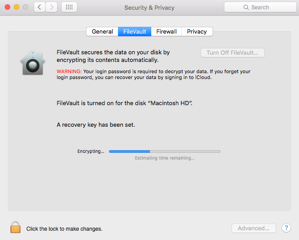
My laptop is just a basic laptop and I have nothing really important on there, so I've never done a backup on it. I thought about completely wiping out the disc and starting over, but I bought my MacBook Pro (13") about 4 years ago, so I've already gone through several OS X updates that I paid for, and don't feel like paying for them again.


Any suggestions?? I'm going to try doing what Appreciate recommends above, but other than that, I'm at a loss for where to go next.

FWIW, I think you have to wait until the drive is done encrypting which can take hours. If there was a way to stop encryption in the middle, you would end up with a drive that was partially encrypted and partially unencrypted. Not a good state.

dialabrain, I went from what came with the laptop about 4 - 5 years ago to the one right before Yosemite, and that cost me $19.99 or something like that.


I went from Leopard to Snow Leopard to Mountain Lion all in one day, and to go from Leopard to Snow Leopard it cost me whatever it was at the time. But you are correct in that since then, it has not cost me anything.

You will have to wait until encryption completes before it can be turned off.


As others have suggested, keeping it on AC power with Sleep deactivated is the best approach. Once encryption completes, you can turn it off, that process will take some time as well.


Or, you can just leave it on.

The process can take along time. It takes my 12" MacBook Early 2015 with a 500 GB SSD almost 24 hours to encrypt.


My guess is that you may have the stock 5400 rpm HD, depending on how much of it is used, your speeds will be slower until the job completes.


Complaining about a situation that was caused by your not pay 00004000 ing attention to the details when you started your upgrade, is not Apple's fault.

FWIW, OSX upgrades are free.

My point was Apple no longer charges for Upgrades. I don't remember when that occurred.

Ok, got it.

BTW, even if you wanted to install an older version of OSX that you did purchase through the App Store, you don't have to pay for it again.

So I basically have a useless paperweight until this thing finishes encrypting itself?

There's no reason you can't use it while it's encrypting.

No, as dialabrain stated, it can be used while the encryption proceeds. It may feel slightly slower until it completes.