Unofficial archive. This is a read-only, community-run archive of the Apple Support Community. It is not affiliated with or endorsed by Apple Inc.

how to export a book made in Aperture to make a similar book in Photos?

I was extremely disappointed today by getting a message telling me that I can no longer order photo books from my Aperture (3.6) program to Apple printing services because is no longer supported. Over a week ago I finished designing a book for a customer and placed an order for 3 copies to be shipped toon address and 20 minutes later, two separate orders of the same book to 2 different addresses. I got the confirmation of my orders and went on vacations for few days. Upon returning I received one email from Apple stating that my order for 3 copies was cancelled due to some file problems with some texts. The other 2 separate copies I was notified they were shipped(???); same file and no problems with two orders of 1 copy each. They suggested to review the film and print it as pdf to see any glitch and then re-submitt the order.

Once back in my computer I re-cheked the file as instructed finding no problems at all; when I clicked the button "Buy Book" a message popped stating that printing orders from Aperture were no longer supported and I had to put everything in Photos (that I hate). There are on instructions on how to send my file made in Aperture to do exactly the same book in Photos.

Does anybody know haw to do this in short time. The book has an elaborate design and I'm concerned I will end up with a different book format made on Photos and my product to the customer will not be the same.

Apple killed such a great pro app, Aperture and now is making the life miserable to all of us who remained faithful to the program by making it non-functional. Any help is highly appreciated.

55 replies

I also have this problem and am trying to solve the problem as I write this.

I saved my book as images (jpg) in a PDF file (eash page is an image). Imported the images into Photos. Created a photoboo 00001DA3 k in the same size with single-images pages and placed them in the order I want. The cover and flap may be a problem though. Have't figured it out yet, but maybe this will help you get started.....

Good luck!

Does anybody know haw to do this in short time. The book has an elaborate design and I'm concerned I will end up with a different book format made on Photos and my product to the customer will not be the same.

Apple killed such a great pro app, Aperture and now is making the life miserable to all of us who remained faithful to

The templates in Photos are very different form the book templates in Aperture, and Photos does not support custom layouts.

You can change the fonts in the text boxes, but it is not possible to resize the photo boxes. You have to use the layout of the pages astray are.


To recreate your book in Photos browse the available book themes and pick the one, that comes close to your Aperture book.


To transfer your book project to Photos for mac, select all photos you used in your book project in Aperture plus the book project, then export the selected items a s a new library with "File > Export > ...as new library".


Then drag the exported library onto the Photos icon in the Dock. Photos will create a new library from the exported library and open it in Photos. The book will probably have been migrated as an album. Use the command "File > New Book" and drag the first photos to the new book project 00004000 .

I would not drag all photos at once to the project, because Photos will create automatically pages for you, alternating between the different page layouts. And usually it will pick the wrong photos for the full page spreads. It will be quicker to add the pages as you go with the correct number of photos per page that you want.

Thank you Léonie for you reply. I did what you suggested me and the result is a total mess; there is no way I can have the pictures in the way I want and to apply texts to photos as I did with the original book. Very little customization in Photos. I will try what Maddyvan also recommended and see if it works although, taking a picture of each page of the original Aperture book will capture the fade created by the page binding. This is so frustrating. I will need to select another company to make the book. Bye Apple! There are many better alternatives to your services.

Check out Presto Photos - they claim to be able to print iPhoto and APerture books - I have never used the and I've seen no feedback here but it is wroth looking at and if you try it please report your results to help others


LN

I suggest that you go the the photobook that you created in Aperture and click on Print. That will open a window where you can select from the lower left side corner (where it says PDF). Select the option Save PDF to folder as JPG , and save it in a folder that you have created on your desktop. Each page will be saved as an image. You can open it with Preview to see exactly what the pages will look like.

You then open Photos and import it to a photobook of your choosing and select single-photo pages where you will place each image, just as they were in your original book. It worked for me. However, Presto Photos has also been helpful and would be your other option.

Best of luck!

If the "Save PDF to a folder as JPEG" option should be missing, you can also save to a PDF file, then open the DF file in Preview and use "File > Export" to split the PDF version of your book into JPEG photos or TIFFs.

When I select "Save PDF to folder as JPEG", the book is processed, but then I get a window called "Copy Finder Items". Selecting 'continue' gives a window that says "The action "Copy Finder Items" encountered an error." Any help?

Bingo ! Same problem this morning - just finished a phonebook of a holiday in Japan and Aperture tells me that I can no longer order through Aperture and I have to "upgrade" to the Photos app. Of course the Photos app is not an upgrade as far as producing books go and I have 50+ books in my Aperture library that I can no longer upgrade.


When Apple stopped supporting Aperture I switched to Lightroom but preferred the flexibility of Aperture for the books - and of course the format fits all the other books I have.


Very poor from Apple - no notification (they have on file all the customers who have ordered a photo book from Aperture).


The book formats in Photos are too restrictive and this is another retrogressive step from Apple abandoning longstanding clients.

When Apple stopped supporting Aperture I switched to Lightroom but preferred the flexibility of Aperture for the books - and of course the format fits all the other books I have.

You can try to select your book product in Aperture and then export just the book as a new Aperture library (File > Export > Book as new Library).

Open this new library in Photos by dragging the new library onto the Photos icon in the Dock. Then look how your book will migrate and if you can get something close to what you want in Photos.

if you do this will the book still be in aperture? I want to know if the book will then be in both aperture and photo???? I made a book and was going to send it to presto for printing. However, presto has slightly different sizes and they do not a comparable dust jacket. I have made sooooo many books in aperture i really want to keep the same look, size and layout. thanks. If i can keep the book in both aperture and photo I might try to duplicate the book in photo and see what that looks like before trying presto

This table shows you the sizes and quality what the Photos books look like: https://support.apple.com/en-us/HT201882

And here are sample photos: http://www.apple.com/osx/print-products/

The books look similar, you just have less control over the layout.

if you do this will the book still be in aperture?

If you export a partial library of your book, the original book will remain in Aperture. You get a second, new library just with the book, that you can try to work with in Photos.

thank you

You're welcome 🙂

This is brilliant! i have been searching for a solution for the past week. I have done as you suggested and everything looks great so far. I just need to put the pages into the a book. What did you do about the flaps on the cover? I'm stuck on that. I ordered this same book from presto this morning. I want to compare the 2 and see which i prefer. This is a great solution, thank you. Now, if i could figure out the flaps...

Will the image quality print the same as if I ordered directly from Aperture? No losses when printing to JPEG as single image?

Since you can not order directly from Aperture it does not matter


a high quality JPEG will print as we 000025C9 ll as a TIFF or other image - if you use low quality JPEGs (greater compression) they will be lower quality


LN

I have ordered from Presto Photos before. I am not 100% happy with it. For starters, they put a watermark on the back of my album unless I paid $10 (maybe more or less) to remove it. I also didn't like that the dust jacket had the images, not the actual hardcover itself like with Aperture. That said, I cannot even export the books with Aperture to print with Presto Photos now. It required that you go to the Order Book page and save the Preview PDF, which had the dust jacket as it's own super wide page.


Anyway, I am in the same boat as the OP. Went to go print out a photo book tonight, realized that I can't do it anymore. The kicker is that I am still on Mountain Lion and have been dreading the upgrade to El Capitan because I am afraid it is going to slow down my 2008 Mac.

Hi Astro, What did the dust jacket look like? I just ordered a book from presto ( have not received it yet) and opted to have the cover mage wrapped as opposed to the dust jacket. Their website said the dust jacket was made from a faux suede like material....if possible, can you post a pic go the dust cover? Yes, i had to pay $10 to remove their logo. however, they also have a n option where for a one time fee of $99 you can have the logo removed from all future projects. Annoying for sure but considering the price of their book was almost half what apple charged I am OK with it. I also ordered the same book from photos. I want to compare the 2 and see which is "better". One thing I can say for sure, so far Presto was MUCH easier than photos. I am interested in your description of the dust jacket


thanks

Where did you up printing your book? I have just ordered the same book from presto and photos. Drawbacks to both for sure.... Apple really left e stranded. i have invested tens of thousands of dollars in creating books in aperture and have been abandon, photos, in my opinion, is inadequate and inferior, Very interested to hear where you went to print your book. thx

I remember te dust jacket being very similar 00004000 , comparable to a book made with Aperture. I don't have the book on hand though since I used Presto to make the cheap books for family members.

i am having this similar problem. i am big fan of apple and i order book regularly through aperture.Its disappointing that they replaced aperture with photos which totally remove creativity. There is no way to reshape the photos boxes to fit your photos size when creating a photobook, it has to be the exact shape of the template. that is absolutely useless. i really hope they put most of the feature from aperture to photos. really disappointed.

Well if that is what you want you need to tell them - http://www.apple.com/feedback/photos.html - other wise htey have no idea what you are hoping


LN

im in the same boat, so upset about apple no longer printing books. go to presto photo. I have made 4 books there since April 1st. they are half the price as apple. you can make the book in aperture , save it as a pdf, and upload it to presto. the cropping is a bit more severe along the edges so ( for me) i have to play around with images a bit, allowing for the cropping then upload it. I've tried several other options and presto is the best ( in my opinion) if you want to stay with creating books in aperture. good luck

Thanks i put a feedback.

I didn't think you can export a PDF from Aperture that Presto Photo likes.


I have ordered from Presto Photo before, they want the PDF that includes the full dust jacket as 1 page with the spine title on it. You can't make that PDF from Aperture anymore. You can only export the pages individually, so I am not sure how people can even use Presto Photo.


Photo creates the PDF but doesn't preview the spine text either, so I have no idea what the process is.


Thankfully, I can still reprint old books from Presto using my saved PDFs

The ability to print the PDF including the dust jacket was available from the "Buy Book" panel. But now this panel is no longer working in Aperture and stopping us, before we can create the PDF preview.

But the Print button for the book is creating a different PDF file without the dust jacket page.

User uploaded file

I was intrigued by the error message. Apple is actually calling the migration to Photos an upgrade! "Upgrade to Photos for OS X to order."


The Aperture Manual says to click the menu entry "Aperture > Aperture Plug-ins" to download the book plug-ins for third party photo books, but this menu entry now opens a completely different page: http://www.apple.com/osx/photos/


User uploaded file

i have been going to print the pdf , saving it and uploading to presto. then at presto you can manually add the text to the spine and adjust the color of the spine and color of the text. i have not been able to figure out he dust jacket. i am now ordering image wrap without a dust jacket. i wish i could get the dust jacket but, to my knowledge, this can't be successfully done from aperture. i hope that helps

Hi Kgem!


Meghan with PrestoPhoto here. Good news! There is a way to save your file so that includes the dust jacket, no special formatting or PDF hacking required. 🙂 In the past few weeks since April 1, we've overhauled our Apple Project software so now it all works like a dream again!


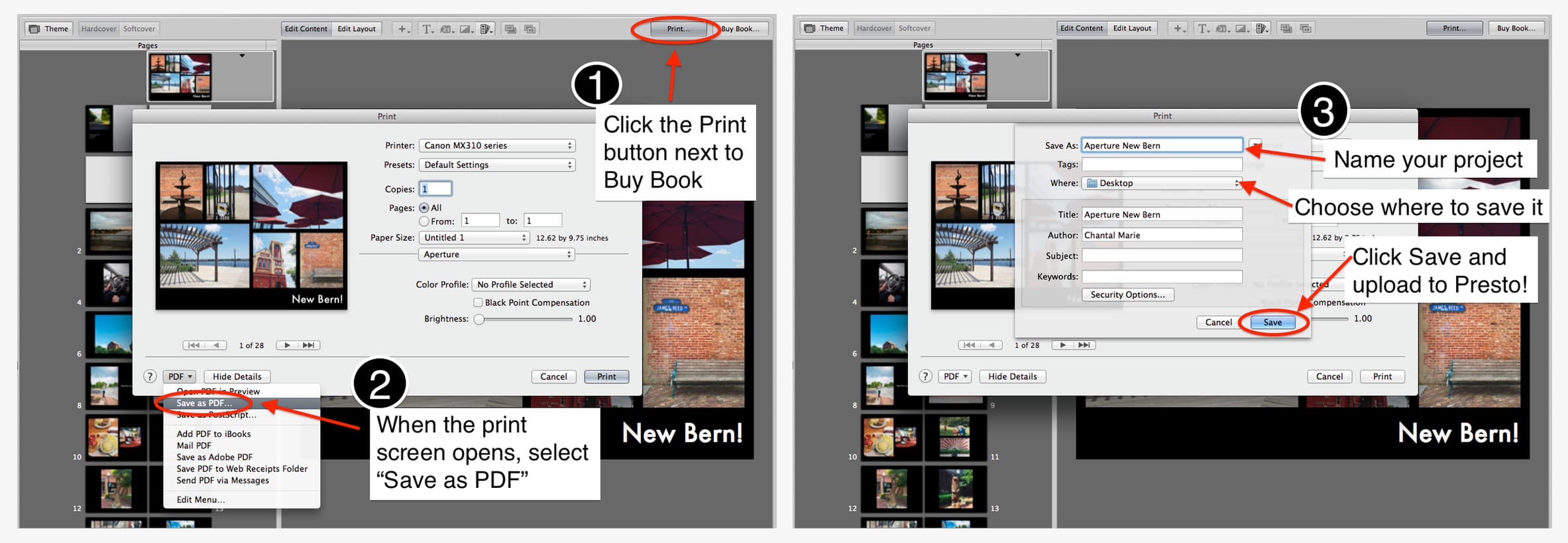
Here is a screenshot that shows how to save properly save the PDF in Aperture: https://www.prestophoto.com/storage/static/iphotopage/aperture-save-as-pdf.jpg


It might look weird when you open it on your desktop (i.e. blank pages and odd-looking flaps, galore), but not to worry. Our software knows what to do, promise!


Oh, also, ometimes Apeture PDFs have borders on them depending on the default printer settings, but that's the only would-be issue that we have been seeing lately. To address this, make sure "borderless printing" is slected OR create a custom size with 0 in margins on all sides. Here is a screenshot showing what to do (but only if you DO see borders): https://www.prestophoto.com/storage/static/iphotopage/aperture-save-large-size-w ithout-borders-two.jpg


I hope this helps!! Let me know if you have any questions - either here or over on Presto Photo Live Chat!! 🙂


-Meghan


PS: I may receive some form of compensation, financial or otherwise, from my recommendation or link. (thanks LarryHN!!)

great, thanks for updating me Meghan. i think you helped me with a book last week. i am working on 2 new books now and will getting ready to print soon so you will be hearing from me 😉 thanks!

Very very good news ! Does this works for www.phonebooks.pro as it is the pro presto brand?

Fabulous, thank you, Léonie!!

Arozs@, yes, it works the Apple upload option works the same on photobooks.pro, our sister site. 🙂 🙂

I hope this helps!

-Meghan

*I may receive some form of compensation, financial or otherwise, from my recommendation or link.*

Hi Meghan, Its Katy again. i am so thrilled to have found you guys. 2 questions: i am super psyched that you guys have made it possible to do the dust jackets with the inside flaps, but is this available for the extra large size now? Last week when i ordered 2 books it was only available for the"normal size" i think 11 by 8?????

A 00004000 nd, when you mention seeing borders....is this the cropping guidelines that we can see before buying the book? Thats the one thing thats giving me a bit of an issue. Previously when i made a book in aperture and printed it through apple there were no crop guides and the book i received looked exactly as they looked on screen when i created them. Now, using Presto, i find that have to go back and forth to aperture, modifying some of my images because of the cropping guides. is this what you are referring to? If not, any plans to tinker with the cropping on your end? Many thanks. You guys are a life saver. Katy

Hi Katy!


Thank you so much for all your kind words, it was such a pleasure assisting you and we're glad you found us!! 🙂 Currently, dust jackets are only available for 11x8.5 books. We're working on adding them for large books (aka 13x10) and we're also planning to add an imagewrap with dust jacket option to our catalog. I will definitely keep everyone posted about these additions and any updates!


I just double checked your books and yours do not have the white border issue, they're both full bleed, which is good! Have you received your orders yet? I think you will see that the trim is not as much as it seems like it will be when reviewing the crop guides. We only trim about 1/8 of an inch but there can be shifting up to 1/4 inch, hence the 1/4 inch caution area. To my knowledge, Apple most likely trims 1/8 of an inch as well. All of us in the print-on-demand world have to trim a little bit to make sure the pages are flush.


I hope this helps, just let me know if you have any other questions!


-Meghan


*I may receive some form of compensation, financial or otherwise, from my recommendation or link.*

Hi ,

i just received the books today and you are right, i don't think the cropping is as much as the cropping lines indicate. thank you thank you thank you!

Oh hurray, Katy!! Thanks for the update. You are so welcome!! 🙂


-Meghan


*I may receive some form of compensation, financial or otherwise, from my recommendation or link.*

Today i had this problem also. With help of this forum i tried two solutions:

  1. Export the book from Aperture to jpg, i file per page and import it into Fotos: I was able to add every page into a new book in Fotos. And these where the troubles i expierienced:
    1. Fotos does not show the file names. Therefore to fill the pages in the right order was a nightmare.
    2. Although i selected the same design for every page (one can select more than one and change the design) the result was not the same on all pages: Some had to be re-aligned other had to be deleted and a new page inserted.
    3. Various difficulties with page color
    4. Delivery adress from Addresss book: Its completely hidden what fields are used to build the address
  2. PrestoPhoto: Simple solution: The book can be printed to PDF in Aperture and than uploaded. At least on the web the result seems to look as i designed the book. Suprisingly, presto would send the book to Spain (and many other countries). Cost of delivery my than be higher than the cost for the book!


My choice the next time: PrestoPhoto: Pro: Easy and straight forward. Contra: Cost for delivery to Europe.

--

Thanks so much for this PrestoMeghan! I'll spend some time looking this over in the next few weeks. I had just finished a big project in Aperture that I fortunately printed in March before Apple turned the lights out, but I've got at least 4 more projects in the queue in Aperture that I wanted to print. And PS - I love that you're in North Carolina! I live down the road in Lake Lure.

Hi tm60, you are very welcome, neighbor!! 🙂


Just let us know if you need any help along the way - we've got Live Chat available on our site too.


We'll stay tuned for now!

-Meghan


*I may receive some form of compensation, financial or otherwise, from my recommendation or link.*

Have saved my book as a PDF Adobe Reader (with phone help from Apple!) & now can't get it to upload to Presto ! Any tips?

Thanks heaps

Iin PrestPhoto under “Products” you find “Apple Books”. Thats all. There is even a section for Aperture users.


Peter Guettinger


El 1 jun 2016, a las 9:16, Apple Support Communities Updates <[email protected]> escribió:


Apple Support Communities

kathyffoulkes <https://discussions.apple.com/profile/kathyffoulkes?ac_cid=tw123456> has posted in the Aperture community.

Re: how to export a book made in Aperture to make a similar book in Photos? <https://discussions.apple.com/thread/7519680?answerId=30279880022#30279880022&ac_cid=tw123456#30279880>

Have saved my book as a PDF Adobe Reader (with phone help from Apple!) & now can't get it to upload to Presto ! Any tips?

Thanks heaps

To post a reply, go to the discussion <https://discussions.apple.com/thread/7519680?answerId=30279880022#30279880022&ac_cid=tw123456#30279880> in Apple Support Communities.

You are receiving this email from Apple Support Communities. You can change your email preferences in your Apple Support Communities Profile <https://discussions.apple.com/user-preferences!input.jspa>. Please expect a slight delay in visibility of points awarded.

TM and copyright © 2016 Apple Inc. 1 Infinite Loop, MS 96-DM. Cupertino, CA 95014.

All Rights Reserved <http://www.apple.com/legal/> | Privacy Policy <http://www.apple.com/legal/privacy/> | Terms of Use <https://discussions.apple.com/docs/DOC-5952> | Apple Support <http://www.apple.com/support/>

Hi Kathy,


Thanks for posting - I'm here to help! What happens when you try uploading? If you are uploading as an "Apple Book" as Peter mentioned above, it should just work, as long as the PDF was exported properly. It can take some time depending on the size of the file and your internet connection.


If the trouble persists, will you please hop on Live Chat on our site so we can walk you through it?


Once you get the hang of it, the upload and ordering process on our site is a breeze. 🙂 Just let me know how I can help - I'll stay tuned for now!


Meghan

PrestoPhoto Support


*I may receive some form of compensation, financial or otherwise, from my recommendation or link.*

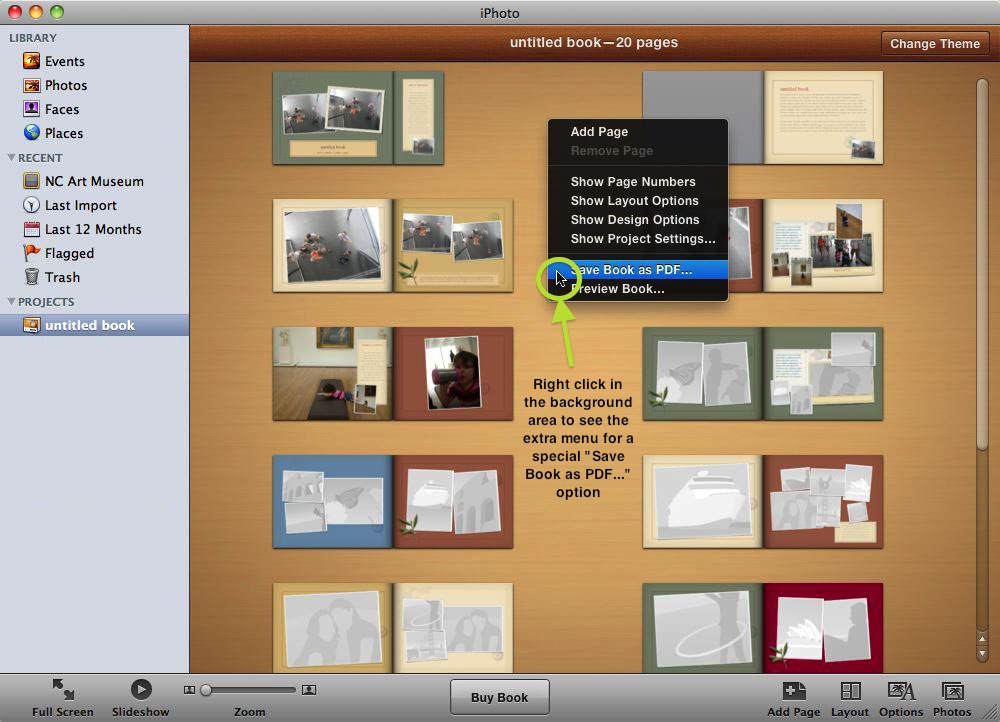
I am in Presto Photo right now and it shows me how to save my Apple photo book. However, I have iPhoto 09 (version 8.1.2) and there is no 'save book as PDF' when I right click on the project.

Hi there!


Thanks for posting - will you please hop on Live Chat on www.prestophoto.com and ask for me? I'll be happy to help walk you through it, I have some tricks up my sleeve and we'll make sure your book gets uploaded and formatted properly together. 🙂


-Meghan


*I may receive some form of compensation, financial or otherwise, from my recommendation or link.*

However, I have iPhoto 09 (version 8.1.2) and there is no 'save book as PDF' when I right click on the project.

Select your book project in the source list and try "File > Print". In the printer panel select "PDF" to print to a PDF file.


and there is no 'save book as PDF' when I right click on the project.

In iPhoto '11 you ctrl-click the empty space between the book pages to bring up the "Save as PDF" dialog, but I don't remember if that was passible in your iPhoto version.

Hi léonie!


Thank you for jumping in to help, I spoke to Pottergarden on chat and she was secondary-clicking on the folder name instead of in the middle of the pro 00001CF0 ject, as shown in this screenshot: https://www.prestophoto.com/products/images/iphoto-saveaspdf.jpg


Once she tried it that way, it worked like a dream!


Doing it The File > Print way does not produce a properly formatted PDF for our software. Just wanted to clarify!! You are totally right about the ctrl-click way to activate the secret menu, though. 🙂 🙂


Just a disclaimer that iPhoto is totally different from Aperture saving-wise. I wish it could be as easy as it is in iPhoto for Aperture!! But just in case anyone who created a book in Aperture is reading this and now scratching their heads more than ever, here is a link to our Advanced Aperture Help Page on our site: https://www.prestophoto.com/help/Advanced+Aperture+Users


Thanks léonie and Pottergarden!!


-Meghan


*I may receive some form of compensation, financial or otherwise, from my recommendation or link.*

Unfortunately, I have no solution, but I share your disappointment with Apple in this case.

I have a number of books made in Aperture, that I need to order copies of from time to time. They are now obsolete and all the time and effort I put int 00004000 o these is waisted.

Apple should at the very leat have made it possible to export the books to Photos (which I hate) . That would have shown some concern for the time and efforts their customers put into their projects.

TThank you LN, I haven't yet tried to create the PDF as described in the link you provided, but it seem like it should work. I do have one problem left though, as I am currently situated in Europe, and when in the past I ordered books through Aperture from this location, they seem to be printed in England. I am not sure I have time for the detective work it will take to try and find a printing service here in Europe that has software which will correctly read the resulting PDF. Maybe it is possible, but Apple has certainly not made much of an effort to make their abandoned Aperture customers lives easier.

Thank you Léonie, I will definitely check it out, although I am afraid that the cost/book will be significantly higher, considering the international shipping cost, and the pproduction time, including intl. shipping, much longer. But still, I will check it out and see if the quality compares. As I usually print art books, the impression of the finished product is important.

Still, too bad that a process that was easy and swift, has been replaced by a much more cumbersome process. Moving forward, in my mind, means to make things better and easier. In this case. Apples move has taken us backwards, as the book designing features in "Photo's" are much more limited and subscribe to a low set common denominator.😟

Hiya Walentin,


Meghan with the solution here—the PrestoPhoto Aperture solution! 😉 Wanted to hopefully ease a little heartache if possible and make sure that you know that we offer flat-rate $14.99 International SuperSaver shipping. Production time for hardcover books is usually about 5 business days, and while the site states that this shipping method can take 4-8 weeks, I can tell you from first-hand experience that shipping time is usually much shorter for orders traveling to many countries in Europe, sometimes just o 00004000 ne week depending on your exact location. Another bonus is that you will be able to add multiple books to your cart at a time, so hopefully we'll be able to save you a bit in fact!


As for quality, knowing that you print art books, I think you would absolutely love our Lustre 260 paper. At 260 GSM, it is even heavier than Apple's standard paper and color reproduction is generally superb. Currently, it is available for 11x8.5 books and we'll be adding it as a choice for the Extra-Large / 13x10 books this August.


If you have ANY questions at all, big or small, I am here to help! Here in the forums and also on Live Chat on PrestoPhoto.com. If you like Aperture, keep using it, we are not going anywhere, promise. 🙂


Cheers!

Meghan


*I may receive some form of compensation, financial or otherwise, from my recommendation or link.*

Just wondering has anyone used Presto Photos to print a photobook yet? Could you let me know how the quality of printing was compared to Apple printing if you have. I'm interested. Thanks

several people have (I have not) adn it you search the forum you will find their positive comments


LN