Unofficial archive. This is a read-only, community-run archive of the Apple Support Community. It is not affiliated with or endorsed by Apple Inc.

Corrupt iPod classic

My sister has corrupted her ipod classic by using the windows explorer eject route in vista rather than the eject button in iTunes. the PC no longer recognizes the iPod as a disc any ideas guys n gals ?


Ive tried a resst to no avail


I also tried putting into disc mode again un responsive!


can it be recovered ?


thanks

196 replies

I gave E: as an example. Is that the drive letter assigned to the iPod when connected? If not you need to use the correct letter in its place. In some cases you would need to put the device into disk mode before connecting it to the computer.


tt2

I'm afraid I rather suspect that the hard drive is shot. 😐


tt2

Turingtest2, you are THE MAN! Your excellent post of step-by-step determination led to rapid resolution of my problem. In my case, after the disk checked out fine, 0 retracts and 0 reallocations, I went over to batch transfers of about 250 songs at a time. Problem solved. Thank you VERY MUCH!


That said, three observations:

  • A post on another website taught me to create a playlist in iTunes on my desktop and copy all of my music to the playlist. This does not transfer any 'missing link' entries (as indicated in the ! column) to the playlist. I then transferred from that playlist to the main folder on my iPod in smaller batches, which worked without a flaw.
  • This problem WAS a consequence of my updating to the latest version of iTunes. I say that with certainty now because I was able to transfer my entire iTunes folder to the same iPod in one step four separate times using several previous versions of iTunes without incident. First, when my iPod was new, once when I was moving all my Holiday music to my 8 GB Nano, and once after my C: drive crashed on the desktop and was replaced, and once recently when I moved my iTunes folder to a larger hard drive that was not the root drive. Four for Four. But update to the latest version of iTunes and under the new version the bulk transfer fails. (As The Fiend pointed out in this thread, the iPod software had not changed.) 00004000
  • I have done enough C++ and JAVA programming to know a software problem when I hit one. This problem is a glitch, not a 'feature'. But your work-around worked splendidly.

these are my first stats these are my second


retracts 13

reallocs 13216 13392

pending sectors 3160 2984

power on hours 203 204

start stops 25552 25561

temp current 34c

temp min 3c

temp max 62c


what do you suggest?


my ipod was working fine until it got synced by mistake, and i lost all my music. When i tried syncing to my library it got up to 10000 songs and then it froze. this happened a bunch of times ,freezing at different points. i tried to only copy 50 songs at a time, but after 300 songs it started going slow again.


P.S. will apple replace my ipod? (im still within the first year of buying it)


Thanx alot

Here are a number of things to try...


Recover media from a manually managed iPod


What follows are tips for restoring your iPod, but if it is the only location currently hosting some of your media then the first task is to try to extract it. See the user tip Recovering your iTunes library from your iPod or iOS device for some recovery tools. Most third party tools will probably require the device to have a functioning library however the techniques outlined in the iLounge Article referenced at the end should work as long as the device still shows up in Windows Explorer or Finder.


Check your iPod with Diagnostics Mode


It is possible that your iPod's hard drive has started to fail. Take your iPod and place your right thumb on the centre SELECT button and your left on the top MENU button. Press down both thumbs for about 6 seconds until your iPod reboots. Immediately move your left thumb around to the rewind button |<< on the left and hold this down together with SELECT for a further 6 seconds. Your iPod should now switch into Diagnostic Boot mode. Press MENU for Manual Test, then select IO > HardDrive > HDSMARTData to reveal your stats. For comparison here are mine taken when my 6th Generation Classic was about 2 years old:

Retracts: 889
Reallocs: 12
Pending Sectors: 0
PowerOn Hours: 2202
Start/Stops: 894
Temp: Current 24c
Temp: Min 10c
Temp: Max 50c

Take a note of your results. When finished press MENU+SELECT for 6 seconds to reset the iPod again.


With modern disc drives sectors are no longer marked bad by a disc scan, if the SMART firmware detects a sector it has trouble accessing it will attempt to invisibly reallocate it to a spare area of the disc.


Note that I've only 12 remapped sectors and none pending. To help explain what the numbers mean here is an extract from the Wikipedia S.M.A.R.T. article:

Reallocated Sectors Count
Count of reallocated sectors. When the hard drive finds a read/write/verification error, it marks this sector as "reallocated" and transfers data to a special reserved area (spare area). This process is also known as remapping, and "reallocated" sectors are called remaps. This is why, on modern hard disks, "bad blocks" cannot be found while testing the surface – all bad blocks are hidden in reallocated sectors. However, as the number of reallocated sectors increases, the read/write speed tends to decreas 00004000 e. The raw value normally represents a count of the number of bad sectors that have been found and remapped. Thus, the higher the attribute value, the more sectors the drive has had to reallocate.


Pending sector count
Number of "unstable" sectors (waiting to be remapped, because of read errors). If an unstable sector is subsequently written or read successfully, this value is decreased and the sector is not remapped. Read errors on a sector will not remap the sector (since it might be readable later); instead, the drive firmware remembers that the sector needs to be remapped, and remaps it the next time it's written.

Large numbers of Reallocs or Pending Sectors would suggest your drive is failing and that you may need to repair or replace your iPod. Check your stats after another attempt to update your iPod. If the numbers increase that again points to hard drive failure. While it won't be good news at least you'll know it isn't some random software problem and you can decide what to do next.


Check iPod hard-drive for errors


Assuming the diagnostics give the drive a clean bill of health it may still be worth checking the drive for logical file system errors.


Hold MENU+SELECT on the iPod for about 6 seconds until it resets, then switch to PLAY+SELECT as soon as the Apple logo appears, again for about 6 seconds to put the machine in disk mode. Open iTunes and in the Devices tab of the preferences menu check Prevent iPods, iPhones, and iPads from syncing automatically. Now connect your iPod to the computer, wait until it connects, then close iTunes.


Windows: Browse My Computer and right-click on the drive for the iPod, click Properties, then click Tools. Under Error-checking, click Check Now. Under Check disk options, select Scan for and attempt recovery of bad sectors (Optional - takes ages but a good idea if you've reason to suspect physical damage). Click Start.


Mac: Run Disk Utility / Repair Disk for the equivalent process.


This should find and correct any errors in the logical & physical structures of your iPod's hard drive. Once these have been fixed you can reset the iPod (hold MENU+SELECT) and should stand a better chance of a successful restore. It might also pay to check the status of the source drive containing your media, particularly if no errors were found on the iPod.


DFU Restore


If the device still won't restore normally try this method. Connect the device to the USB cable, press MENU+SELECT like a standard reset but keep holding for 12 seconds. The device should reboot as normal and then the screen should go blank. Now open iTunes and try to restore again.


Reformat Drive


If all else fails try Erase your iPod - The Super Fix for most iPod Problems. Basically a low level format of the iPod’s hard drive to get around whatever problems are stopping iTunes from restoring it properly.


Break up large transfers


Once you've restored your iPod don't rush to dump all the data back exactly as it was before. I have found that lots of large or complex smart playlists can sometimes trigger constant reboots or dumping of the iPod's library. In addition, larger transfers can fail leaving data in an inconsistent state. Try this technique for populating the iPod in stages.


In iTunes select the menu item File... New Smart Playlist. Change the first drop-down box to Playlist, the next to is and the next to Music or whatever playlist holds the bulk of the content you want on your device. Tick against Limit to, type in say 10, then change the drop-down to GB, and set the last drop-down to artist. When you click OK you can enter a name for the playlist, e.g. Transfer.
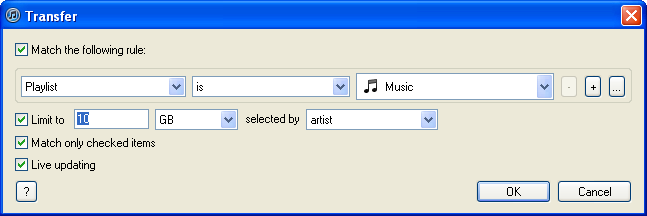

User uploaded file


Now sync this playlist to your iPod rather than your entire library. When the sync is complete modify the rule (File... Edit playlist) to increase the size by your chosen amount, then sync and repeat. You can experiment with different size increments, if it doesn't work just choose something a bit smaller until it works each time. Before long you should have all your music on your iPod. Once that's done you can move on to other media such as podcasts, videos, photos, playlists, etc.


tt2

Max. temp is a little high. The chances are that iTunes wants to read something in those pending sectors which is why it freezes. Restoring or reformatting the drive should free those up to be replaced with more reliable ones.


tt2

Hi, Thanks for the quick reply !!


Specs:


Retracts: 12

Reallocs: 17

Pending Sectors: 9

PowerOn Hours: 2161

Start/Stops: 187

Temp: Current 28c

Temp: Min 15c

Temp: Max 51c


I cannot format, it shows like a corrupt usb device....Cannot access it, nor properties etc...


User uploaded file

Any help would be greatly appreciated because I'm completely out of ideas !!?? Thanks

I realize that this thread hasn't been active for a while, but I'm desperate. I got a refurbished iPod classic 120gb and a couple of months ago, all of a sudden it would not play any songs when it was connected to any device (at the time that the iPod stopped working it was plugged into my car's "media" player) or headphones. It just kept skipping to the next song but would not play. The songs play fine in iTunes. I tried to restore the iPod but when I connect the iPod and open iTunes i get "iTunes has detected an iPod in recovery mode. You must restore this iPod before it can be used with iTunes." I hit the OK button, click "restore iPod," another window pops up and says "iTunes has detected an iPod in recovery mode. You must restore this iPod before it can be used with iTunes." I click "Restore" and immediately get another window that says "The iPod could not be restored. An unknown error occurred 1434)." I have tried to do all of the steps listed and used different cords, but so far nothing has worked. I have a 2013 MacBook Air, and I've done the Disk Utility/First Aid and the only thing it says when I run the First Aid is that it was completed. I have also tried erasing the iPod from this section too but I just keep getting error messages that say "Unable to write to the last block of the device" and that the operation failed. When I try the Restore option from the Disk Utility it immediately pops up with a red stop sign and says "Validating target..., Validating source..., The volume on device "/dev/disk0" is not of type Apple_HFS or Apple_UFS, Could not validate source - Device not configured, Operation failed…" And when I go to check the diagnostics, sometimes I get a "ERROR Diag Halt" message, and other times the only specs I can get from it are Temp: current 32c, min 0c, and max 0c. I don't even see any stats for Retracts, Reallocs, Pending Sector, PowerOn Hours, Start/Stops. I have no idea what else to do or if the iPod is still salvageable. Any help r insight is greatly appreciated. Thanks!

The pending sectors can only be released if the file or folder they are part of is deleted, Since there is no way to get that information deleting all data is the only realistic approach. You should have copies of all media on the device in your library, and that should be backed up too.


tt2

How odd. This may be one of those occasions when using another computer for the format helps out. It is also possible that something isn't quite right with the iTunes install and Windows is using the wrong driver for the iPod. See Troubleshooting issues with iTunes for Windows updates for a guide to reinstalling iTunes.


tt2

πŸ‘Ώ


I forgot to mention Apple's own support topic for iPod Displays a Red "X" Icon. On the basis that it is probably beyond help you could also look up drive replacement instructions online. You could try opening up the case and reseating the connectors in a more conventional fashion, or investigate the option of replacing the drive.


tt2

Yes, if the library file on the device gets corrupted then there is generally no other way to "see" the media on it. The first section of my Corrupt iPod classic post deals with extracting media from an iPod with a corrupt library. This would normally be into an iTunes library, but Windows Media Player or MediaMonkey could also potentially read the recovered files. It depends on how locked down the computer is and how much free space there is to play with.


tt2

Try temporarily disabling AVG for a set period, reboot and try again, just to eliminate that as possible cause. Otherwise take a look at Troubleshooting issues with iTunes for Windows updates. You can try reinstalling the current version. If that doesn't help try the for older video cards release.


tt2

_JASE_ wrote:


Thank you for all the information posted. I've followed everything...did the DFU restore etc but now my iPod just wont go past disk mode. I've tried resetting it, plugging it back into the pc, tried to reformat the drive, but I just can't 00004000 get it out of disk mode now. When I plug it back into my pc and open iTunes nothing happens, it is in disk mode and says 'do not disconnect' - I left it like that for about 6 hours last night and it didn't progress... Is there any way to get it out of disk mode?


Press MENU+SELECT for 6 seconds to reset the iPod again.


What are the HDD stats? See Corrupt iPod Classic for steps to view them.


tt2

thanks anyway 😟

Here are my stats:

Retracts: 11Reallocs: 0Pending Sectors: 8PowerOn Hours: 2732Start/Stops: 36783Temp: Current 27cTemp: Min 1cTemp: Max 55c


Same problem, ipod classic 80gb from 2007 and I have never had problems with it until itunes was updated. I reinstalled an older version of itunes (10.3.1.55) but it still freezes whenever I plug in my ipod. The ipod itself still works when I use it but there's no way I can add music to it now because of the freezing.


Is there anything else I can do or will I need to reformat the whole thing?

I have an ipod classic that is a few years old that keeps appearing as corrupted.

These were the stats I got:

Retracts 4

Reallocs 2848

Pending Sectors 0

Power on hours 123

starts/ stops: 11004

temp: current: 32 degrees c

min: 0 degrees c

max: 53 degrees c


When I did it a second time after trying to restore again the only thing that changed was starts and stops (to 11011)


Should I be replacing it or is it still fixable?


Thanks

Max. temp of 62 suggests you've let it get too hot at some point which may be the root of the problem, or it could be a symptom of the fact that the drive is having to work too hard to retrieve data. I can't answer for Apple, but it isn't likely to make a spontaneous recovery. I guess you could make an appointment with your local Genius Bar and see what they say.


tt2

thanx alot.


does it make sense that the reallocs keep going up but at the same time the pending sectors are going down? because these are my numbers after a bunch of attempts.


First attempt Second Third Fourth


retracts 13

reallocs 13216 13392 14208 14544

pending sectors 3160 2984 2168 1832

power on hours 203 204 214

start stops 25552 25561 25569 25590

temp current 35c 33c

temp min 3c

temp max 62c


P.S. Does it make sense that i cant even copy files onto the ipod in disk mode?

If you're struggling to add data via Windows Explorer after a restore then I think the drive is shot... Restoring should release the pending sectors for reallocation. Either they're not all being released or new ones are being detected almost as quickly as you can clear the backlog.


tt2

i just reformatted my ipod with windows and these were my new results.


retracts: 13

reallocs: 16376

pending sectors: 0

power on hours: 215

start/stops: 25607

temp current: 38c


when i tried syncing after that it got stuck again at around the 1 GB mark. Also when i tried copying through windows explorer it also got stuck at around the same place. Now that the pending sectors are gone is there any hope. (even to just backup the files, because i dont have it backed up.)


i dont have my own computer. therefore i borrowed my friends computer and i backed up all my music onto it. but i cant leave it there forever. is there any way possible to use my ipod as a regular harddrive just to store the files on, until i can get a new ipod?


Thanx

massroadtrip wrote:


i dont have my own computer. therefore i borrowed my friends computer and i backed up all my music onto it. but i cant leave it there forever. is there any way possible to use my ipod as a regular harddrive just to store the files on, until i can get a new ipod?


Thanx


The fact that so many defects have been found and swapped out suggests the drive is no longer reliable. Anything you store on it may not be able to be read when you try. If you're having trouble loading data then that just adds to the picture.


tt2

massroadtrip wrote:


i just checked the stats again, and this time nothing changed, even after a hung sync. is that a good sign


Well the hung sync is a bad one... Sectors only get marked as pending when the device tries and fails to read them. They're not checked after writing.


tt2

Mine has decided to stop working in the last couple days too. It plays music, but whenver I tried adding new music to it, songs would transfer sooo slowly. Made sure everything was updated, still slow. Reset the ipod to factory settings, and it was doing well for a while, but by the time I reached the J artists in iTunes, it slowed down again and eventually froze. Now plugging it in says its a corrupted iPod. I look at the stats and found 130 Reallocs, 37 Pending Sectors. I think the worst part is that the max temp said 250C, which is significantly higher than anyone else's I've seen in this thread.


Tried plugging it in to run disk repair/utility but its not showing up in My Computer.


Any ideas?

Retracts: 501

Reallocs: 0

Pending Sectors: 8

PowerOn Hours: 1724

Start/Stops: 493

Temp: Current 27C

Temp: Min 12C

Temp: Max 46C


What does this say about the ipod because it hasn't been allowing me to restore andjf don't show up in the internet exploerer

orangeshoeskid wrote:


Mine has decided to stop working in the last couple days too. It plays music, but whenver I tried adding new music to it, songs would transfer sooo slowly. Made sure everything was updated, still slow. Reset the ipod to factory settings, and it was doing well for a while, but by the time I reached the J artists in iTunes, it slowed down again and eventually froze. Now plugging it in says its a corrupted iPod. I look at the stats and found 130 Reallocs, 37 Pending Sectors. I think the worst part is that the max temp said 250C, which is significantly higher than anyone else's I've seen in this thread.


Tried plugging it in to run disk repair/utility but its not showing up in My Computer.


Any ideas?


The 250C temp. is probably a corrupt value recorded as the result of some kind of crash. I think parts of the iPod would have melted had it really got that hot.


The counts of pending and reallocated don't seem that serious. Might be worth trying the DFU restore method from the previous page of this thread.


tt2

mlinque wrote:


Retracts: 501

Reallocs: 0

Pending Sectors: 8

PowerOn Hours: 1724

Start/Stops: 493

Temp: Current 27C

Temp: Min 12C

Temp: Max 46C


What does this say about the ipod because it hasn't been allowing me to restore andjf don't show up in the internet exploerer


Again I'd try the DFU restore method. It ought to sort things out.


tt2

I wanted to try that, but whenever I connect the iPod to my macbook, iTunes will recognize it (and promptly tell me the device is corrupted), but it won't be recognized as a device anywhere else, which makes me unable to do the disk utility restore, right?

DFU Restore


If the device still won't restore normally try this method. Connect the device to the USB cable, press MENU+SELECT like a standard reset but keep holding for 12 seconds. The device should reboot as normal and then the screen should go blank. Now open iTunes and try to restore again.


I haven't mentioned it there, but go into iTunes preferences and tick the option Prevent iPods, iPhone and iPads from syncing automatically. Close iTunes. Connect the USB cable and immediately press MENU+SELECT for exactly 12 seconds. Get the timing wrong and it starts up as normal or reboots again. iTunes should be able to restore the device if you can get the device in DFU mode.


tt2

Retracts: 99

Reallocs: 4928

Pending sectors: 1248

PowerOn Hours: 517

Start/Stops:27956

Temp: Current 25c

Temp: Min 14c

Temp: Max 51c


Is the hard drive dead?

Since i restore the IPod and i always get this image: Do not disconnect and ok to disconnect screen. Can't access to the main menus even the ipod isn't connected to the computer.. Any solutions? Btw I already tried to format and nothing.

alberto220 wrote:


Is the hard drive dead?


I think so... 😟


Even if reformatting would convert the pending sectors to reallocated that is a high number and is a likely indication of more failures to come.


tt2

hello,

I don't know if my problem is the same of yours but I try to explain.

I have iPod classic 160GB using both Mac and Windows.

Because a Windows crash (what news ?!?) my iPod seems crazy.

When I connect it to Windows, everything crashes.

In Mac is different: a lot of time iTunes says "Verifying iPod...". In iPod display there's always the sync logo with written "Syncing. Do not espell" nothing changes.

I've tried to connect it normally, in Disk Mode; I've tried all the diagnostics in this thread and these is my results:

Retracts: 64

Reallocs: 2

PΓ©ending: 3

PowerOn Hours 846

Start/Stop: 1030

Temp: current 29Β°

Temp: min 3Β°

Temp: max 53Β°


I've tried also the 12 seconds DFU restore. Nothing.

I've also tried to restore with iTunes but nothing. The program says something like "Impossible to restore iPod because it's impossible to disable".

I've tried analyze/repair with Utility Disk buth nothing.

I've tried restore/disable/format with Disk Utility but nothing.


The greatest thing is that I CAN listen iPod. Works perfect. But I can't add/remove/menage from iTunes.


what could you suggest ?

so is my ipod hd bad? i have the 7th gen. and would i be able to by a new hd and fix it? my ipod is able to connect to my computer but not itunes i restored it like 15 times and it restores but it wont connect to itunes after it finishes.


retracts: 65

reallocs: 6512

pending sectore: 32

poweron hours: 181

start/stop: 5299

temp: current 34c

temp: min 12c

temp: max 57c

hello
Retractors: 235
Reallocs: 181
Pending Sectors: 1

PowerOn Hours: 703

Start/Stop: 1551

Temp: Current 28c

Temp: Min 4c

Temp: Max 51c

My Ipod Classic keep ejecting itself whenever i connect it to my computer. What should i do? Please help me

Evening

I recently restored my ipod as it had stopped playing certain songs but they played fine in itunes. That did not fix the problem though I may try again.


retracts: 8

reallocs: 55

pending sectors: 1

power on hours: 96

Temp: current 27c

Temp: min 15c

Temp: max 51c


Any ideas?

I've been having an issue with my iPod and I'm hoping that you might be able to help.


I have a classic 160gb iPod that began re-setting in a continuous loop. I tried putting it into disk mode and connecting to my Mac with iTunes open, but I get a message saying that the iPod β€œappears to be corrupted” and when I tried to restore it, I couldn’t and just got an error message saying it can’t be restored due to unknown error 1430. I tried this several times, with 2 different usb cables, using different usb ports after having turned the Mac off and then on again.


I repeatedly tried erasing it by way of Disk Utility on my Mac, but always got a message saying Disk Erase failed because of an input/output error. I tried to do it again with another USB cable (one of the the same ones I used when trying to restore the iPod with iTunes) and this time got a message saying that a USB device was drawing too much power and that the USB hub it was connected to was being shut down.


I tried a DFU restore, and iTunes detected a device in "recovery mode" and offered to restore it. I chose that option but again got the 1430 error message. I tried the DFU route again but didn't connect the lead until the iPod did the initial reset – same result.


These are the status I get from diagnostic mode:

IO>HardDrive>HDSMARTData:

Retracts: 95

Reallocs: 0

Pending Sectors: 2

PowerOn Hours: 6940

Start/Stops: 13047

Temp: Current 29c

Temp: Min 2c

Temp: Max 53c


HDSpecs:

SNO: s16********76

FW Revision: NB100-05

LBAs: 0x12a19eb0

Is there any hope for my iPod or is it dead as a door nail?

<Edited by Host>

Hey, I tried the diagnostics mode and this is what i got;

Retracts:5

Reallocs; 16376

Pending Sectors; 0

PowerOn Hours:166

Start/Stops: 43712

Current: 29c

min: 6c

max: 55c


Should I get the Hard Drive replaced? Or can I try restoring on my computer?

Ok I did the test and got this.


Retracts: 42

Reallocs: 464

Pending Sectors: 128

PowerOn Hours: 129

Start/Stops: 13075

Temp: Current 34c

Temp: Min 0c

Temp: Max 66c


However i cant even get my pc to read the ipod

Not great, but may still have some life in it. Try another cable and/or check for fluff in the dock port. Any errors from Windows at all or does the device just fail to appear? You could try putting it into disk mode. Check that iPod service is running. The DFU restore method ought to be able to wipe the drive and free up those pending sectors.


tt2

Hi, I am having a similar issue with my 80GB classic, I have tried all steps mentioned and NOTHING works !! Please, what should I do ? Biggest problem is that iPod shows up as "Removable Drive E" in explorer so I cannot format !? Thanks

R.P.H wrote:


Hi, I am having a similar issue with my 80GB classic, I have tried all steps mentioned and NOTHING works !! Please, what should I do ? Biggest problem is that iPod shows up as "Removable Drive E" in explorer so I cannot format !? Thanks


You can format a removable drive with Windows, but before you try that what are your stats?


tt2

Hi, I did try it. Here's what happens:


1) Open iTunes

2) Connect iPod - "Disk mode do not disconnect"

3) iTunes Freezes

4) Hold menu + center for 12 seconds - iPod resets then screen goes blank

5) iTunes comes back to life - says preparing iPod for recovery blah blah blah

6) Green bar loads to end then iPod turns on; back to same mode as before

7) iTunes Freezes !?


Doesn't work at all.....This all started just because I decided to switch from "manually manage music" to "syncing" my library. It became kinda slow during the process, long story short iTunes closed and iPod immediately started freezing iTunes (and pc in general) immediately after that.....

OK. If that hasn't worked then try putting the device in disk mode before connecting to the computer. Close iTunes if it opens. Open a command prompt window and (assuming it still shows as drive E:) type in Format E: then press return.


Assuming the format is successful try the break up large transfers method to get content back onto it.


tt2

Hi, it can't be iTunes or the drivers because I already tried on another windows PC running iTunes with the exact same fruitless results !


I'm at a complete loss how something so simple became so hard....Apple can get LOST as far as I'm concerned....

Alright thx, maybe if I connect it to a Mac then it may show up, although I'll have to try find one first...Got no clue what else to do..thx Apple for not building in a hard factory format on the device itself..


The fact that it relies so heavily on iTunes which more often than not freezes when issues like this arise is the most stupid thing I have ever seen !

9 pending sectors doesn't seem too bad, but if they are where critical data about the drive is stored, such as the root directory, that might explain why iTunes hangs when it tries to access the drive and even possibly why Windows Explorer is having trouble.


tt2

Im having trouble with my iPod Classic 160gb 7th gen.

I did a report and i got these results:

Retracts: 7

Reallocs: 3904 first time round, 3970 second time round

P Sectors: 0

Power on hours:124

Start/Stops: 15980

Temp Current: 30c

Temp Min: 57c

Temp Max: 255c


Ive tried all the methods pretty much, help please.

If i took it into an apple store for repair or sent it in, how much would it cost? its frustrating to ****.

Don't know what to do

A big thank you, turingtest2, for your earlier post with instructions for disc-checking, restoring, DFU restore of ipod classic and the link to the advice on reformatting the ipod hard drive. Your post put me on the track to solving my ipod classic problem. I hope my own experience, which ended in success, may be of some help to others. I have an ipod classic 5th generation 30gb which I'd been syncing to my iTunes library on a Windows 7 64bit HP Probook for two years with no problems. A couple of days ago I docked my ipod on my Bose Sounddock and was fast forwarding through tracks when the hard drive started making a high pitched whistle. I removed the ipod from the dock and tried to turn it off but could not. I let the battery run down and the hard drive stopped (of course). I connected to my laptop, opened iTunes; my ipod and all songs on it showed in the iTunes window but when I tried to sync I got a "device not found" message. I thought my ipod might be dying but the disc checks described by turingtest2 showed it to be healthy. I tried restore (menu + select for 6 seconds) and DFU restore (connect to computer without iTunes running, menu+select for 12 seconds, open iTunes) but neither worked. I did a bit more research and identified that the problem could be with the drive letter assignments by Windows (my ipod and all the folders on its drive were showing in windows explorer and in iTunes but iTunes sync could not connect; previously I'd had a problem with Windows randomly changing the drive letter for my Seagate expansion drive that I use for back up). I plugged in my Seagate and changed the drive letter and changed the drive letter for the DVD drive and restarted the computer. I plugged in my ipad - iTunes not running - and changed the drive letter and reformatted it and restarted the computer. I plugged in my ipod and started iTunes. iTunes recognised my ipod but I had to restore it with the iTunes restore button. Now, as I write this, my ipod is happily syncing (and my laptop is backing up to my Seagate).

Hi,

Not sure whether you can help but my I pod is coming up that it is corrupt. I have tried all of the things suggested above and still nothing. I think my hardrive may be on its way out but the stats are as below :

Retracts 12

Reallocs 2736

Pending Sectors 0

Power on hours 17

Start/Stops 2144

Temp Current 25c

Temp min 12c

Temp max 55c

Any advice would be greatly appreciated!! 😟

Hi.


You have a fair number of failed clusters, but within the range that is catered for. None pending is good, max. temp has got a little warm as the device should never exceed 50c. Try the DFU Restore followed by the Break Up Large Transfers method to put your music on it.


tt2

I have loaded up a 480GB mSATA with 145GB, over 30K songs, and then found that the IPod was unusable, stuck on the logo, unable to re-boot, etc. I sent it back to the seller to re-set and format for me, but I am concerned about repeating the problem when I get it back. I will use your suggestion to break up large transfers. My question is will I be able to later synchronize my actual playlists after that, and should I put them in a certain amount at a time (after all the media is loaded)?

I found that once all of the media had been added, introducing the additional playlists I wanted on it could be done in one step. That said I was using a regulation 160Gb iPOd classic, but I can't think of a good reason for it to be any different.


tt2

I apologize for replying to this long forgotten post but I just want to know if you can determine if my Ipod classic (80g) is worth trying to fix. I've tried so many different methods to repair this problem of being unable to sync music to ipod with error codes -50,-69 (and a couple others), itunes cannot finish syncing 5k songs into ipod (itunes freezes so I am forced to manually disconnect ipod). Ive tried to break apart my sync, re-installed itunes, restoring ipod, and countless other methods. Could you just let me know if the specs of my diagnostic test of the hard drive is worth to keep trying to solve the issue or should i just scrap it. Any help will be greatly appreciated!

Retracts:116

Reallocs: 328

Pending sectors:33

PowerOn Hours:1089

Start/stops: 895

Temp: Current 29c

Temp: min 18c

Temp: Max 42c

Those numbers are low enough to suggest the iPod probably has some life left in it. Try the DFU restore or reformat methods. Other things to try are the break up large transfers method on a smaller transfer size, excluding any anti-virus from the library and the iPod's drive, or disabling it altogether, and a different cable.


tt2

Will do, I will try to the the DFU asap along with cable and anti-virus disabled, however, I was unable to transfer in small sizes I have roughly 4.8k songs so I synced in playlists of 4 (~1200 tracks each) I am able to sync half successfully but am not able to add the other half for some reason (doesn't matter what order I add the playlist in). Thank you I appreciate your help!

After the DFU or reformat check the stats again before you start loading data. The numbers should change from:


Reallocs: 328

Pending sectors: 33


to:


Reallocs: 361

Pending sectors: 0


If it fails again try repeating the same steps several times to clear up any remaining pendings. Unless there is some really large contiguous block of fatally damaged disk it ought to be possible to map out the bad clusters and write data to the good ones.


tt2

Unfortunately after 4-5 DFU
attempts with both different cable and antivirus uninstalled, the diagnostics of
the still shows, even tried formatting the ipod, though I think it was unnecessary to fix pending sectors.


Reallocs: 328


Pending sectors :33

That's a shame, DFU or reformatting ought to have changed those numbers. πŸ˜•


One other approach would be to get a Mac owning friend to try restoring it, which would change the file system, then restore it again on your computer. This has sometimes helped to fix obscure issues with classics.


tt2

I read through this thread and ran similar tests on my 6th Gen iPod. The numbers below don't seem remotely possible. I'll assume it is time for a new purchase. Has anyone seen data this irregular or just plain wrong? (This iPod was purchased at a PX in Iraq in the Summer in 2008, but I don't think it ever got THAT hot).


Retracts:1

Reallocs: 0

Pending sectors: 0

PowerOn Hours:1120

Start/stops: 22397

Temp: Current 31c

Temp: min 55c

Temp: Max 244c

I doubt it got that hot, but possibly hot enough to start spitting random instructions. Ostensibly the stats indicate that the drive is healthy. What happens when you try to add media to it? Have you tried an alternate cable?


tt2

Hello there! A friend of mine has given me an nice 120 gig Ipod classic.. but surprise surprise!- I think it may be corrupt. 😟

When I try to start it or plug it into a computer a large red circle with an "X" in it can be seen with the URL of the apple support page.

Well I have seen and tried many things like resetting it by pressing the centre and menu button at once. At first my computer DOES want to read it and suggests to "Restore" it. But halfway through the process and every time at the same percentage it stops and shows an unknown error.

Then I have tried pulling up the stats after turning it onto Diagnostic Boot mode. But when I do this the IPod reads "[Can't Open Device]" at the top off the screen and "ERROR! Diag Halt" in flashing letters at the bottom of the screen.

This IPod will not sync with my computer, preventing me from formatting the 00004000 device at all like suggested in this post.


Is there anything else I can do to possibly format, factory reset, or completely re-install the drivers onto this device?

Am I missing any details? What should I do?

Hoping you can help me here too!

The last few days, my Ipod classic has wiped all the songs off there as it says it failed to sync. I've restored it 3 times and when it gets to about 300 songs on there, uploading gets very slow and happens again, erasing everything.


Here's my results, so any help is greatly appreciated!


Retracts:2

Reallocs: 9856

Pending sectors:16

PowerOn Hours: 447

Start/stops: 9439

Temp: Current 24c

Temp: min 9c

Temp: Max 53c

Thanks for the help - done all that now. DFU and everything. But my results are exactly the same, still got 16 pending sectors.


Is there any other way of trying to get rid of them? As I can start putting songs back on there again, but know when it gets to around 300, the same thing is bound to start happening.

So from reading this entire thread i have to assume my 2009 160gb ipod classic is poked. After ITunes said it needed to be updated in May, it kept making me restore (over 6x) my ipod (which worked beautifully before) and then when it finally did restore and sync, some of the songs just skip over and don't play. I have followed your advice here and see no numbers like mine, so thought I would share......


Retracts: 3

Reallocs: 800

Pending: 11872

Power on hours: 56

Starts/stops: 4046


apart from those all normal.


as i live somewhere that there is absolutely no apple support, don't suppose you have hardware repair manual πŸ™‚ ah ha ha ha. if it is done, then that will end my apple relationship i think.

first

this are my results:

Retracts: 9

Reallocs: 80

Pending Sectors: 824

PowerOn Hours: 179

Start/Stops: 25335

Temp: Current 30c

Temp: Min 8c

Temp: Max 53c

second :

Retracts: 9

Reallocs: 88

Pending Sectors: 816

PowerOn Hours: 179

Start/Stops: 25360

Temp: Current 26c

Temp: Min 8c

Temp: Max 53c

Actually when i tried to restore in itunes at the end appears a sign saying that couldn't be restore mis 1429...

Stats like that suggest it crashed in some fashion that caused it to write incorrect values into the CMOS RAM. Getting too hot at some point could cause this. Good to hear it is otherwise holding out.


tt2

I have an IPod Classic from 2007 that has this same problem, and I am hoping it can be fixed.


My last computer was Windows Vista, and I moved to Windows 8. The previous computer had a motherboard fail and I moved to a new computer.


I managed to move all of my library over the old iPod into a new iTunes on my new computer, and then the trouble began.


The iPod says it has 0KB free yet there is nothing on it whatsoever. When it's plugged into the computer, it just freezes up my windows (can't access it through the 'My Computer') and it freezes iTunes, or iTunes absolutely won't open at all. Then when it's unplugged, the computer goes back to normal.


I did the instructions on the opening thread, and here's what I got out of my results.


Retracts: 31

Reallocs: 0

Pending Sectors: 2

PowerOn Hours: 192

Start/Stops: 294

Temp: Current 32c

Temp: Min 20c

Temp: Max 46c


After this, I went into iTunes and checked the box to not sychronize with an iPod plugged up, then plugged it in and as it did before, iTunes froze up, however when I unplugged the iPod this time, it seemed to have read it and said the unit was corrupted and needed to be restored, however I can't restore it at all since iTunes freezes up.


I pray this thing has not been broken and is possible to fix. It's a Classic 80 gig and I know they aren't made brand new today.

It is likely those two pending sectors hold some crucial data like the root folder of the drive which is why everything seizes up. The rest of the numbers look fine. Try the DFU restore method, or reformat. If you can't get that to work ask a Mac owning friend to try restoring it if you have Windows, or vice versa.


tt2

Relived to hear that it's not 100% broken.


Tried a DFU restore this morning. Plugged it up, held in the buttons, then opened iTunes. iTunes froze as it always does, but when I unplugged the iPod, iTunes came back to normal with a screen reading that the iPod was corrupted and needed to be restored. So hopefully I'm doing something right.


I don't know anyone else with a Mac, and I don't think reformating it is possible since as soon as you plug it up, iTunes won't run and if you right click it in 'My Computer', it just freezes up that window.

You may be able to format from a command prompt (Start Menu > Accessories > Command Prompt) rather than Windows Explorer. Assuming the drive letter is E: for example you would use Format E: /Q to reformat the drive.


tt2

hi turingtest2


The stats on my iPod are


retracts: 20

reallocs: 0

pending sectors: 1

everything else is quite low compared to every one else's posts


My main problem is that I am traveling for work and don't have iTunes on my work computer, so I can't connect to iTunes at the moment. I had plugged my iPod into the tv in my hotel, however it didn't work (said something in German which I didn't understand), so I unplugged it without ejecting. Now I have nothing on my iPod. Guessing I'm stuffed until I get home and can get onto iTunes...


Thanks for for any suggestions you might have.

Hi tt2,


Plugging the iPod into my work laptop hasn't done anything other than ask me if i want to re-format it... i think not. Windows Media Player doesn't seem to have anything useful in it, and we cannot run any downloaded software without admin rights. I guess I will just have to wait until I get home in a couple of weeks and try itunes. Luckily i can get some of my music from the cloud onto my phone or ipad in an emergency πŸ™‚... just not 5000+ tracks...

I had previously posted this in another thread, but it seems like my corruption problem is actually fairly similar to those mentioned here.


Any and all help will be greatly appreciated.


Recently (one week ago), I installed the latest itunes update on my computer, a Dell Inspiron (OS: Windows 7). Since then, anytime my ipod is connected, the contents of my ipod are deleted and I am prompted to restore the ipod.


Prior to the update, there were no issues with my ipod.


My ipod is a classic 120 gb.


I ran the ipod in diagnostics mode and the following are the results of the scan:

Retracts: 19

Reallocs: 72

Pending Sectors: 0

PowerOn Hours: 1225

Start/Stops: 21163

Temp: Current 31c

Temp: Min 57c

Temp: Max 245c


After posting this, I hooked up my ipod to my computer, and after finding my ipod as a drive, right clicked the drive, selected properties, then tools, and then, under error checking, selected scan and attempt recovery of bad sectors. No problems were found.


This problem has been very frustrating for a number of reasons.


Does anyone have any solutions to this problem or am I simply out of luck because the drive is failing?


I have an appointment at an apple store tomorrow, but am not optimistic.


iPod classic, Windows 7

The temperatures are out of whack, but that could be due to a crash that corrupted the CMOS data. The realloc and pending counts are OK. Have you tried the DFU restore and break up large transfers methods? You may also want to disable your anti-virus program while trying to update the device in case that is having an impact.


tt2

I've got an iPod classic from 2007 or 2008 (can't really remember), 80gb, and it's randomly just stopped working.


Did all the things listed in the first post, and this is what I got:


Retracts: 11

Reallocs: 1648

Pending Sectors: 312

PowerOn Hours: 4359

Start/Stops: 10253

Temp: Current 35c

Temp: Min 64c

Temp: Max 239c


I know the numbers are so out of whack, but honestly, I just wanna know if it'll ever work again or if I should just let go of it.

Thanks in advance

sheduoj wrote:


I've got an iPod classic from 2007 or 2008 (can't really remember), 80gb, and it's randomly just stopped working.


Did all the things listed in the first post, and this is what I got:


Retracts: 11

Reallocs: 1648

Pending Sectors: 312

PowerOn Hours: 4359

Start/Stops: 10253

Temp: Current 35c

Temp: Min 64c

Temp: Max 239c


I know the numbers are so out of whack, but honestly, I just wanna know if it'll ever work again or if I should just let go of it.

Thanks in advance


If you are lucky a few rounds of DFU restore or reformat might release all of those pending sectors. If that doesn't work you could consider replacing the drive. Otherwise call it a day.


tt2

Hi,


I have an iPod classic 5th gen and am having the exact same problems. So I have read through this thread and tried everything as suggested but nothing has worked. All of my music is backed up, so I restored my iPod (so it now has no music on it), and I took the readings below. I also tried the same in disk mode.


Retracts: 4

Reallocs: 0

Pending Sectors: 0

PowerOn Hours: 64

Start/Stops: 12957

Temp: Current 27c

Temp: Min 57c

Temp: Max 251c


On other posts it says that if there are no reallocs or pending sectors then there could be hope...is this right? Do I stand any chance at getting my iPod working or do I need to replace the hard drive as others have suggested?


Any help would be really appreciated.


Thanks.

Thanks for the reply.


My iPod won't show in iTunes. It just tells me that the iPod is corrupt and I can restore or disconnect and reconnect. So iTunes doesn't recognise the iPod and I can't sync anything to it. I am on a Macbook so have checked Disk Utilities and tried to repair the iPod in First Aid but it doesn't allow me to do anything, only eject the iPod (which doesn't work).


Any ideas?


H.

I have loaded up a windows laptop and received the message the the device driver software could not be installed and to consult with the device manufacturer in getting the device installed.


Sorry, I am not that familiar with windows so you'll have to bear with me.

H

I put it into disk mode and reconnected the iPod. It told me I had restore it as it had previously been synced with a Mac so I restored the iPod to allow it to sync with windows. Now, it is syncing the iPod with my iTunes account on the Microsoft machine.


So am I right in thinking that now it should be ok when I plug it back into my Mac? Fingers crossed!!! I'll let you know how it goes.


Thanks.


H.

Hello I just purchased a used 160gb 6gen and cant restore the Ipod the test results are

Retracts: 23

Reallocs: 302

Pending Sectors: 9

PowerOn Hours: 54

Start/Stops: 198

Temp: Current 29c

Temp: Min 14c

Temp: Max 53c

I've tried everything I came across with no prevail the only thing that changed was when I tried a DFU restore my Itunes unfroze and my ipod when disconnected from usb says connect to itunes to restore but itunes keeps freezing and my computer doesn't recognize the device it never shows up in my pc and at one time I saw Itunes says that a Ipod is in recovery mode but when I reconnect my Ipod it freezes Itunes again thanks for any help =D

Hm dont think I have any friends that have a Mac I tried with a different cable with no prevail all that happens is Itunes freezes the Ipod is plugged in and sometimes when I use the DFU restore Itunes says that theres a Ipod that is in restore mode to reconnect and when I do Itunes freezes and the Ipod just keeps saying don't disconnect but nothing happens I tried just about every step that was suggested at the beginning of the forum but I cant do this step.

Reformat Drive


If all else fails try Erase your iPod - The Super Fix for most iPod Problems. Basically a low level format of the iPod’s hard drive to get around whatever problems are stopping iTunes from restoring it properly.
I tried to do this step on three different computers two of which I saw the device under devices but it wasn't near the C: drive it was i think the F: drive a few times I was able to get to format the device but it wouldn't be able to format kept saying unable to format the device. Thanks so much for your help =)

I've tried everything as suggested, but I still cannot get it to reboot and/or re-load itunes program. It's stuck in Disk Mode too. I even tried reformatting it on my windows 10 pc using disk format but when I go into to windows explorer and click on the drive, the pc locks up.

I've tried everything as suggested, but I still cannot get it to reboot and/or re-load itunes program. It's stuck in Disk Mode too. I even tried reformatting it on my windows 10 pc using disk format but when I go into to windows explorer and click on the drive, the pc locks upl

Those numbers don't look too bad, but you probably need to reformat the drive in order to release the pending sectors. You could try manually deleting all files and folders (including hidden ones) via Windows/File Explorer, you could try a quick format, (but it seems you've tried that and failed) or you could try getting a Mac owning friend to restore it for you, and then restore it again on your computer. Windows and OS X put different file systems on the device and this approach often succeeds when others don't.


tt2

Evening.


retracts: 636

reallocs: 603

pending sectors: 6

power on hours: 759

Temp: current 28c

Temp: min 10c

Temp: max 55c


Any ideas?


160 GB classic i pod

LBAs 0x12919ebO fw NB100-05


Question about physical geometry hd? testdisk_win rong Parameter...

Cylinders 4200 ?

Heads 254?

Sectors 32?

Sector-Size 512?


Bye vibe

hi,

some mistake massiv atm ^^ hddRegenerator Software only bad sectors see in 39gb.

crc...,raw..Cluster...

Normal Format for ipod hds+ FAT? Fat32?

I look atm here ..https://en.wikipedia.org/wiki/Design_of_the_FAT_file_system#CLUST_1

i will try to understand the Problem to be fix atmconfused...

maby all pat. delrte?

is correct, the sector 0 may nev er begin pat?

Hi, I went into the diagnostics mode and when I ran the SmartDATA test I got 'device opened' and then 'error'. My iPod does not go into DFU mode when I try that. Windows seems to think its an unformated drive, but fails when I try to format it (I also tried downloading a fat32 formatting program you mentioned in a different thread which also failed). Doesn't show up in iTunes, but it does show up in Windows device manager.


It isn't just that it doesn't show up on the computer or show that it has music, every time it restarts it goes back to the language selection and the clicker sound turns back on.


I don't care about losing all my stuff on it, I just want to save this thing. I've been scouring different threads and posts but gotten nothing. Its five years old, I guess its had a good run. Does it sound like its dead?

I suspect the drive has failed. There is an outside chance that there is a misplaced connector in the device. You could try this: http://joshhighland.com/2006/03/29/fix-your-ipod-by-spanking-it/ or you could look into options for replacing the drive.


tt2

Max temp. isn't supposed to get above 50 but otherwise the stats look OK.

Have you tried different cables?

Does the device appear in iTunes?

Are there any error message?

What anti virus do you have, and have you tried temporarily disabling it?


tt2

tried different cable

it shows on the screen

avg free and never been a issue before


ran diagnostic this is the result

Microsoft Windows 10.0 x64 Home Premium Edition (Build 9200)

LENOVO 20351

iTunes 12.3.3.17

QuickTime not available

FairPlay 2.10.5

Apple Application Support 4.3

iPod Updater Library 12.0

CD Driver 2.2.3.0

CD Driver DLL 2.1.3.1

Apple Mobile Device 9.3.0.15

Apple Mobile Device Driver 1.67.0.0

Bonjour 3.1.0.1 (333.10)

Gracenote SDK 3.06.1.3084

Gracenote MusicID 3.06.1.3084

Gracenote Submit 3.06.1.3084

Gracenote DSP 3.06.1.3084

iTunes Serial Number 000000D4F5D521BC

Current user is an administrator.

The current local date and time is 2016-03-26 18:52:37.

iTunes is not running in safe mode.

WebKit accelerated compositing is enabled.

HDCP is supported.

Core Media is supported.

γ€€

**** External Plug-ins Information ****

No external plug-ins installed.

**** Device Connectivity Tests ****

iPodService 12.3.3.17 (x64) is currently running.

iTunesHelper 12.3.3.17 is currently running.

Apple Mobile Device Service service 3.3.0.0 is currently running.

No Universal Serial Bus Controller found.

No FireWire (IEEE 1394) Host Controller found.

Connect 00004000 ed Device Information:

TIMST200'S (F:\), iPod classic running firmware version 2.0.4

Serial Number: 8K2234Y19ZU

Bus Speed: 61440

Most Recent Devices Not Currently Connected:

iPhone 5s (CDMA) running firmware version 9.1

Serial Number: DNPMPAASFFG8

**** Device Sync Tests ****

No iPod, iPhone or iPad found.

well I have found the fault I think its not being found by the computer looking like a driver issue but I just can suss how to fix it tried the driver fix and loked at the you tube video on how to fix it but nothing is working if you have any ideas i'd be glad to try them thanks

((((What does it mean or what can you do to fix it if you run the diagnostics mode with the steps listed above and it says [Can't open device] ERROR! DIAG HALT ??)))) -- Nevermind seen previous entries

I connect my device, itunes freezes till i unplug my ipod.

I open my computer, there is usb driver (h) instead of ipod.

I open it, infinite loading till i unplug ipod.

Right click the file, crashes screen till i unplug ipod.

Checked computer management,

In Device Manager ipod shows as apple mobile device usb driver.

Disc management does not load till i unplug my ipod.

Retracts: 11

Reallocs: 1016

Pending Sectors: 16

PowerOn Hours: 548

Start/Stops: 5598

Temp: Current 31c

Temp: Min 8c

Temp: Max 42c


Try reformatting the device. If you put it in disk mode and connect it while your computer is turned off you should be able to start your computer and perform the format. If you're unsuccessful then try to get a Mac owning friend to try restoring it for you, then see it you can restore it again. If you can clear all of the pending sectors you may get more use out of it.


tt2

Thank you for all the information posted. I've followed everything...did the DFU restore etc but now my iPod just wont go past disk mode. I've tried resetting it, plugging it back into the pc, tried to reformat the drive, but I just can't get it out of disk mode now. When I plug it back into my pc and open iTunes nothing happens, it is in disk mode and says 'do not disconnect' - I left it like that for about 6 hours last night and it didn't progress... Is there any way to get it out of disk mode?

Thank you - I am unable to get the stats, when I press Menu+Select and then Menu+|<< it just goes back to Disk Mode. Your instructions are excellent and clear, but I just can't get the iPod out of Disk Mode.

Toggle the hold switch a few times to make sure it isn't active, then try again. If you hold Menu+Select for around 12 seconds then the device may reboot if it hasn't after 6. Failing that let the battery go flat. It should reset itself when you put it back on change.


tt2

Thank you, I'll try toggling the hold switch.


I should add, when I hold Menu+Select for 12 seconds iTunes says "waiting for iPod". Then it says "iTunes needs to prepare your iPod for recovery. Please leave your iPod connected" then I click "Continue". iTunes then says "preparing your iPod for recovery". The iPod then displays the Apple logo. After a minute or two the iPod then displays in Disk Mode "Do Not Disconnect" with the flashing circular strike through symbol....and does nothing else...

But as I said, I'll try toggling the hold switch and get back to you.

Unfortunately no - I've tried it a few times and it just wont work. It resets fine Menu+Select but as soon as I try Menu+|<< it just wont do it... goes through to "iTunes needs to restore" and then just shuts down :-(

OK - I was able to open the diagnostics menu (just held down the buttons for about 45 seconds and prayed) navigated to the menu as per your instructions, BUT, in the SMART DATA menu once the [Device Opened] it says "Error" and on the bottom of the screen it says "MENU to Continue" - I'm guessing that isn't good?

You can try spanking your iPod or open up the case and attempt to re-seat the hard drive connector. Either approach is at your own risk, but if isn't working now you don't really have anything to lose.


tt2

Hi,


Just wanted to add my own experience after 3 days working hard on the subject (and I'm humbly an experienced IT person !)

I'm on Windows 8.1 on a Surface Pro 3 (hey Apple) with latest iTunes version (12). I spent a lot of time reading posts on this forum so I'll share my own experience πŸ™‚ hope it'll help.


1/ IPod Classic went wrong after a bad disconnection. Music playing was OK but any connection to any PC (tested on 5 differents devices) was failing. Messages were : "IPOD DEVICE (<letter>) can't be found. Please insert disk" or just "Removable device <letter>" in the explorer. PC and file explorer were freezing up all the time with no access to IPod. Itunes was eventually failing after IPod detection when it did.


2/ I used Hiren boot CD on a different PC and launched some tests like "Testdisk" and some other free tools. All went to the same conclusion that something was really wrong with hard drive sectors.


3/ To make sure harddrive was OK, I launched the iPod Diag procedure (SELECT+MENU for 6s then SELECT+LEFT on the apple logo). Hard disk is more than OK with just a total 150h of use and no obvious errors. Also, no bad noise coming from it. Thus it really was logical bad sectors.


4/ I then ran a restore (DFU mode) on the iPod. Of course, it failed badly with 1434/1415/... errors. iPod was constantly requesting the restore and so it was of no use anymore.


5/ So I took a drastic decision.. I launched MiniXP in Hiren boot CD, browse to "DiskWizard". It detected no partition for my iPod (free partition). So I created one in FAT32, saved the partition table and then let DiskWizard format it... After 2 secs, it was OK. A drive letter was assigned to my iPod and I could create folders / copy files /...


6/ I reconnected the iPod to my PC with iTunes on. I launched the restore (DFU) and all of a sudden, the restore process was OK. My iPod was recovered with the "Welcome to your new iPod".


7/ Just before this post, I've launched the sync and everything has been fine so far πŸ˜‰ (1000 out of 1600 synced).


So it's looking really good and all I can tell is that rebuilding the partition is really the solution to the "iPod corrupted or not recognized by PC/Mac".

Thank you SO MUCH! I'm so happy I could cry. 😁😁 I've been searching the internet how to solve this problem I had with my Classic from 2007 (holy crap it's 10 years old!) I only recently had this problem maybe 3 months ago after restoring just because my computer said there was an error on the disk everytime I plugged in the iPod. I tried resetting, restoring with no luck - had to manually add songs (20 at a time), still froze eventually.


Thank you! So far, I've added 7 GB back on and it seems to be working and fast!

That's what I was doing, and it still randomly freezes...although, after it freezes for a bit, the iPod almost boots itself off my computer...so, it shows 'syncing' when it syncs, and then when my iTunes freezes, the iPod shows 'connected' for a minute or so, then goes to the main screen like it's been disconnected and the computer thinks so too. Now, my computer is trying to sync the ipod again (without me doing anything - I was filling this out). 'Finishing sync' shows in iTunes...appears to be frozen. Now, I finally get an error message "The ipod "Krysta's iPod" cannot be synced because it cannot be read from or written to." I click OK and the iPod is completely disconnected from the computer. Is not showing in iTunes.

I can start this whole process over again by unplugging and plugging the iPod back in the usb.


Not sure if this is pretty much what others have dealt with the freezing process.

Does the device seem to be getting warm? Can you sync a smaller amount then let it rest before trying again? Any change in the stats?


You can try spanking your iPod or open up the case and attempt to re-seat the hard drive connector. Either approach is at your own risk, but if isn't working now it would seem you don't really have much to lose.


tt2

Hi, I tried what you said exactly, but I don't think it's working....It's just sitting at this point with the cursor blinking after hitting enter:

User uploaded file

What are the stats? See the first page of this thread for the method to access them. Re: Corrupt iPod classic.


tt2

Restore it again, then try the Break up large transfers process from Corrupt iPod Classic.


tt2

This is great thank you i will try all these and post the results. Thank you very much!

Is there anyway to delete the pending sectors? I don't really want to reformat my ipod and lose all that music :/

If you formatted the device any files stored on it are gone. 😟


The first step in my initial post advices you to recover your media from any manually managed device.


tt2

i just checked the stats again, and this time nothing changed, even after a hung sync. is that a good sign

My test results are:

Retracts: 11

Reallocs: 16376

Pending Sectors: 0

Start/Stops: 1706

Temp: Current 26c

Temp: Min 11c

Temp: Max 54c


just to check, would these results mean the hdd is bust? :c

I'd say so. 😟


tt2

it says I cannot open my device when I try says 'ERORR! Diag Halt' at the bottom

Sounds pretty terminal to me. 😟


tt2

Retracts: 11

Reallocs: 13272

Pending Sectors: 1256

PowerOn Hours: 11030

Start/Stops: 46637

Temp: Current 37c

Temp: Min 12c

Temp: Max 55c


I'm having the same problem. :\ Can I still recover my iPod somehow?

Sadly no... 😟


Options are to replace the drive or get a new one while stocks last.


tt2

Thank you so much! The DFU Restore totally solved it. πŸ™‚

Yay! πŸ™‚


tt2

Max. temp is a little high, but no reallocs and only 2 pending is quite positive. Perhaps a PC owning friend could try to format / DFU restore it for you.


tt2

I'd say the hard drive was shot. A new hard drive is likely the only option that is going to work.


tt2

Try the DFU Restore steps. I'm assuming that all your media is in your library so there is no reason not to wipe the device.


tt2

Is there anything else I can try ?


Do you know the method to format/repair the iPod on a Mac ?


Thanks

Details in the Erase your iPod - The Super Fix for most iPod Problems link.


tt2

Hi, I was finally able to format and then restore the ipod using a windows 7 machine....strange it didn't work for me on windows 8.....


Thanks for the help !

You're welcome. πŸ™‚


tt2

Thanks Mike. That's another useful nugget of information. πŸ™‚


tt2

Hi,

Many Thanks for your quick reply will give that a try now.

πŸ™‚

You're welcome. πŸ™‚


Best of luck.


tt2

Hi,

Sorry to bother you again just tried the DFU Restore and its coming up with the message ' The I pod could not be restored. An unknown error occurred (1439) 😟

Would I need to Reset The HDD due to the Following stats:


Retracts: 2

Reallocs: 13288

Pending Sectors: 0

PowerOn Hours: 245

Temp: Min 4C

Temp: Max 38C


Thanks in Adv!


-Kevin

You can try the DFU restore method, but that is a hefty chunk of reallocs indicating that the drive really isn't healthy. You can't make those go away short of replacing the drive.


tt2

Got it. πŸ˜‰


tt2

If it has the big red X and won't go into diagnostics then it is probably done for. The only thing you might try is this tip:

http://joshhighland.com/blog/2006/03/29/fix-your-ipod-by-spanking-it/.


tt2

I s2g. xD

"Spanking it" I laughed too hard when reading that.

Don't get me wrong I'm beating the he11 out of it as we speak but omg that's funny. x,D

Thank you very much! "Spanking it" did help! I just had my husband beet it on his knee for a moment and it's good as new! Thank you very much!

πŸ˜€


tt2

Wish i can spank this corrupt classic ha!

Try the DFU Restore and Break up large transfers methods. Check for zero pending after the restore. Repeat until things work out, or you get bored of trying.


tt2

Try formatting the drive to see if that clears the pendings.


tt2

Yes, I'm afraid that looks terminal. There are third parties that can supply and/or fit replacement hard drives.


tt2

this are my results:

Retracts: 9

Reallocs: 80

Pending Sectors: 824

PowerOn Hours: 179

Start/Stops: 25335

Temp: Current 30c

Temp: Min 8c

Temp: Max 53c

what do you suggest?

Try the DFU restore or reformat to see if you can clear away the pending sectors.


tt2

Have you tried both methods? If not try the other one.


tt2

tried both same problem...

miss 1429 still show 00004000 s when i tried.

Don't think I have other ideas then. 😟


tt2

My max temp is 255 and it works decently fine, plays music and everything


then again my minimum is 68 celsius and the current is 27 celcius lol

Didn't know this was possible. Just typed in Format E: /Q
and it says "insert New Disk Drive for E: and press Enter when ready"


I unplugged it and put it back in, and still the same thing.

It's at Drive E:


I put it in disk mode and tried again, again it didn't work. Computer still freezes up in it's window if I try to right click it from there.

I guess I'm out of ideas then. 😟


tt2

Hi tt2


Success! Doing the disk repair worked! No reset required... very happy... although in the intervening three weeks I discovered the joy of iTunes radio on my iPad!


Thanks again

You're welcome. πŸ™‚


tt2

Apart from the high temperature, which I'll assume 00004000 is an aberration, the stats look OK. What happens if you try to sync a single album to the device?


tt2

Did you try the DFU restore method?


tt2

If that's where you connect the iPod and then press and hold the menu and select button for 12 seconds then yes?

H.

Can you ask a Windows owning friend to try to restore it for you?


tt2

Sounds promising. πŸ™‚


tt2

Success! My iPod is now syncing with my Mac and I have music back on my iPod.

Thanks for your help here and in previous posts! Really helpful! :-)

H.

You're welcome. πŸ™‚


tt2

The stats suggest things are possibly not too bad. Make sure you have a known good cable. If you have Windows ask a Mac owning friend to restore it for you, or vice versa, or try reformatting it.


tt2

Retracts: 81

Reallocs: 244

Pending Sectors: 28

Power on Hours:21450

Starts/Stops: 396

Temp: Current 22c

Tem: min 19c

Temp: max 50c

Glad it helped. πŸ™‚


If you still have the broken links I should be able to help you get them reconnected to the tracks if they exist, or otherwise remove the bad entries from the library.


tt2

Total reallocs isn't too bad if you can release the 6 that are pending. However if I've done the maths correctly the geometry is suggesting a 16.3 Gb hard drive. Some mistake surely? πŸ˜•


tt2

Use the DFU restore method to reformat the drive. Alternatively use a Mac to restore a drive that should be in Windows format, or vice versa.


tt2

Yes, if you cannot get past the device open screen that sounds like a failed drive. 😟


tt2

Bummer. 😟 Thank you for responding.

You're welcome. Sorry it wasn't better news. 😐


tt2

This was really good info and I got as far as this: "SMART DATA (Can't Open Device) ERROR - Diag Halt". Can my iPod Classic be repaired from this point?

mine is showing

retracts 0

reallocs 0

pending sectors 0

poweron hours 91

start stops 12911

temp current 28

temp min 0

max 66c


ipod will not sync with iTunes any ideas thanks

Is the iPod seen by iTunes when you have it in disk mode?

If so can you sync it then?

Have you tried a full tear down and rebuild as outlined in the second box of the troubleshooting tip?


tt2

Ah, unplug it from the computer. The behaviour changes when it is plugged in.


tt2

Yes, I did that - the logo screen is bright and now says Use iTunes to Restore for about 5 seconds, then the iPod turns off.

Can you review the stats now?


tt2

Try switching to menu and rewind as soon as the screen goes blank your resetting it, then keep holding for up to 12 seconds just in case diagnostics will fire up.


tt2

Thank you - I am doing it right, it just refuses to go into diagnostics mode...

I'm afraid that's a fairly conclusive indication that the hard drive has failed. 😟


tt2

😟 😒 Thanks for trying to help though! I sincerely appreciate it. 😎

My hard drive stats are fine.I had to completely reset my iPod. It took a number of tries with error messages saying it "appears corrupted," and "could not restore." but finally it did.

thanks!

hi

These were the stats I got:

Retracts: 13Reallocs: 4968

Pending Sectors: 3528PowerOn Hours: 260Start/Stops: 17534Temp: Current 32cTemp: Min 6cTemp: Max 53c

I think my ipod hard drive has a problem.

So do I. 😟


tt2

What if 00004000 you've tried to do this and your ipod simply says error and gives no stats or says ERROR! Diag Halt?


Thank-you

You're welcome. πŸ™‚


tt2

Ok, so I guess I jinxed myself...I've done everything on this list, and it still freezes while syncing. And randomly too. I don't know what else I can do?

What are the HDD stats?


tt2

Retracts: 12Reallocs: 0

Pending Sectors: 0PowerOn Hours:428Start/Stops: 52615Temp: Current 29cTemp: Min 68cTemp: Max 235c

I know the temps seem REALLY wrong, but...anyways, that's what mine said.

Maybe I just have to add 1 GB at a time. :/ Seems to cooperate 90% of the time when I keep it in small batches.