Presumably your iPad needs to be activated - and is prompting for your Apple Account (formerly known as your AppleID) password. This situation can occur for many reasons.
Start here >>> If you can't activate your iPhone or iPad (Wi-Fi + Cellular) - Apple Support
If you are experiencing difficulties with (re)activation of your iPad, you may have more success if you connect your iPad to a Windows PC (with iTunes for Windows installed) or a Mac (with iTunes or Finder - as appropriate for the installed version of macOS). Once connected to your computer, your iPad will be detected - and you should be able to activate using iTunes.
- Make sure that you have the latest version of macOS or the latest version of iTunes.
- Check that your computer has an Internet connection.
- With the cable that came with your iPad, connect your iPad to your computer. Locate your device on your computer.
- Wait while your computer detects and activates your iPad:
- If you see an alert that shows "Set up as New" or "Restore from Backup", it means your iPad is activated.
- If you get an error message that says the "activation information was invalid" or "activation information could not be obtained from the device", use recovery mode to restore your iPhone.
Use of a PC or Mac may be unavoidable. If you don’t have access to a suitable computer of your own, that of a helpful friend or family member will suffice. Alternatively, the technicians at the Genius Bar of your local Apple Store will be delighted to assist:
Genius Bar Reservation and Apple Support Options - Apple
A restart of your WiFi Router may also be helpful.
To restart you home router, disconnect power - then wait at least 30 seconds before restarting. When you router has rebooted (which may take several minutes), force-restart your iPad:
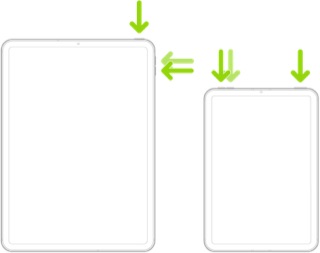
Force restart iPad (models with Face ID or with Touch ID in the top button)
If your iPad doesn’t have the Home button, do the following:
- Press and quickly release the volume button nearest to the top button.
- Press and quickly release the volume button farthest from the top button.
- Press and hold the top button.
- When the Apple logo appears, release the top button.
Force restart iPad (models with the Home button)
Press and hold the top button and the Home button at the same time. When the Apple logo appears, release both buttons.

Should it be necessary to escalate your issue to Apple Support, the quickest route to engaging with Apple Support will be via the Support link at top-right or bottom-left of this page - or using this link:
Official Apple Support
 User level: Level 1 (107 points)



