Unofficial archive. This is a read-only, community-run archive of the Apple Support Community. It is not affiliated with or endorsed by Apple Inc.

Cancel iScanner free trial

How do I cancel iscanner subscription during free trial. there is no option in the app and the apple settings show the subscription button as grey so it cannot be clicked. i dont want to be charged

2 replies

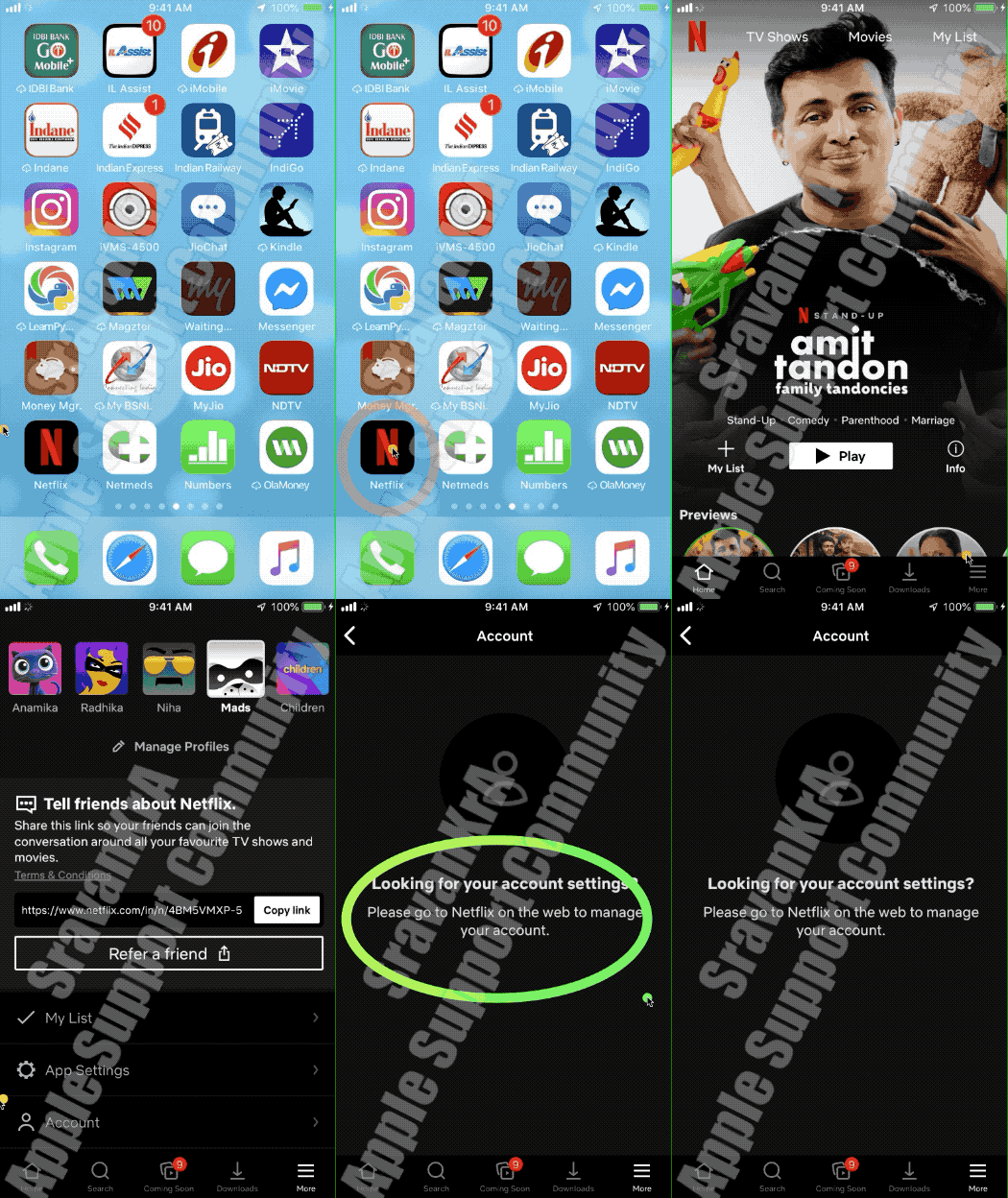
There are broadly two type of subscription

  1. Purchased through App Store (Watch the 1st GIF)
  2. Purchased directly from Third Party App developer (Watch the 2nd GIF)


1st GIF



2nd GIF

If you don't see the subscription that you're looking for

If you tried to see or cancel a subscription and you can't find the subscription that you're looking for, check the following things. Or contact Apple Support.


Is the subscription billed through another company?

On your bank statement, find the charge for the subscription. If it does not say iTunes, Apple, or something similar, the subscription might not be billed through Apple.

Get help with subscriptions that aren't billed through Apple.


Did a family member sign up for the subscription?

A Family Sharing organizer can’t manage subscriptions for other family members. Ask your family members to change or cancel their subscriptions from their own devices or when they're signed in with their own Apple ID. You can also use Ask to Buy to control what kids buy.

Turn on Ask to Buy.

Did you subscribe with a different Apple ID?

To see subscriptions for a different Apple ID, sign in with that Apple ID, then follow the steps in this article.

Forgot your Apple ID?


Do you need to manage iCloud storage or AppleCare plans?

Downgrade your iCloud storage plan.

Manage an AppleCare+ plan or AppleCare Protection Plan.



Welcome and thank you for reaching out. 🤗


It seems you may need to contact Apple Support directly, but first, learn how to → cancel a subscription. ↓


Then click ▶︎ Request a Refund.


NOTE: Refunds are not guaranteed, they are the exception.


According to Apple:

If your refund is approved, the funds are applied to the same payment method that you used to buy the item.


Here's how long it takes for a refund to appear on your account or statement:


Store credit—It might take up to 48 hours to see the refund in your Apple Account balance.


Mobile phone billing—It might take up to 60 days for the statement to show the refund. Processing time might be affected by your carrier. You can contact your carrier for an update.


Credit and debit cards, Apple Pay, Apple Cash, and all other payment methods—It might take up to 30 days for the statement to show the refund. If you don't see the refund after 30 days, contact your financial institution.


Note: Once a decision has been made on your refund request, you will get a follow up email from Apple.


Click ▶︎ Check Refund Status.


Final Note: I have written a detailed user-tip on this subject that goes into greater detail. See ▶︎ Request A Refund for more.


Good luck! 👋🏼😉

Smiliñ 😎 Brian | Community Volunteer

