Unofficial archive. This is a read-only, community-run archive of the Apple Support Community. It is not affiliated with or endorsed by Apple Inc.

Why is my shared location not updating on my husband's iPhone 15 Pro?

When I share my location frommy 14 Pro husband is using 15 Pro and my location on his phone keeps saying locating we are both updated and sitting right next to each other. We have googled and tried everything we can think of.


[Re-Titled by Moderator]

Original Title: Sharing from find my

2 replies

This usually happens when location sharing permissions are mismatched between you and your contacts. Since they can see your location but you can’t see theirs, it means your side of the connection is fine, but theirs hasn’t been fully enabled. 


Network & Privacy Settings

  • Both devices need a stable internet connection.
  • On their phone: Settings → Privacy & Security → Location Services → Find My should be set to While Using the App.
  • If Location Services are off, you won’t see them.


The process shown in the image must be enabled on both devices.


To use Find My and Location Services on an iPhone effectively, both your iPhone and the device you're trying to locate must have an active internet connection. These services rely on internet access to share your location with friends and family and to track the locations of devices, people, and items. Without internet connectivity on either end, the sharing and locating features of Find My and Location Services will not function properly. --> Internet not available WiFi and Cellular … - Apple Community


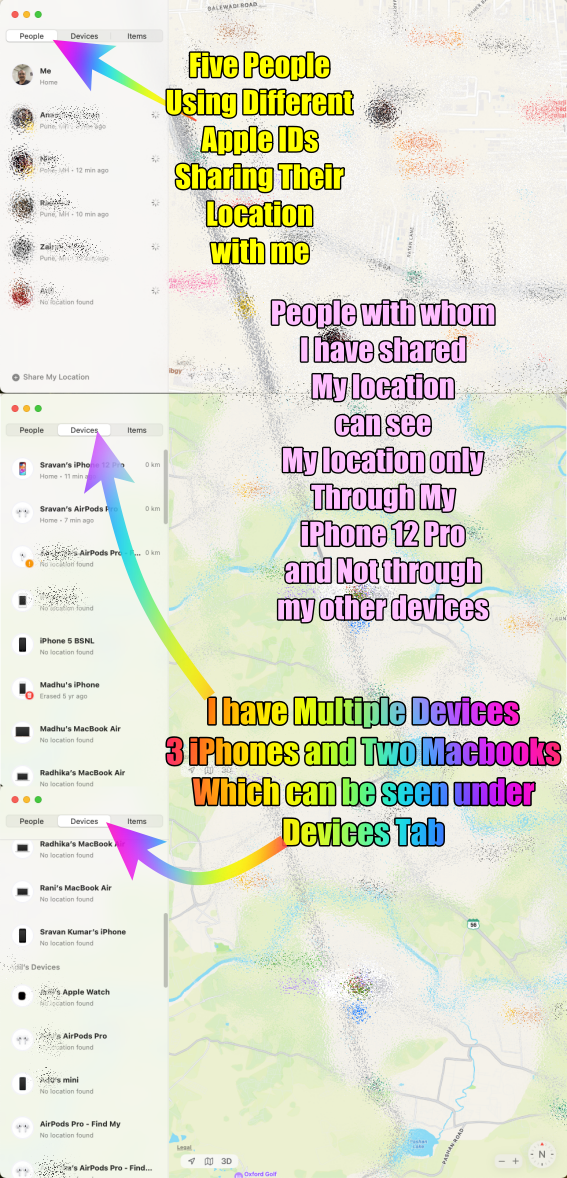
There are two scenarios: People and Devices under Find My


In the Find My app, there are distinct functionalities for tracking People and Devices. Under the People tab, the sharing of location is limited to a single device. If multiple individuals are using the same Apple ID, only one person's device location can be viewed at a time. This means that if you've shared your location with someone using the Find My app and they are also using the same Apple ID, you'll only be able to see the location of one of their devices under the People section.


Conversely, the Devices tab offers broader visibility. Irrespective of whether multiple devices are linked to the same Apple ID, all these devices' locations can be shared and viewed. This tab allows for comprehensive tracking and visibility of all devices associated with the Apple ID, enabling users to locate and monitor the whereabouts of various devices simultaneously.


Essentially, the distinction lies in the limitation of sharing a single person's device location under the People tab versus the broader accessibility to view all device locations under the Devices tab, regardless of the number of devices linked to the Apple ID.


Summary

  1. Multiple Devices with the same Apple ID...
    1. The People Tab will show only one device
    2. The Device Tab will show all the devices
  2. Multiple Devices with multiple Apple IDs...
    1. The People tab will show all the devices except your own which is shown under the Me Tab
    2. The Device Tab will show all the devices (If they are part of your family)


The pic below is self-explanatory