By design: Unknown Callers Are Not Actually Blocked
The various iPhone settings used to deal with unknown or unwanted callers can be confusing. None of these settings actually prevent the caller from reaching your iPhone or registering the call. They mainly control whether the call rings your device and interrupts you.
The relevant settings include:
- Unknown Callers — Never
- This means calls from unknown numbers are not automatically silenced by this particular setting.
- Call Filtering — Unknown Callers
- Unknown callers may be filtered or silenced rather than being allowed to interrupt you with a ringtone.
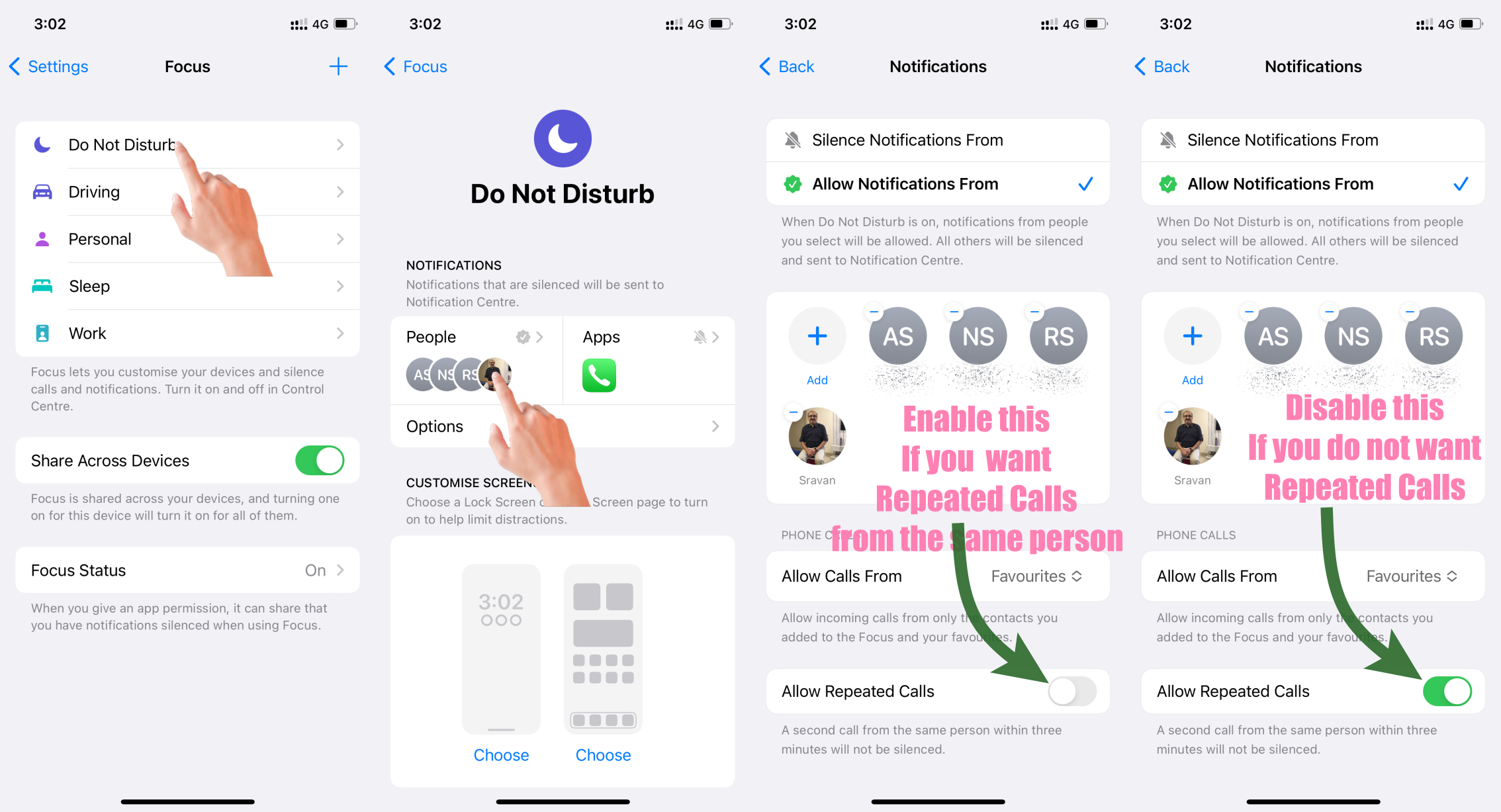
- Focus Settings — Allow Repeated Calls: Disabled
- When this is disabled, a caller cannot bypass the Focus restriction simply by calling you repeatedly.
- Allow Calls — Selected Contacts Only
- If Focus is configured to allow calls only from selected contacts, calls from everyone else will be silenced while that Focus mode is active.
What Actually Happens to an Unknown Caller?
The important point is that silencing is not the same as blocking.
When a call is silenced:
- The caller can still dial your number normally.
- The call still reaches the iPhone's calling system.
- Your phone simply does not ring or disturb you.
- The call can still appear in your Recent Calls list.
- Depending on your settings and carrier, the caller may also be able to leave a voicemail.
- The caller generally has no indication that you have silenced the call; from their perspective, they are simply making a normal call.
So these settings are better understood as notification-management features, rather than call-blocking features.
An Important Exception: Repeated Calls
There is one particularly important Focus setting: Allow Repeated Calls.
When this option is enabled, a caller who calls you twice within three minutes can bypass the Focus restriction and make your iPhone ring.
If Allow Repeated Calls is disabled, that bypass does not occur.
However, even when the repeated-call bypass is disabled, the caller is not actually blocked. The call can still reach the device's call-handling system and be recorded in your Recent Calls. It simply does not produce an audible interruption.
Repeated Calls: If someone calls you twice within three minutes, the second call isn't silenced.
Please see the pic below which is self-explanatory
In Simple Terms
Think of these settings as putting your iPhone on a "Do Not Disturb me" mode rather than putting up a "Do Not Enter" sign.
The caller can still call. The call can still be recorded. They may still leave a voicemail. What changes is whether your iPhone alerts you by ringing or otherwise disturbing you.
That distinction between blocking a call and silencing a call is important. Apple deliberately keeps the call history available so that you can see who tried to contact you even though the call did not interrupt you.


