Unofficial archive. This is a read-only, community-run archive of the Apple Support Community. It is not affiliated with or endorsed by Apple Inc.

Noise reduction in pictures - iOS27

Ever since updating to ios27, my pictures are showing as extremely noisy. Using noise reduction in edit doesn’t clear them up. I’ve tried updating settings, hard reset of the phone - still no improvement. Has anyone else experienced this and found a way to fix it? Very disappointing that pictures that I used to take in the past are so terrible that it’s not even worth taking at this point.

3 replies

Adjust the camera’s focus and exposure

Before you take a photo, the iPhone camera automatically sets the focus and exposure, and face detection balances the exposure across many faces. If you want to manually adjust the focus and exposure, do the following:

  1. Tap the screen to show the automatic focus area and exposure setting.
  2. Tap where you want to move the focus area.
  3. Next to the focus area, drag  up or down to adjust the exposure.
  4. To lock your manual focus and exposure settings for upcoming shots, touch and hold the focus area until you see AE/AF Lock; tap the screen to unlock settings.



If your Photos and Videos are stored in iCloud and you share it before downloading the original then it may appear blurry but it is not.


Your photos and videos are stored on your device in their original, high-resolution version. This means that they use a lot of space on your iPhone, iPad, and iPod touch. With iCloud Photos, you can make more space available on your device and have your entire collection, everywhere you go.

Get started with iCloud Photos:

  1. Tap Settings > [your name] > iCloud > Photos.
  2. Turn on iCloud Photos.
  3. Select Optimize iPhone Storage to save space on your device.
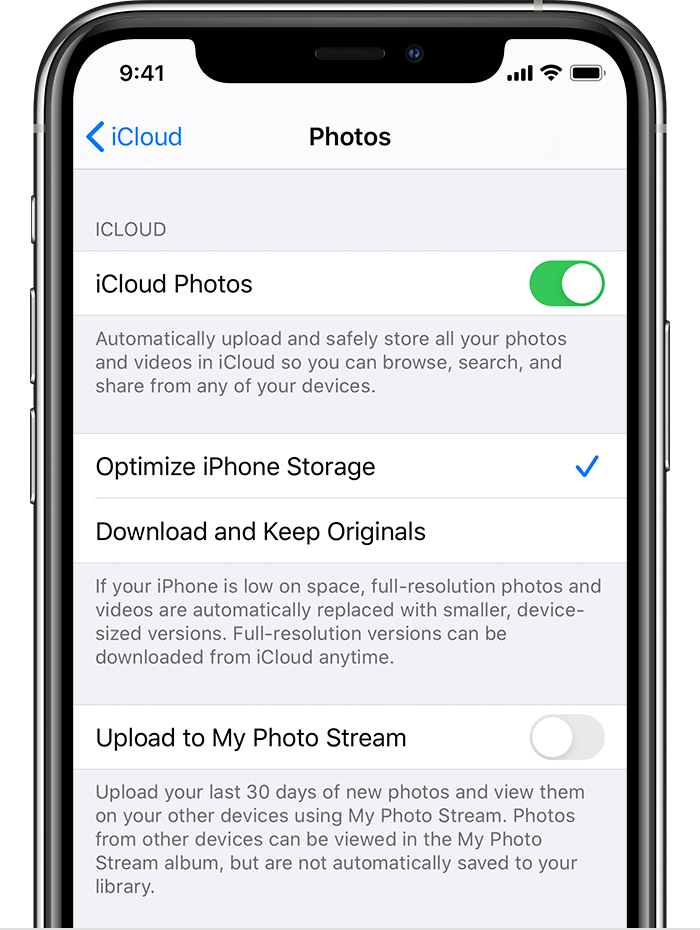
With Optimize Storage, smaller, space-saving photos and videos are kept on your device while all of your original, full-resolution versions are stored in iCloud. And as long as you have enough space in iCloud, you can store as many photos and videos as you want.


You may try some of these steps, please check after each step...


  1. Ensure adequate lighting. Poor lighting can significantly impact eye-tracking performance.  
  2. Sometimes assistive touch settings can interfere. Check your assistive touch settings within the accessibility menu.
  3. Ensure your screen protector or case isn't obstructing the front-facing camera. See the poic below


Please provide an example or two of the excessive noise in your photos. It’s also extremely helpful to know the exact settings used for each photo, ISO, shutter speed and aperture (f/number).

Help_me987 wrote:
Ever since updating to ios27,

Not every issue an individual encounters on their device can be attributed to an iOS update. iOS 27 or later may have coincided with what you are experiencing, but that does not mean the issue was triggered by iOS. Coincidence in timing is not, by itself, evidence of causation.


If the update itself were the root cause, then every device running that same version of iOS would exhibit the identical problem. In such a scenario, the forums would be flooded with countless posts reporting the same malfunction, creating an unmistakable wave of complaints that no one could possibly overlook.


The absence of such widespread reports strongly indicates that the issue is not a general, system-wide problem with iOS 27 or later, but rather something specific to the individual device, its configuration, installed apps, settings, hardware, or another interacting factor.


In short: iOS 27 or later may be a coincidence in timing, but there is no basis to conclude that iOS itself triggered the problem simply because the issue appeared after the update.

