Many people think the iPhone alarm might not go off at times, but it's usually due to a simple setting. Let's check a few things:
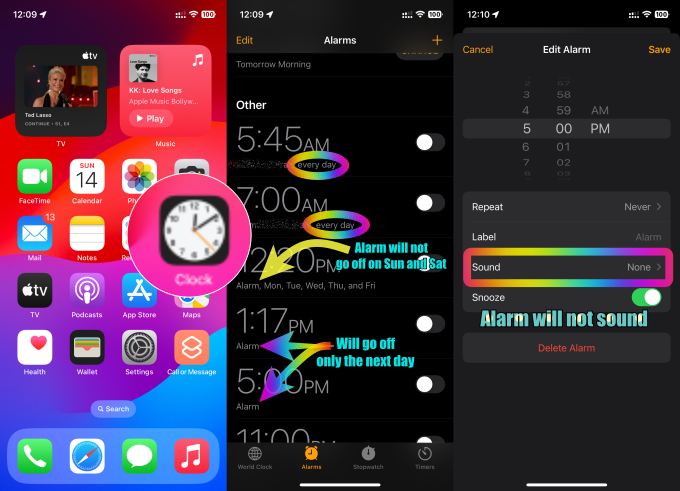
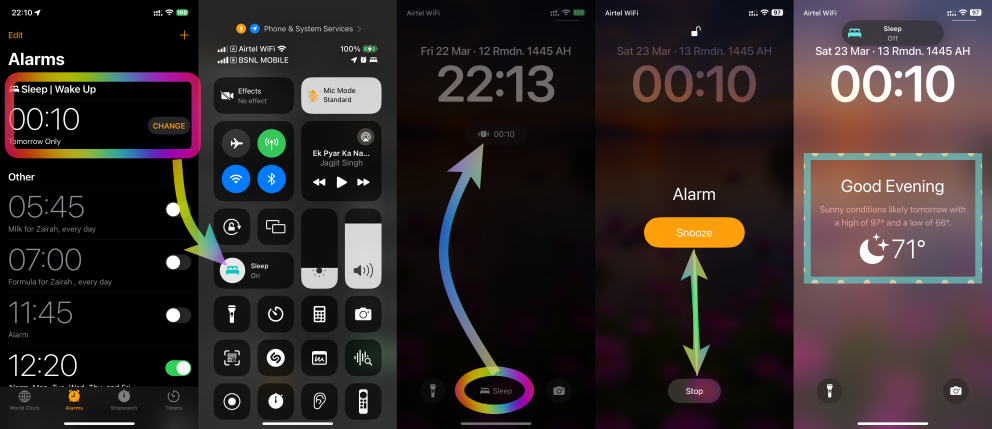
Is the alarm set for "Tomorrow" only? If you intended for it to repeat, make sure it's set for the days you need.
Is the alarm set for specific weekdays? Double-check that it's not accidentally set to a different day or multiple days.
Is the sound turned off? The alarm won't make any noise if the sound is muted or set to "None."
By checking these things, you can ensure your iPhone alarm wakes you up when you need it to.
Note:
Do Not Disturb, the Ring/Silent switch and Silent mode don't affect the alarm sound. If you use the Ring/Silent switch or Action button to turn on Silent mode or turn on Do Not Disturb, the alarm still sounds.
Warning:
Manually adjusting the time on your iPhone in Settings to change app behaviour, such as game timers, isn’t recommended and can affect alarms.
 User level: Level 1 (4 points)