Unofficial archive. This is a read-only, community-run archive of the Apple Support Community. It is not affiliated with or endorsed by Apple Inc.

iPad 2 Air screen shows horizontal lines

hi all,

i'm new to this forum, i'm hoping someone can help me sort out a problem i've run into w/my ipad 2 air.

it's been working fine for years now, but yesterday the screen started acting strangely. it's filled w/horizontal lines that look a bit like 'video interference'. impossible to see anything now. it's not like the 'snow' we used to see on older television sets, these are rows and rows of very fine horizontal lines. see image below.


the lines are aligned w/the long edge of the ipad, regardless of whichever way i rotate it. in addition, the touch screen still seems to be working correctly.


does anyone have any idea about what might have caused this?

is this something i'd need to take in to get repaired, or is it likely i can fix it w/a few basic tools and such?


thanks much.

5 replies

You can easily determine if you have a hardware or software issue. A reliable method to confirm a screen or other hardware fault is to take a screenshot when the fault is evident - and then review the captured screenshot image...


When reviewed, if the lines are not present in the screenshot image, then you have demonstrated that you have a hardware fault that, sooner or later, may become sufficiently severe that repair or replacement of the iPad are the only options. If the lines are visible in the screenshot, the something other than hardware will be the cause.


Note: When reviewing the image, rotating the iPad screen orientation by 90°, from Portrait to Landscape, will ensure that the image does not coincide with screen defects if present.


Take a screenshot on your iPad – Apple Support


If the test indicates that a hardware fault (as, given your description this is very likely) a visit to the Genius Bar at your local Apple Store is recommended - where the technicians will be able to test and assess your iPad. This will likely inform your next steps:


Genius Bar Reservation and Apple Support Options - Apple

iPad Repair – Official Apple Support


For practical purposes, in lieu of repairing and returning your own iPad, Apple usually exchange the iPad for a renewed/refurbished iPad of the same model and specification. The cost of the exchange is the same as would otherwise be charged for repair. Unless you have benefit of an active AppleCare plan, an out-of-warranty repair while expensive will be somewhat less than the cost of a replacement iPad.


As for out-of-warranty repair costs, Apple offers a fixed-price price repair. You can verify eligibility and cost for your region/country here:

iPad Repair & Service - Apple Support


If you have an active AppleCare+ plan, the cost of repair is reduced to a small excess/deductible fee.


Welcome and thank you for reaching out. 🤗


There appears to be a problem with the internal display panel. Only a certified Apple technician can determine the cause and offer a complete solution.


Therefore, I recommend service.


Service Checklist:


Service Appointment:


Contact Information:


Additional Support:


Good luck! 👋🏼😉

Smiliñ 😎 Brian | Community Volunteer

Perhaps unlikely to help, but try a forced-restart of your iPad:


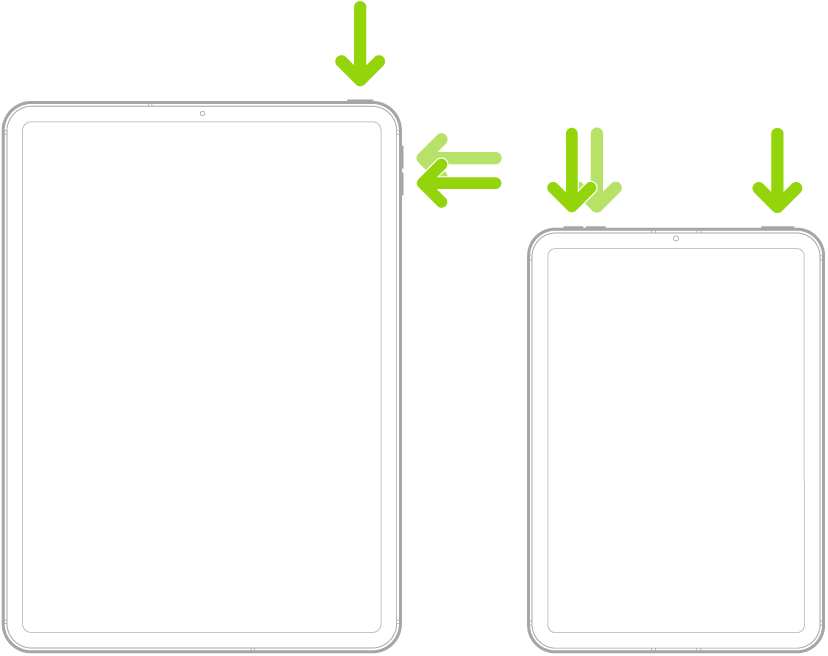
Force restart iPad (models with Face ID or with Touch ID in the top button)

If your iPad doesn’t have the Home button, do the following:

  1. Press and quickly release the volume button nearest to the top button.
  2. Press and quickly release the volume button farthest from the top button.
  3. Press and hold the top button.
  4. When the Apple logo appears, release the top button.


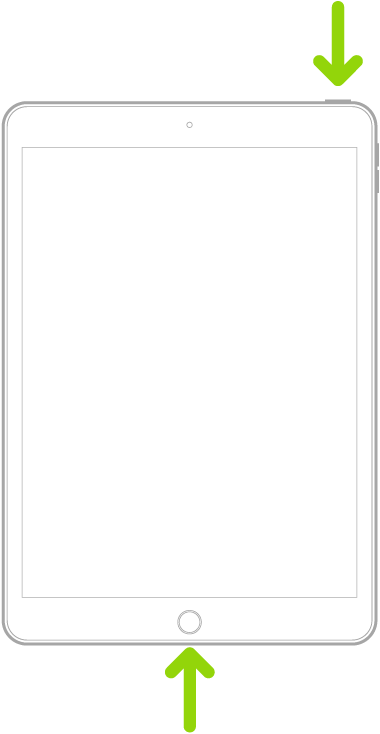
Force restart iPad (models with the Home button)

Press and hold the top button and the Home button at the same time. When the Apple logo appears, release both buttons.

thanks very much for your help, @LotusPilot, @Smilin-Brian.

i can't even get it to take a screenshot [it just turns off], so i'm thinking there's really an electrical here. into the shop i go...