Archive. This is an archive of the Apple Support Community. Discussions are being restored and soon you will be able to read and post here again.

iPad keyboard occupies nearly entire display after iOS 27 update

I recently updated my two-year-old iPad to iOS 27, and the keyboard now occupies nearly the entire display. I attempted to resize it, but the reduced layout is impractical for typing. I would appreciate recommendations for alternative solutions.


Thank you. 


9 replies

Thank you for the screenshots. There have been a number of reports concerning issues with key-layout and key/keyboard proportions.


When using the English US (EN-US) onscreen keyboards - as illustrated in your upper screenshot - the layout and proportions are as expected.


By contrast, your French (EN-FR) keyboard appears to have has two issues:

  • The immediately obvious issue of the keyboard being vertically stretched (e.g. the principal alpha keys are taller than they are wide) making the entire keyboard taller than expected - and as a consequence will occupy more of the available vertical screen space.
  • The Return-key itself is vertically displaced.


The English UK (EN-UK) keyboard is also partially affected - here the issue with the Return-key being vertically displaced, but the keyboard and key proportions being otherwise as expected:


Other iPad Keyboard selections may be similarly afflicted - but of available selections, the EN-US keyboard (perhaps unsurprisingly) has no issue.


These issues are due to a bug introduced in iPadOS 27 that wasn't fixed in iPadOS 27.0.1.


For those affected by this specific issue, it would be in your best interest to submit a Bug Report via Apple's Product Feedback portal - as until Apple receives a sufficient volume of reports, it may not assign resources to investigate and resolve the issue. For iPad and iPadOS:

Feedback - iPad - Apple


When submitting a report, please ensure that you include details of your iPad model, the installed version of iPadOS and affected keyboard layout within the body of the report.


You are unlikely to receive a personal reply, however, it is our understanding that all feedback is logged, analysed and forwarded to the appropriate team(s).

If your iPad on-screen keyboard is not functioning as expected subsequent to updating to iPadOS 27, try a forced-restart. A forced-restart will often clear an isolated or post-update software issue:


Force restart iPad (models with Face ID or with Touch ID in the top button)

If your iPad doesn’t have the Home button, do the following:

  1. Press and quickly release the volume button nearest to the top button.
  2. Press and quickly release the volume button farthest from the top button.
  3. Press and hold the top button.
  4. When the Apple logo appears, release the top button.
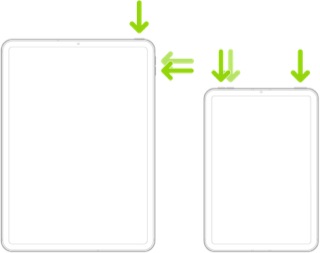


If the problem persists after performing the restart, it may be necessary to reset your iPad settings. While this reset will not cause any loss of data, as a precaution, it is always wise to ensure that you have a current iCloud or iTunes backup before performing the reset:

How to back up your iPhone, iPad, and iPod touch - Apple Support


When you are happy to proceed, you can perform the reset from iPad settings:

Settings > General > Transfer or Reset iPad > Reset > Reset All Settings


If the problem still doesn’t clear, the next step is to reset the iPad to factory settings:

Restore your iPhone, iPad, or iPod to factory settings - Apple Support


Otherwise, you would be best advised to seek assistance directly from Apple Support. You can contact the Support Team using the Support link at top-right or bottom-left of this page. Alternatively and perhaps easier, you can initiate and manage your support cases using the excellent Apple Support App. If not already installed on your iPad, the App can be downloaded from the App Store:

https://apps.apple.com/app/apple-support/id1130498044


You might also visit the Genius Bar at your local Apple Store or Apple Authorised Service Provider (AASP) - where the technicians will be able to assist with troubleshooting:

Genius Bar Reservation and Apple Support Options - Apple

Note the keyboard you displayed second above, which is your keyboard, has an extra key shown on the bottom row. The “EN FR” key appears because you have both English and French keyboards enabled.


To remove the French keyboard, which would remove this button. go to:

Settings > General > Keyboard > Keyboards. Then swipe left on the French keyboard and tap Delete.

That's not at all helpful as I even tried that and it's in an actual OS hard-coded visualization setting that the developers need to fix as I even confirmed the facts that with your top-rated reply is fully redundant as the original poster said this directly "I recently updated my two-year-old iPad to iOS 27, and the keyboard now occupies nearly the entire display. I attempted to resize it, but the reduced layout is impractical for typing. I would appreciate recommendations for alternative solutions." Which that to me as a computer systems technician and networking grad purely comes off as simply an internal display setting of the OS not at all to be able to be fixed in the settings. So the true fix is to have the developers actually see that code for the digital keyboard on the sizing scalability and see as to why it actually increased in size on the display for all devices.

I'm experiencing the same exact thing with the iPadOS update and it's a back-end factoring of the actual full-view mode for the digital keyboard. It's got nothing to do with the floating keyboard feature or even anything at all to go with the actual functionality it's straight up on the display screen scaling which is another fumble on development which Apple has usually a good year from when they blueprint the specs to actually when doing beta-testing that all things are to be warranted on those tests prior to the actual launch.

Prior to even submitting my reply so that the forum admins see this on the premise for my reply is fully validated when I say this in a clear factual and technically sound response:


The previous comment by Arnold_school123 situation was titled and stated exactly as this "

iPad keyboard occupies nearly entire display after iOS 27 update


I recently updated my two-year-old iPad to iOS 27, and the keyboard now occupies nearly the entire display. I attempted to resize it, but the reduced layout is impractical for typing. I would appreciate recommendations for alternative solutions.


Thank you." So that fact I ask is why in your reply is it at all redundant to post a linked article that is about "Use the floating keyboard on your iPad" is as it clearly says the issue that Arnold has is that the digital keyboard in its full viewed mode is scaled larger than what it was, which I as well have the same issue when using apps etc that have a textbox that keyboard hides it and the use for the floating keyboard is not a viable option as that size of keyboard is more for the use of a stylus/apple pen not someone that's been use to using an actual digital keyboard. So what has to occur in the next iPadOS is a descaling of the keyboard size on what it was in iPadOS 26. Thus in conclusion my inquiry is valid for being replied to and remaining stable on this topic.

HBKTheIcon wrote:
Thus in conclusion my inquiry is valid for being replied to and remaining stable on this topic.

If your conclusion that Apple needs to change its keyboard sizing algorithm were valid, then tens (or perhaps hundreds) of millions of iPad users would face this issue.

Other iPad users are having this issue. This is a screenshot of my husband‘s iPad that hasn’t run the iOS 27 update yet and mine which has. On my iPad, the keyboard is now occupying more than 2/3 of the screen, the space bar is essentially gone and the characters overlap. Mine started the moment that I installed 27.

