If your iPad is unresponsive, connect your iPad to its Power Adapter and allow the iPad to charge. While still connected to the Power Adapter, perform a forced-restart. When performed correctly, the iPad will restart:
Force restart iPad (models with Face ID or with Touch ID in the top button)
If your iPad doesn’t have the Home button, do the following:
- Press and quickly release the volume button nearest to the top button.
- Press and quickly release the volume button farthest from the top button.
- Press and hold the top button; do not release the button until...
- When the Apple logo appears, release the top button.
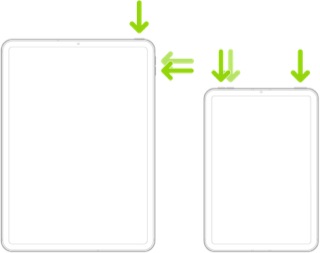
NB: Ignore the power-off slider if it appears. Continue to hold the top button until the Apple logo is seen. This may take 15-20 seconds.




