Unofficial archive. This is a read-only, community-run archive of the Apple Support Community. It is not affiliated with or endorsed by Apple Inc.

Apple email not showing all inboxes in ios 26.6.2

apple mail no longer shows all email inboxes on my ipad 9th generation with iOS 26.6.2. Has been working ok but this AM it will no longer show the all email inboxes. Shows individual (gmail, icloud, etc.) but not the "all email inbox". Also had some display issues with sidebar. Restarted iPad. No change.

3 replies

Begin by updating your iPad to iPadOS 16.7.


If after the update your iPad is not operating as expected, try a forced-restart - as this will often clear an isolated software issue:


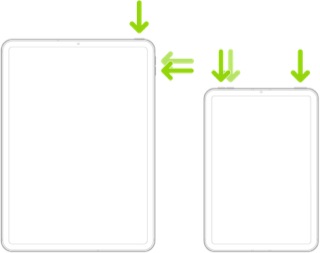
Force restart iPad (models with Face ID or with Touch ID in the top button)

If your iPad doesn’t have the Home button, do the following:

  1. Press and quickly release the volume button nearest to the top button.
  2. Press and quickly release the volume button farthest from the top button.
  3. Press and hold the top button.
  4. When the Apple logo appears, release the top button.


If the problem persists after performing the restart, it may be necessary to reset your iPad settings. While this reset will not cause any loss of data, as a precaution, it is always wise to ensure that you have a current iCloud or iTunes backup before performing the reset:

How to back up your iPhone, iPad, and iPod touch - Apple Support


When you are happy to proceed, you can perform the reset from iPad settings:

Settings > General > Transfer or Reset iPad > Reset > Reset All Settings


If the problem persists after performing the update and restart, it may be necessary to restore your iPad to factory settings:

Restore your iPhone, iPad, or iPod to factory settings - Apple Support


Otherwise, you would be best advised to seek assistance directly from Apple Support. You can contact the Support Team using the Support link at top-right or bottom-left of this page. Alternatively and perhaps easier, you can initiate and manage your support cases using the excellent Apple Support App. If not already installed on your iPad, the App can be downloaded from the App Store:

https://apps.apple.com/app/apple-support/id1130498044


You might also visit the Genius Bar at your local Apple Store or Apple Authorised Service Provider (AASP) - where the technicians will be able to test and assess your iPad - and you can explore your available options:

Genius Bar Reservation and Apple Support Options - Apple

Thank you. I did the upgrade, consulted with my favorite AI tool which confirmed your approach as safe and the most likely to work. The “all inboxes” view was not present after the upgrade so I restarted again. Still no joy.

There is another thing that happens regularly with Apple Mail. I attached a picture showing overlaid information. It happens more often with the list of mail messages where two occupy the same slot. Another issue is that occasionally messages are multi-selected leaving them in a useless state. I can make those issues go away with a restart but they make me think there is something in the Mail app itself that goes awry.
