Archive. This is an archive of the Apple Support Community. Discussions are being restored and soon you will be able to read and post here again.

9th gen iPad performance issues after iOS 26.5 update

Since updating to iOS 26.5 problems on 9th generation iPad, battery drain has increased and Wi-Fi performance has become very slow. Apps are slow to switch and frequently freeze. I have restarted and hard booted multiple times. Have more than 50% memory available. Device is just about unusable.


18 replies

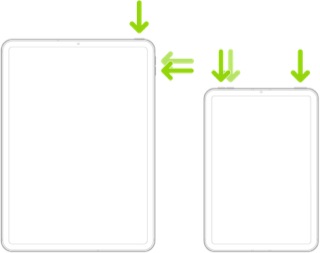
If your iPad is not operating as expected, try a forced-restart - as this will often clear an isolated or post-update software issue:


Force restart iPad (models with the Home button)

Press and hold the top button and the Home button at the same time. When the Apple logo appears, release both buttons.



Force restart iPad (models with Face ID or with Touch ID in the top button)

If your iPad doesn’t have the Home button, do the following:

  1. Press and quickly release the volume button nearest to the top button.
  2. Press and quickly release the volume button farthest from the top button.
  3. Press and hold the top button.
  4. When the Apple logo appears, release the top button.


If the problem persists after performing the restart, it may be necessary to reset your iPad settings. While this reset will not cause any loss of data, as a precaution, it is always wise to ensure that you have a current iCloud or iTunes backup before performing the reset:

How to back up your iPhone, iPad, and iPod touch - Apple Support


When you are happy to proceed, you can perform the reset from iPad settings:

Settings > General > Transfer or Reset iPad > Reset > Reset All Settings


If the problem still doesn’t clear, the next step is to reset the iPad to factory settings:

Restore your iPhone, iPad, or iPod to factory settings - Apple Support


Otherwise, you would be best advised to seek assistance directly from Apple Support. You can contact the Support Team using the Support link at top-right or bottom-left of this page. Alternatively you can initiate and manage your support cases using the excellent Apple Support App. If not already installed on your iPad, the App can be downloaded from the App Store:

https://apps.apple.com/app/apple-support/id1130498044


You might also visit the Genius Bar at your local Apple Store or Apple Authorised Service Provider (AASP) - where the technicians will be able to assist with troubleshooting:

Genius Bar Reservation and Apple Support Options - Apple

…found that if I quit using Private Relay the speed issue is very slightly improved. If I use DuckDuckGo rather than Safari there’s a dramatic improvement in both speed and website performance. By turning off Private Relay and using DuckDuckGo exclusively, even with the DDG VPN it’s like a brand new iPad.

I updated the 9th Gen iPad to 26.5.2, and performance is almost back to normal. I can run multiple apps again without crashing. WiFi (whether on VPN or not) is as it was prior to 26.5.

Just an FYI. Don’t know why it didn’t auto update with the new patch as it is set to do so. Biggest remaining issue I see is app switching; it still drags a bit at times.

I'd been struggling with this issue as well. Even navigating the settings menus was slow (several seconds between taps and navigating to sub-settings).

I just installed 26.5.2, and although there was nothing specific about this in the release notes, at least for me it is MUCH improved. Hope everyone else has the same improved experience.

Naturally, the VPN, when activated, will slow the network connection a bit. I have a choice of three and they all run about the same speed & show similar latency and ping numbers when and if I choose to use one of them. The issue is the OS update that literally all but bricked some of the 9th Gen iPads, not how we connect to an ISP. The iPads simply will not run more than one app at a time and they have a great deal of trouble doing that. We follow the factory recommendations to restore with no results and get zero help from Apple as we are no longer covered by maintenance/warranty. Never mind that all was just fine prior to the 26.5 update.

Kinda hard to believe so few are complaining about this issue. I now have to do a reset-restart-reset to new factory settings.


[Edited by Moderator]


Same issues on multiple iPads in household one older one current model so it’s the update

twomiracles wrote:
We shouldn’t have to reach out to Apple for an obviously common issue. l
Let’s have a fix, please, Apple…or do you just want us to all have to buy new iPads?


Please understand that the Apple Support Community is a user-to-user technical forum. Contributors here are all end-users, just like you. Other than the site Moderators, Apple neither monitor nor participate here. As such, if you anticipate that Apple will see or act upon your posts made here, you will be disappointed.


However, Apple does invite submission of constructive comments via its Product Feedback portal:

Feedback - iPad - Apple


While you are unlikely to receive a personal reply from Apple, we understand that all submissions are logged, analysed and forwarded to the appropriate team(s).

sheriji wrote:
My ipad is also behaving very oddly since the update. Apps just quit for no reason, certain websites won’t load properly. I don’t want to be told to restore factory settings. I want Apple to figure out what’s going on and issue a new update to correct it.


First, please understand the Apple Support Community is a user-to-user technical forum. Contributors here are all end-users, just like you. Other than the site Moderators, Apple neither monitor nor participate here. As such, if you anticipate that Apple will see or act upon your post made here, or perform any troubleshooting not prompted by you, you will be disappointed...


Perhaps not the response that you would prefer, but my reply to thread of 23rd May offers comprehensive troubleshooting steps. While freely acknowledging your desire to avoid performing a factory restore, this appearing much later in the troubleshooting process, it is a valid (and sometimes necessary) step to resolve difficulties.


If you follow the recommended steps, you will create a backup of your locally stored data and settings - which can be restored after performing a factory restore should it be required. In so doing you will lose nothing more than a little time and effort.

That VPN may well be part of the issue

Thanks for the suggestion of forced restart. I used the wrong verbiage (rebooted). The forced restart did absolutely nothing to remedy the issues. Making sure I had a good recent backup, I did a factory reset. No change. When time allows, I’ll reach out to Apple.

My apologies that you are experiencing the same issues as many of us are. I can’t offer any more advice as I have done 3 factory resets with zero improvement. I’m using it for a reader now. Had to go back to my WIN11 laptops. It is that bad.

My ipad is also behaving very oddly since the update. Apps just quit for no reason, certain websites won’t load properly. I don’t want to be told to restore factory settings. I want Apple to figure out what’s going on and issue a new update to correct it.

This is not working. All that happens is the power off button comes up.

We shouldn’t have to reach out to Apple for an obviously common issue. l

Let’s have a fix, please, Apple…or do you just want us to all have to buy new iPads?

Im bout to just get a new one bc there should be no reason im lagging and all i have is Spotify, roblox, minecraft and YouTube

Like many other users, I have not only tried this. I have a multitude of time.

I want my old IOS back!

If I have to replace my tablet for this reason, it will not be an Apple product