Unofficial archive. This is a read-only, community-run archive of the Apple Support Community. It is not affiliated with or endorsed by Apple Inc.

Apple Super Drive only works on PCs!

I bought an Apple Super Drive w/USB. I can connect it to my 2017 Apple iMac or my new Studio Mac computers, but if I put a standard CD in, it does not show on my desktop and I can not eject it.

The Fixit shop says it works on a PC.

How can I get it to work on my Macs?

8 replies

The Apple Super Drive must be plugged into a USB port on your iMac. It will not work if plugged into a USB port on a hub or dock.


My Super Drive works perfectly with my M1 Studio Max.

I don't believe that with newer versions of macos for mounted volumes to show up on the desktop


these days they only show up default in finder


if that is your issue then you can get it to show on the desktop by reading this

remove mactintosh hd icon off my imac des… - Apple Community


more macos don't show drives on desktop - Google-


if it's not then it's not a general problem many posts around here where people do not have issues using the old superdrive with newer macs using a usb-a->usb-c adaptor (though some adaptors are cheap and only connects the power pins of the usb ports so those do not work for data)

Ty Ford1 wrote:

You are correct about where to plug the drive in. I did.

So with the drive plugged in open System Settings and look at the bottom of the window under Keyboard and Mouse. There should be an option for "CDs & DVDs”. If the option is present that means macOS sees the SuperDrive. If the option is not there it means macOS does not see the drive and something is wrong.


You can also open System Information (option + ) and look at the USB devices connected. The SuperDrive should be in that list of devices.

I have a Mac Studio with the latest software. When I plug in my other Super Disk, and insert a disk the disk shows up on my desktop. when I try to use the bad Super Drive on an older iMac, it also does not show up.

thats the thing really, the optical disc drivers for both macos, linux and windows are generic as in one size fits all, so in terms of software compatibility, you should be able to use any optical drive with any computer


the last optical drive I used with macs were SBC-06D2X-U|Optical Drives|ASUS Global it worked out of the box on all computers, still have it and it still work but, it's rare that I fiddle with optical drives and discs really, never tested a blueray in it much less burned a blueray disc with it


it does require a cable that connects to 2 usb ports though one for power and data and one just for power

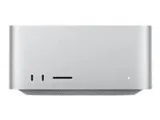
You are correct about where to plug the drive in. I did.

Since Apple still sells the Super Drive wouldn't the point be that it should work with current Apple Macs?

When I went to look for one, sadly, what I found said they were discontinued.