Unofficial archive. This is a read-only, community-run archive of the Apple Support Community. It is not affiliated with or endorsed by Apple Inc.

Transaction from APPLE.COM/BILL

A month ago, approximately $100 was deducted from my bank account with the description "POS TRANSACTION APPLE.COM/BILL." I do not own any Apple products, have no connection with any Apple-affiliated dealers, and did not authorize this transaction. Since I don't own any Apple devices, I am unable to register on the support page, which prevents me from submitting my complaint directly to Apple.

Can anyone offer me some useful advise as to how I can proceed? Thank you in advance.

6 replies

Ingo2711 in on the right track. There is a decade-old scam that involves criminals mining up credit card and account numbers from defunct web sites that were improperly shut down, then making purchases posing as a major retailer like Apple. It happened to us, and Apple cannot help in the case of fraud.


These financial news articles describe the scam:


https://toughnickel.com/scams-fraud/Apple-iTunes-866-712-7753-Scam


https://www.foxbusiness.com/personal-finance/credit-card-statements-scam-charge


https://www.chron.com/business/moneytips/article/Check-Your-Statements-For-This-Long-Running-Scam-13888458.php


If your card issuer or bank is not familiar with a publicized 10-year old scam....well, you know what to do.


Start here:


If you see 'apple.com/bill' on your billing statement - Apple Support


The most important part of that article is "View your purchase history." If Apple does NOT show a record of the charges in your history, it is very possible that scammers have gained access to your credit card or bank number.


If Apple’s purchase history shows the purchase, continue with the instructions in that article. 


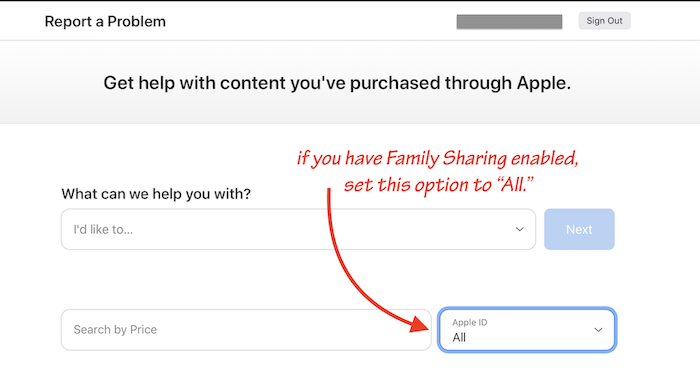
⚠️ Important note for reviewing your Apple purchase history: If you are using Family Sharing, make sure you set the "Apple ID" box to the "All" option to get a complete history of purchases Apple shows as made from your account:


Yes, I did all of the above...


Apple Billing Support online - Something went wrong

You must use an Apple Account that has previously been used in the store. Sign in again with another Apple Account.


Contact Apple for support and service - Apple Support - I do not live in one of the listed countries, so when I try to call, the call just drops. Think because there are all toll free numbers?


Also have a look at this article:

If you see 'apple.com/bill' on your billing statement - Apple Support - Jip. Tried everything in the article. No luck.


Did you contact your financial institution?

If you did not get any bill from Apple via mail, this looks like fraud, and someone managed to take money from your banking account.

Yes, I have, and they are also looking into it.

I'm afraid, this is all you can do from your side, if you can not reach the official Apple Support in your country.

All the best!