If you are seeing open draft mail messages, simply open the Drafts folder from your Mail App sidebar - find the draft message, then swipe to the left to expose the Delete button.
Alternatively, find the message in the Drafts folder, then touch-and-hold the draft message to expose the action menu - and tap Delete Message.
If you you are unable to close the draft window, perform a forced-restart of your iPad:
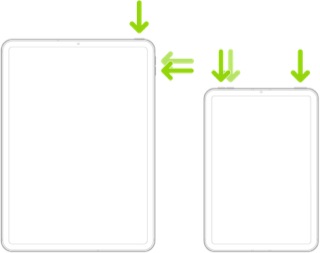
Force restart iPad (models with Face ID or with Touch ID in the top button)
If your iPad doesn’t have the Home button, do the following:
- Press and quickly release the volume button nearest to the top button.
- Press and quickly release the volume button farthest from the top button.
- Press and hold the top button.
- When the Apple logo appears, release the top button.
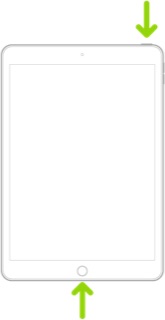
Force restart iPad (models with the Home button)
Press and hold the top button and the Home button at the same time. When the Apple logo appears, release both buttons.
 User level: Level 1 (4 points)

