Unofficial archive. This is a read-only, community-run archive of the Apple Support Community. It is not affiliated with or endorsed by Apple Inc.

Cannot export or edit photos

Just got a new 2022 MacBook Pro M2 - running Venture 13.5 , photos Version 8.0 (560.0.110)

My photo library is stored on an external hard drive

On another Mac I can use that external hard drive and edit and export with no problems

On the new Mac I keep getting an unknown error whenever I try to export or edit .

So it can't be the external hard drive as it works on the 2020 MacBook Pro running Ventura 13.4 Photos Version 8.0 ( 551.0.140)

What setting do I need to change to get it working ?


13 replies

Well, reassure us about the hard drive, anyway-- How is it formatted? An external drive must be formatted in either APFS format or Mac OS Extended (Journaled) format. Additionally, the drive can not have had Time Machine on it since it was formatted. Have you checked the "Ignore Ownership" box?
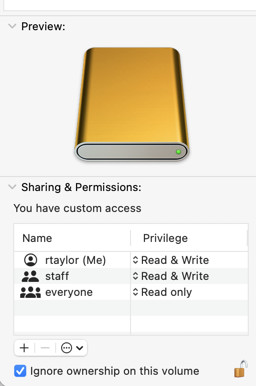

And with that out of the way, try some other tricks, like these, some of which you may have already done:


  • Restart the computer (of course)
  • See if it's about the user account: make a new user and see if the same problem recurs with it
  • Use another library if you have one, or make a small test Library with a few pictures in it and see if the same thing happens. You could make a small Library on your internal drive, see if it works, and then move it to the external drive.
  • Start in Safe Mode (different for different computers, so see the link) This bypasses certain potentially disruptive processes.

           Start up your Mac in safe mode - Apple Support 


One of these steps may fix the problem, but their failure to work is also diagnostic.

You did not reply to Richard.Taylor's question about the "Ignore Ownership on this volume" flag. If you have not done so, try to set this flag in the Info for the external drive. If this flag cannot be set, there is a problem with the drive.


Also make the test recommended by Richard. Create a new, empty library on the external drive and check, if you can open this library on both your Macs.


Is there a reason, why you do not update both your macs to exactly the same system version? A Photos Library can only be shared between two macs, if the system version is the same.


Have you installed and run any "cleaning", "optimizing", "speed-up", anti-virus or VPN apps on your 2022 MBP?


Is the library a managed or referenced library?


Hard drive is fine - its Mac OS formatted and works with my other Mac ( ie can open pics using photos on my other Mac )

Its also not all pics - there is about a month worth of pics that won't export or edit - pics before or after then are fine and interestingly if I export the pic via air drop from one Mac to the new Mac the photo opens, edits and exports fine


Its bafffingly why some photos would open ok , others not but those same photos when opened on the other Mac and transferred over start working ok again


I haven't tried the other things you suggested yet - given the above do you think would help ?

I can't edit edit my photos in PHOTO 8.0 (560.0.110).

Hardware: Mac mini M2 Pro (2023) with 32 GB memory and 2TB SSD (with no problem).

System recently updated to OSX Ventura 13.6

One week ago, before updating to Ventura 13.6 this edit problem did not exist.

What to do?


My Photo library is in my 2 TB

internal drive of the Mac mini M2 Pro (2023) with Ventura 13.6 (updated last week), as above mentioned.

Everything was working correctly until upated last week to the Ventura to 13.6.

Today, I can export a photo without problem, but I cannot edit (people and also the photo location).

I am using PHOTO 8.0 (560.0.110).

I installed the new Mac OS SONOMA 14.0 to see if the problem with the PHOTOS application would be fixed and it did not work. I suspect that the system malfunction is due to iCloud Drive, which I have completely disabled as I no longer want this tool enabled on my machine. Enough of this iCloud! It's horrible! With the upgrade to the new OS SONOMA 14.0 system, my machine, which continues to experience FINDER crashes, is now configured like this: Mac mini (2023) M2 Pro / Memory: 32 GB / 2 TB internal storage (with PHOTOS) / OSX SONOMA 14.0 / FINDER 14.0 / PHOTOS 9.0 (608.2.113) / iCLOUD off  with only 1,9 MB of 5GB used. I believe the PROBLEM is with iCLOUD DRIVE disabled. It would be interesting for APPLE to check this possible incompatibility that may be causing the entire system to MALFUNCTION. I DON'T WANT TO USE ICLOUD ANYMORE. The SONOMA operating system, as well as all previous versions, should work perfectly with ICLOUD disabled.


its a managed library and no haven't run any anti virus or VPN on the Mac

That difference in Ventura version might be the issue, but you Macbook should have already tried to change the library.


Do you have the same user name and password on the external?

yes same

What errors do you get? Is your library on the internal drive?

You should start your own topic so we can focus on your situation.

While I have not yet tried Sonoma, my Macs work fine without iCloud.