Unofficial archive. This is a read-only, community-run archive of the Apple Support Community. It is not affiliated with or endorsed by Apple Inc.

Messages take a lot of my storage and It’s getting worse every day

My massages take 19 GB of storage but when i open messages in storage settings it should take about 10GB. Everyday it takes more and more and I keep deleting images - the “big ones”- from my massages everyday by hand but it’s getting worse! Why?? I text only one person

7 replies

Aselif wrote:

Everyday it takes more and more and I keep deleting images - the “big ones”- from my massages everyday by hand but it’s getting worse! Why??

Are you aware that deleting messages simply moves them to “Recently Deleted” since the introduction of iOS 16?


Open Messages. Tap “Edit” in the upper left, then “Show Recently Deleted” from the drop-down. Choose “Delete All” on the bottom.

Hello Aselif,


We would like to see how we can help you with your storage. Which iOS version are you currently running? Go to Settings > General > About for the version. If you restart the iPhone with the steps in this link, do you see any change to your storage: Restart your iPhone - Apple Support


"How to restart your iPhone X, 11, 12, 13, or later

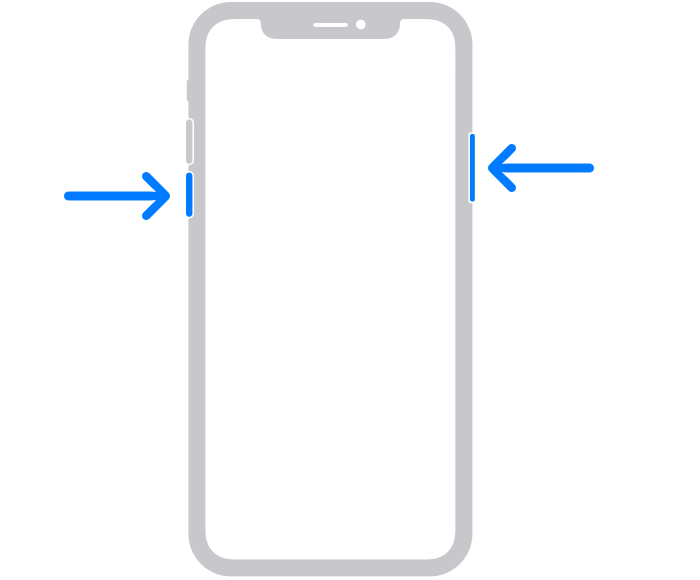
  1. Press and hold either volume button and the side button until the power-off slider appears.

The volume button is located on the left side of the device, and the side button is located on the right


2.Drag the slider, then wait 30 seconds for your device to turn off. If your device is frozen or unresponsive, force restart your device.

3.To turn your device back on, press and hold the side button (on the right side of your iPhone) until you see the Apple logo."


Cheers!


Aselif Said:

"Messages take a lot of my storage and It’s getting worse every day"

-------


Thank you for the screenshot.


Troubleshooting iPhone Storage:

Try Removing Data from the iPhone itself...

Internal storage cannot be upgraded. It is what it is. So, the maximum internal storage capacity never increases, even if you upgraded your iCloud plan. Learn More here: What's the Difference Between Device Storage and iCloud Storage? Apple Support


So, what to do...

Use my two User Tips:

Clear Space Using my User Tips:

See this screenshot:

Aselif Said:

"Messages take a lot of my storage and It’s getting worse every day: What if I wanted to clear the messages storage, it takes almost 20GB and when I delete things it stays the same”

———-


Export these Messages:

You’d have to either (A.) trash them all, or (B.)export them first, so that nothing is lost. Perform my user tip, when it comes to exporting: How to Save or Print a Complete iPhone Messages Thread - Apple Community


It didnt work

What if I wanted to clear the messages storage, it takes almost 20GB and when I delete things it stays the same ☹️