When you set a password on a Pages document, you will see this dialog:
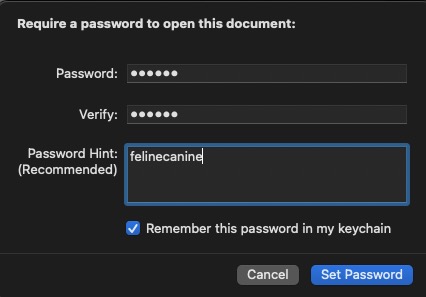
See that blue check box? That is your only hope that Pages will query the keychain on the original Mac and user account to automatically fetch the password and open the document for you. If you didn't choose to let the keychain keep that password for you, then your only option to open the document is now relegated to memory recall or a written list of passwords. If you did check that box, you need to take the document to the same Mac and user account where the password was created, and hope it is the same keychain data. That may just open the document for you.
Even if you had selected the Remember this password in my keychain, it is only valid for the current user account on the original Mac where it was set. Attempt to open that password protected Pages doc on another or same version of macOS with the identical user account, and as no keychain assistance is shared, it will prompt you for the password.
I just tested the last paragraph between identical users and operating systems (Ventura 13.3.1) and the other Mac threw a password prompt because the keychain is not shared from the first Mac.