In Photos for Mac you can display the titles below the thumbnail of a photo. See this user tip: How to view the titles or filenames below… - Apple Community
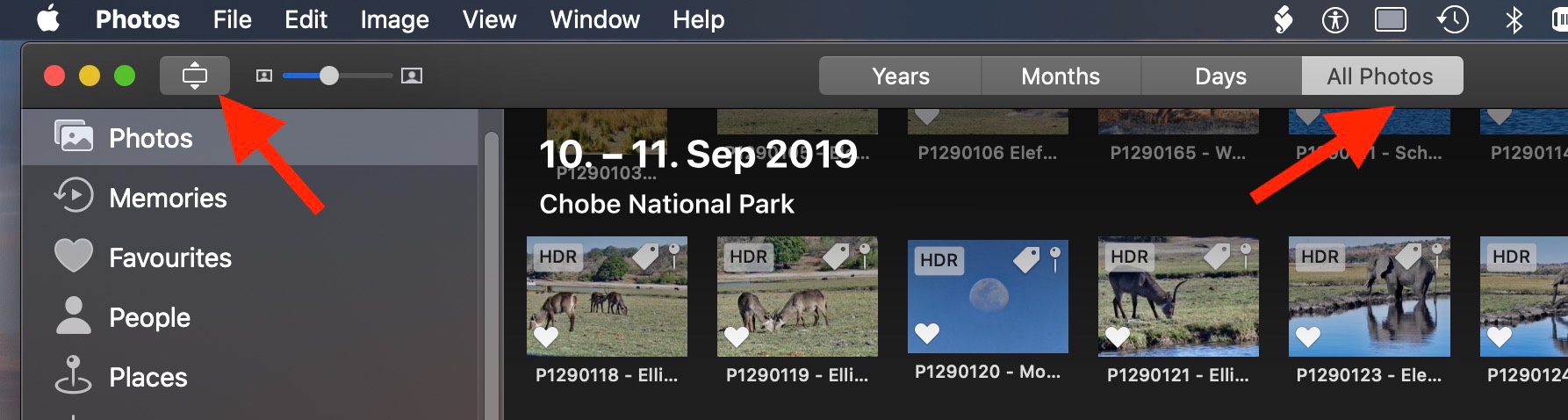
- You just have to enable the titles to be shown in the menu "View > Metadata" - set the checkmark for titles.
- And you have to display the thumbnails in the correct aspect ratio, do not enable the tiled layout with the photos cropped to squares. Click the tiny display icon to the right of the traffic light in the toolbar to see the thumbnails in the correct aspect ratio and not tiles as squares.
If you want to see more metadata below the thumbnails, get yourself the free trial version of PowerPhotos. It is a very versatile toolbox as a companion to Photos. The free trial lets you view two lines of metadata below the thumbnails of photos. You can view your Photos Library in a second window, either as thumbnails or table with the metadata in colums and sort the columns. https://www.fatcatsoftware.com/powerphotos/
In Photos for Mac you could use the workaround to print selected photos to PDF, using the spread-sheet layout.

 User level: Level 1 (7 points)


