Unofficial archive. This is a read-only, community-run archive of the Apple Support Community. It is not affiliated with or endorsed by Apple Inc.

Stop "Sign in with Google" pop-ups

I have a Mac air. I am not a big Google user (or Google fan for that matter). However, I do have a Google account that I have accessed via my Safari browser. However, just about every other website is now causing a pop-up that asks me to "sign in with google" as many of these sites have a SSO with Google. I have removed all of my Google sign-in's from Safari, removed cookies, removed history but these annoying "sign in with Google" prompts still exist. I have removed this "opt in" check-box on my Google account as well without any success. How do I stop the annoying pop-ups from Google asking me to sign in?

93 replies

I'm using Firefox and autodelete all cookies - except a few whitelisted - after closing its tab or the browser. The default solution to disable Google Account sign-in prompts in the Google Account settings doesn't work as I'm no longer logged into Google when I close its tab or my browser.


The solution I found for Firefox is using the following string as as custom rule to your adblocker:

||accounts.google.com/gsi/iframe/select$subdocument


This should also work for Safari except that the only adblocker I could find that allows custom rules is AdGuard for Safari. After installing AdGuard for Safari I opened the settings, clicked on Filters tab, enabled User rules and clicked on User rules. This enabled me to paste the custom rule and click on Save to enable it.


I tested it by going to Reddit and the "Sign in with Google" pop-up no longer appears. After disabling all AdGuard for Safari extension and reloading Reddit the pop-up came back. After enabling extension in Safari I discovered you only need to enable AdGuard Custom to enable this User rule.


Tested some further and closed AdGuard for Safari (not keeping it active in menu bar) and disabled launch at login and it still works.


Credits: https://www.ghacks.net/2022/12/24/how-to-block-sign-in-with-google-popups-on-sites/

I'm using Firefox and autodelete all cookies - except a few whitelisted - after closing its tab or the browser. The default solution to disable Google Account sign-in prompts in the Google Account settings doesn't work as I'm no longer logged into Google when I close its tab or my browser.


The solution I found for Firefox is using the following string as as custom rule to your adblocker:

||accounts.google.com/gsi/iframe/select$subdocument


This should also work for Safari except that the only adblocker I could find that allows custom rules is AdGuard for Safari. After installing AdGuard for Safari I opened the settings, clicked on Filters tab, enabled User rules and clicked on User rules. This enabled me to paste the custom rule and click on Save to enable it.


I tested it by going to Reddit and the "Sign in with Google" pop-up no longer appears. After disabling all AdGuard for Safari extension and reloading Reddit the pop-up 00004000 came back. After enabling extension in Safari I discovered you only need to enable AdGuard Custom to enable this User rule.


Tested some further and closed AdGuard for Safari (not keeping it active in menu bar) and disabled launch at login and it still works.


Credits: https://www.ghacks.net/2022/12/24/how-to-block-sign-in-with-google-popups-on-sites/

I cannot help but recommend the application LULU, which has been the most valuable asset in my personal quest to protect my privacy. This app will serve the purpose...and more. I neither work for nor am paid to represent this company in any way. I have come to deeply appreciate it though, and I would like to see it continue so that I can continue to use it.


The company, Objective-See, makes free, open source security software while specializing in MacOS. I have followed some of their research publications / conference presentations and find that this small company appears to position itself on the 'cutting edge' of privacy protection. A listed 'friend' is Malwarebytes, so I am not sure how 'small' this company is. Of course, time ages wine beautifully. In other domains, time does nothing so beautiful. Be responsible for your own due dilligence. In my estimation, it's trustworthy and most useful at this point in time.


See attached images. The relevant point here is that the app becomes a network filter to block incoming and outgoing network requests / communications, at the global level, for which you can create a custom block list. The blocklist is a simple text file to which LULU is directed. My blocklist contains a few specific addresses that effectively block Google login windows from appearing. The app can be easily toggled on and off in the case I want to log into Google. If Google changes the addresses, I can find the new address by inspecting the source of the page and updating the address in the blocklist. Ready-made blocklists can also be gathered online for free from leading security / privacy / malware centric platforms. Advanced users can automatically update their blocklists by tapping into APIs. All Apple programs / applications can be allowed free-range communications by checking a box. For third-party software, the same option exists. But I do not allow third-party software this option. Instead, LULU blocks them and shows me the destination address of the intended communication. I am given the option at this time to permanently block, temporarly block, or allow.


I have been using the app for about two years now, and it has worked beautifully on my Intel Mini, late 2014.
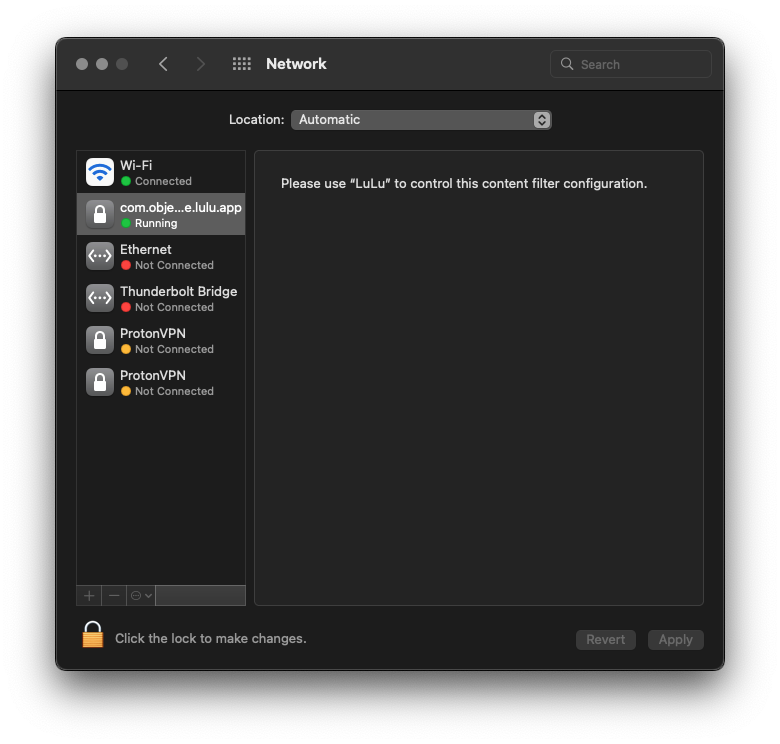
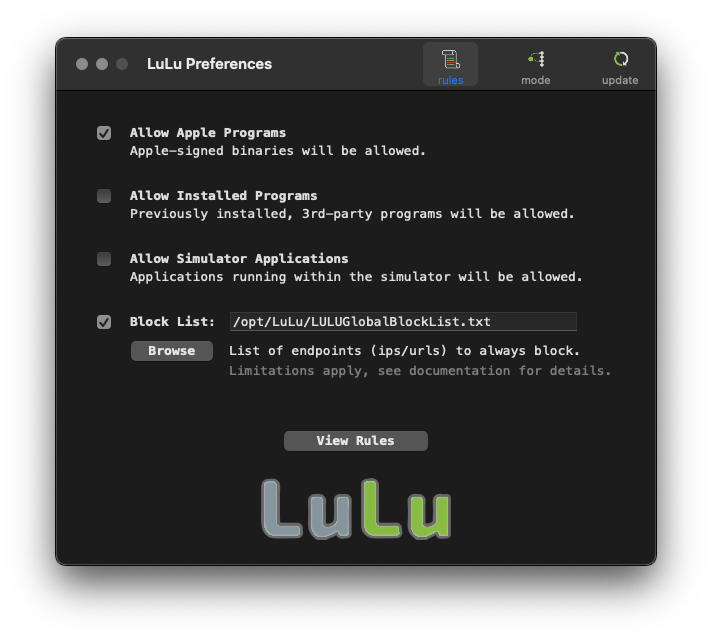
I do not like the Safari browser so my recommendation for more reasons than this is to switch to Firefox and install uBlock Origin. It instantly stopped every google pop-up.


https://www.maketecheasier.com/disable-sign-in-google-prompt-websites/


I also don't recommend using SSO with Apple or Google, and certainly not Facebook. Use 1password or alike. If for any reason you want to exit the Apple world, this key integration will make it very difficult to exit. How many companies have changed a policy and you have wanted to leave them behind?

Safari for Mac used to have an easier way to block pop-ups. The current way allows for detailed exceptions for websites that you want to allow them on.

Open Safari

Select "Settings" (under Safari menu)

Select "Websites" tab

Scroll down to "Pop-up Windows"

For sites you have visited, you can allow pop-ups, but you can (at the very bottom, in the gray section of the border)

Select "Block" for "When visiting other websites:"

I just tested it with several sites that have been popping up the Google login (ebay, redfin, dropbox) and it works.

It is a very frustrating and annoying situation. I did, however, find the solution - an app called Banish - available from the Apple App Store. Been using it for several weeks and, so far, it works flawlessly at blocking these Google pop-ups.

There is an App available on the Apple App Store - Banish. Works seamlessly to stop the super annoying Google sign-in request. Been using it now for several weeks and all is good. No annoying pop-up asking me to sign with Google which I do not use.

subarusvxlsl wrote:

Do we have a fix for this yet. It’s giving me rage issues.

It is a choice of the site management of each site, and Google pays them to include the Sign in with Google. The only fix is to boycott sites that do this, and tell them why you are doing so. Apple can’t do anything for both legal reasons and the fact that it isn’t just an Apple issue; it happens whether you visit the site with Windows, MacOS, Linux, Android device, Chromebook, or any other device with a browser.

I am on a MacBook Air and have dealt with this problem for months. Can't promise this will work for everyone but here is what resolved the issue for me.

I went into Safari - Preferences - Search -

My search engine is on DuckDuckGo -

I unclicked "Include Search Engine Suggestions" -

Below the Search Engine, look at "Search Field"

Where it says Enable Quick Website Search there is a box "Manage Websites"

Click on Manage Websites and see if Google is in there

If it is, remove Google


Hope this helps someone, it worked for me


PixelRogue1 wrote:

Apple can offer a function that users could enable to disable (Google's) relentless popups.
Safari (and other browsers) offer options to block popups - same principle.

The requests to sign in using Google on other websites are not coming from Google. They are coming from the website you're visiting (one example is redfin.com). Those websites have chosen to use Google's sign on services. It's how they want you to log into their website. Apple can't make them not do that. If you don't like it, don't visit sites that use that service.

Lawrence Finch wrote:


IdrisSeabright wrote:

It's not Google who's asking you to sign in. The individual websites have bought a service from Google that allows them to offload the sign up/sign in process.
And in the process allow google to track all of the sites you visit.

Absolutely. But, unless people simply refuse to participate and tell the websites why, it's unlikely the websites will stop using the feature. Yelling at Google is, of course, like yelling at the ocean.

PixelRogue1 wrote:

The fruition everyone is discussing is not about multiple companies having their own sign-in options. It is the fact that Google (yes, likely through a free powerful easy to install ALI) forced a disruptive panel when the page loads. That is what we all want to stop.

And neither you nor Apple can stop it. Only the site developer can opt out by not using the Google API. But it’s likely that Google pays them for implementing the API, so for the business that runs the site it’s a no-brainer.


Hello VivaMerida,


Thanks for your post to Apple Support Communities. We see you are asking about a pop up to sign in to websites with your Google account using Safari. We did find some steps from Google to manage your account settings that should stop this pop up. Check out their support guide here: Use your Google Account to sign in to other apps or services


All the best.


You are welcome! Although I had the pop-up again so I also changed the Settings / Safari / Search Engine from Google to Yahoo and I haven’t had another popup since. (The other setting definitely reduced the amount of pop ups but I haven’t had any since I changed this last setting.)

Leo Bloom wrote:

It's not just safari, I use firefox and don't have a google account, nor do I search with google. It's something that I suspect only the websites themselves can control. I doubt anyone in this forum would know, but I suspect PC Window users have it too.

You are spot on. It's a "service" that lots of websites offer. As it has lots of benefits to them (there is probably some information sharing with Alphabet, customers more likely to sign in because they don't have to set up a new account) that I suspect it's unlikely to change.


All I can recommend to people is that they complain to the particular website. But, I'm not really sure how much good that will do.

I forgot to mention the other change I made was going into the Safari-Websites-Downloads

"allow downloads on websites with setting below"

Click DENY on the Google tab

As I scrolled down, I found Google was in this list more than once, so I had to switch the tab from ASK to DENY on more than one Google tab.

Make sure you find them all!

Good luck!

I just found this on the Google site and followed the instructions. Hope it works.


How to stop obnoxious google sign in prompts?

  1. Go to "My Account" : "Security" ( https://myaccount.google.com/security )
  2. Click on "See all connections" link in "Your connections to third party apps & services"
  3. Click on the gear at the top of the "Third party apps & services" page.
  4. Disable the "Signing in with Google" prompt.


Hi VivaMerida,


Great job following those steps. Since Google's steps did not resolve the issue, the next step is to contact them for help. Google Help


In the meantime, try using Private Browsing Mode with Safari. This should hopefully stop those pop-ups. Check it out here: Browse privately in Safari on iPhone

Visit sites privately
You can use Private Browsing Mode to open private tabs, which don’t appear in History on iPhone or in the list of tabs on your other devices.
1. Tap the Tabs button.
2. Tap the Tab Groups button in the center of the tab bar at the bottom of the screen, then tap Private.

Tabs in the Private Tab Group aren’t shared with your other Apple devices, even if you’re signed in with the same Apple ID.
You can easily confirm that you’re in Private Browsing Mode by checking that the search field bar is gray or displays the word Private.
To hide the sites and exit Private Browsing Mode, tap the Tabs button, then tap the Tab Groups button to open a different Tab Group from the menu at the bottom of your screen. The private sites reappear the next time you use Private Browsing Mode.
To close private tabs, tap the Tabs button, then swipe left on each of the tabs you want to close.

Take care!

IdrisSeabright wrote:

Yelling at Google is, of course, like yelling at the ocean.


Arguably, Google doesn't have anything to do with it. All they do is provide the progra 00004000 mming API:


https://developers.google.com/identity/gsi/web/reference/html-reference


... just like Apple does:


Sign in with Apple | Apple Developer Documentation


... or FB for that matter.


The website developer can choose to implement those APIs, or not.


Strange, how no one seems to complain about "Sign in with Apple". So why do people complain so loudly about Google? Hmm....


(Yes that was a rhetorical question)


But, unless people simply refuse to participate and tell the websites why, it's unlikely the websites will stop using the feature.


👍

michael1040 wrote:

I followed these instructions a few months ago and just rechecked settings. They had no impact. I'm still stalked by Google sign-in pop-ins.

As long as websites choose to use Google's login services, you will see them. You have no control over that.

Apple, help!

Apple isn't here. And, even if they were, they have no control over third-party websites.

After changing the Search Engine and turning off Search Engine Suggestions I had also cleared the history and website data and the popup has stopped on my iPhone.

Hello,


As noted in my original post, I did follow the Google recommendations to stop this pop-up on Safari with no success. It just does not go way. I went even further and remove any Google log-in accounts, removed all Google passwords and cookies and thing will not go way.

Well I tried all that and still nothing. I am cursed for life it seems. I switched to Duck Duck Go to flee the google update your settings pop up and now this new google junk has taken its place. So freaking irritating.

I don’t even have a Google account or gmail and that nasty pop up comes up on all my Apple devices now. Tried all the suggestions above and more to no avail! Surely Safari could protect ag 00004000 ainst this Google intrusion?

Same issue I have had recently; Quite annoying! So, I went to Settings and changed the default search engine to DuckDuckGo 🦆


Never a Goggle fan and this experience has prompted me to move away from using their Search. Now Safari with DDGo as search engine and along with Msft Edge and Bing ChatGPT, there’s no need for relying on google.

MissNikita73 wrote:
What I don't understand is why Google thinks we want to sign in to every single website we go to.

It's not Google who's asking you to sign in. The individual websites have bought a service from Google that allows them to offload the sign up/sign in process.

From what I’ve read, you can use a Safari plugin extension, however those that work are apparently paid. There is LuLu firewall, but requires you to connect and always be tweaking an always changing list of IPs. We really need an Apple solution here.

As the Google sign-in prompt is generated by the website, there really isn’t anything that Apple can do about it. And, even if they could, as Google and Apple are competitors, Google or various governments could charge Apple with anti-trust violations for blocking access to a competitor.

While Google and Apple are competitors, they are also partners (ie. the amount Apple receives to keep Google as default search engine.)


Agree that website developers are in part responsible for this terrible distraction, there ARE steps Apple could do to counter the distraction, just like annoying advertisements - which are also placed on websites by developers yet Apple provides read mode, other developers offer services and features to minimize add distraction. Apple could EASILY set up a preference option for users to essentially hide or suppress Google authenticate panel.

PixelRogue1 wrote:

The fruition everyone is discussing is not about multiple companies having their own sign-in options. It is the fact that Google (yes, likely through a free powerful easy to install ALI) forced a disruptive panel when the page loads. That is what we all want to stop.

No, Google is NOT forcing it. The websites are asking (not forcing) you to log into their sites using Google's log in API. I'm not sure why that's so hard to understand.


I get it all the time with Redfin. I just close the pop up and move on with looking at houses I'm not going to buy.

hillie wrote:

Whilst Apple .. well nothing they do is annoying. It's just the things they DON'T do that are sometimes annoying ;)

Apple cannot prevent third-party websites from contracting with Google to use Google's sign in service any more than Google can prevent websites from using Apple's.

Apple needs to make a way to turn off Google pop-ups asking us to sign in on websites!!!

unfortunately, this explains how to stop using the sign in. This doesn’t explain how to stop the pop-up. it appears that the answer is, you can’t.

Dismiss the pop up. Continue using Safari.

Cause: Someone has mentioned this elsewhere in this thread, so I am just repeating something similar here: The Google login pop up is created by a script in the website you are visiting. It has nothing to do with Safari. Safari loads whatever the website script tells it to load, with few exceptions. I could give you an example, but I don't want to advertise. Each time I go to url www.blablabla.com, the Google login pop up appears. But the competitor to the previous url, www.blablablacompetitor.com does not team up with Google to offer this "feature." I am sure that this "feature" simple gathers data about your activity on the site and combines this with the already gathered data in your profile (if you chose to log in ), which goes through Google analytics, to generate additional revenue on your dime. One Solution: I have mentioned a desktop solution in this thread, but I do not believe I mentioned a phone solution yet. For iphone, I use an app called "Lockdown." The app is free, and you do not need to create an account or purchase any subscription with them to use the basic features (all you need to block the Google login pop up). Download the app (see image of app), install the app, and allow it to function as a VPN (see image). When you open the app, you do not need to use the "Tunnel" feature (see image), which is the paid feature. Use the "Firewall" (see same previous image) feature only (turn it on by clicking the button after creating your url "Block List"). Create a custom url "Block List" by clicking the eponymous tab under the "Firewall" button. When you reach the new screen, click the "Custom" tab. Click the plus sign to create a new Custom url Block List. When you reach this stage you need to type the urls (address connections) into this document / Block List that you want to block. You can use the urls I provide in the attached images. One of them is responsible for blocking the Google login pop up, but I do not remember which one. If you want to know which one, you need to add each url, one by one, and test each one by closing the Block List document, turning on the Firewall button, and try loading a website which offers the Google login "feature." You can turn the Firewall button off if you want to actually login to Google. If you turn it on, however, the app will not allow your phone to communicate with that url address.

thanks. I've been looking for a solution to this, as well as to pop-up video ads, and AdGuard appears to work!

It's not just safari, I use firefox and don't have a google account, nor do I search with google. It's something that I suspect only the websites themselves can control. I doubt anyone in this forum would know, but I suspect PC Window users have it too.

TuckerdogAVL wrote:

unfortunately, this explains how to stop using the sign in. This doesn’t explain how to stop the pop-up. it appears that the answer is, you can’t.

Complain to the websites that are serving the pop-up to you. They obviously want you to log in using Google.

This works if you are on Chrome and are using it to sign in and search the web. Doesn't do anything to stop the drop down/pop up/cover the cover of the screen incessant "Sign into Google without password" in Safari. Thanks for the tip, though. I think it is stopping it in Chrome (when I occasionally are required to use it for specific apps).

Right. We all have time to contact EVERY WEBSITE. This is what I'm trying to remove. It has NOTHING to do with the individual websites. It is every time. Every website. And I use DuckDuckGo for my search. I'm not even using Google.

I gave up. I have to click the "X" to get rid of the pop up everytime. I also have to get an authentication for FB everytime because "from time to time we ask you to verify" and since I upgraded to Ventura, I get this everytime. And no matter what I attempt to do, I have to put in passwords for a half dozen sites where, no matter how many times I have asked Safari to save or trust the browser, it doesn't. I did just find out how to stop Google Maps from automatically being the link from when I search for something (switch to DuckDuckGo and remove Google maps from your phone; now, Apple maps will link) which is a small victory.

TuckerdogAVL wrote:

I gave up. I have to click the "X" to get rid of the pop up everytime.

Yes, would will have to dismiss the pop-up on any site that uses Google sign-in. Complain to whatever company runs the website.

I also have to get an authentication for FB everytime because "from time to time we ask you to verify" and since I upgraded to Ventura, I get this everytime. And no matter what I attempt to do, I have to put in passwords for a half dozen sites where, no matter how many times I have asked Safari to save or trust the browser, it doesn't.

That is most likely a FB issue. All of their apps seem to have been somewhat broken lately. Not surprised to hear their website is, too. But, I'm not sure how it's related to this thread.

I did just find out how to stop Google Maps from automatically being the link from when I search for something (switch to DuckDuckGo and remove Google maps from your phone; now, Apple maps will link) which is a small victory.

I'm not sure how this is related to the subject of this thread, either.

I'm not sure how not sharing additional information that may help someone, when going throught the daily tech he!l we all go through, doesn't matter. So what if it's "off topic." Especially since it actually does relate: They are attempting to stop GOOGLE. And GOOGLE MAPS is one of the worst offenders.


It's every website re: the Google pop up. So, we'll played. Let's go down the thank you for contacting us, we'll see if we can help you, and there 's actually no way to get in touch with us rabbit hole.


No, it's a Safari issue, as every site, each time requires some authenication that doesn't "save." FB is just the one I daily attempt. But, good try.


I await the repremand and "not appropriate," and "be kind" and all the others because I disagree with the condescending answer.


I have taken these steps and disabled the "Sign in with Google" prompt, and disconnected all sites that sign in automatically (or accidentally), AND THEY CONTINUE TO SHOW UP. Other than not using any browser at all, there is no way to get this super annoying popup to go away. What I don't understand is why Google thinks we want to sign in to every single website we go to. What is scary is that these prompts are proof that they watch everything we do, every single keystroke, everyday, for our entire lives. Thanks, Google for the reminder. I can't tell if it is brilliant or the most vexing design flaw ever. I think it is time for a VPN.

Respectfully, has the responder read the thread in full, or tried the instructions posted? I mention because even people with NO google account are graced with Google login panel. Fresh new device that never had a sign in to Google service will hit in the face with the same panel.

A preference setting to the effect of “Disable Google login popup” may have legal risk.


A preference setting to the effect of “Minimize pop-up login panels” would be fine. Google isn’t the only one with this beloved feature. This would be off by default, enabled by the user.


In addition as it stands today users still can login to same website using Google credentials after the panel was closed. Such a feature would not be harmful to website employing the beloved feature, end user actively taking action to minimize and end user can still log in with out without they panel. Ensure plug in is also WVAG compliant and good to go.

The fruition everyone is discussing is not about multiple companies having their own sign-in options. It is the fact that Google (yes, likely through a free powerful easy to install ALI) forced a disruptive panel when the page loads. That is what we all want to stop.

PixelRogue1 wrote:

The fruition everyone is discussing is not about multiple companies having their own sign-in options. It is the fact that Google (yes, likely through a free powerful easy to install ALI) forced a disruptive panel when the page loads. That is what we all want to stop.


So? Go ahead and stop it. What's preventing you from doing that?

Actually, Apple could easily fix this; all they would need to do is have an ad blocker as a standard in Safari with custom filtering. They acquire all these other companies, why not an ad blocker company...

phebes83 wrote:

Actually, Apple could easily fix this; all they would need to do is have an ad blocker as a standard in Safari with custom filtering. They acquire all these other companies, why not an ad blocker company...

Except it's not an ad. It's the log in window for the website you're visiting.

For Safari: Out of all the repeating suggestions on the internet this actually worked!! For reference two websites I know have the annoying popup are Pinterest and Canvas, and bo 00004000 om it was gone. So yay!!

Sign in with Apple doesn't obnoxiously pop up a window in a world with already 500 popup windows, some created by regulations which are supposed to somehow... help us?


I would say take the GDPR back and give me back websites without stupid popups about "we use cookies! we use cookies!" ...


It seems like the more time goes by the more we have to deal with on the web that is "for our own good" but really is annoying.


I don't think your question is rhetorical for most. People claim to care about privacy and be all "I am in the know and I know how to stop people from spying on me" and then they have a Google Android phone. The answer is Google is evil, Apple is not. And in this case I won't go deep .. it's just as simple as Google seems to be obsessed with stealing as much data from people as they possibly can, and stalking them worst than the most notorious stalker.


Whilst Apple .. well nothing they do is annoying. It's just the things they DON'T do that are sometimes annoying ;)


[Edited by Moderator]

hillie wrote:

Sign in with Apple doesn't obnoxiously pop up a window in a world with already 500 popup windows, some created by regulations which are supposed to somehow... help us?


Correct. That's the reason you won't find a single complaint about Sign in with Apple. Perhaps Apple actually... thinks about these things?


Yes it was a rhetorical question. I realize subtlety often goes unappreciated.


I would say take the GDPR back and give me back websites without stupid popups about "we use cookies! we use cookies!" ...


Can't say I disagree. It's a lame regulation that solves nothing. All it does is get in the way. The law is a blunt instrument.


I don't think your question is rhetorical for most.


I don't endeavor to speak for most. My opinions are my own.

Very true. I left Android and use Duck Duck Go as much as possible. When I used Android things that I had talked about during the day would mysteriously wind up in my Google or YouTube feed without me looking them up. Ever since I switched to Apple that doesn’t happen anymore. Moral of story is Google tracks users relentlessly

Me safari rumored to offer options to modify and block content on web pages.


Hope there will be an option to block repeating offenders (hard look at Google authentication panel) across new websites, rather than limit page edits to already visited sites.

It was suggested to go from Safari to a Chrome-based browser. That is the acme of irony, switching to a Chrome based browser to avoid Google. Chrome is Google’s browser, that is designed from the bottom up to track everything you do, even when private browsing. From the frying pan into the fire.

I gave up a long, long time ago. I have to use Chrome for a couple software-web-based applications. And because many designers have never heard of Apple or Macs, they only design their bank sites or credit card sites to work with Chrome. Other than that, I try to avoid it.

Here's what I did in the last version of Chrome for Mac:


Settings ⟶ Privacy & Security ⟶ Site settings ⟶ Additional content settings ⟶ Third-party sign-in ⟶ "Block sign-in prompts from identity services"


Interesting, does that prevent you from going to Single-Signon sites like US government sites, that require login using ID.me? Or medical sites that use health-id.com?


And if you use Chrome that’s sort of like locking the front door and leaving the back door where Google spies on you continuously and sells your browsing habits open wide.

For those saying Apple can’t do anything about it, that perspective would be similar to saying Apple can’t do anything about ads online, but Apple provided tools to help

manage and minimize ads, increasing reader mode.


There are many legal, reasonable and ethical steps Apple could do to address.


Presuming Google offers code, analytics and even authentication tools for free in exchange for the popups.

I was able to stop the pop-ups by going to Settings / Safari / turn off the Search Engine Suggestions

I think that worked! Thanks so much, it was really annoying me, I canceled all my google stuff because of it.

Yeah it doesn’t work. Sign in Pop ups came back. I switched to duck duck go also

Nothing works.

None of these suggestions work. This pop-up is a major pain in the *** and will not go away. We need a fix from Apple in Safari to block this - it is pervasive on every web site.


I use a DuckDuckGo as my default and it doesn’t matter. I still get this annoying pop up.

I took AdGuard off because it seemed as intrusive as the sites capturing the data LOL (I do have ABP on here; I'll give it ago)

Not there, but good idea.

Please help me stop Google pop up page from stopping me from using Safari on my Mac Air.

Apple - please pitch in w/a feature for users to disable.

Mind sharing the specifics on what is blocked, and/or the "/opt/Lulul/LULUGlobalBlockList.txt" file?

PixelRogue1 wrote:

Apple - please pitch in w/a feature for users to disable.

Apple can't disable how other websites ask people to sign in.

Apple can offer a function that users could enable to disable (Google's) relentless popups.

Safari (and other browsers) offer options to block popups - same principle.

Gosh, thank you! It worked!


That did not do anything. "Signing in with Google prompt" was not turned on to begin with

Mind pasting the text of your file? I use Lulu but it hasn’t yet stopped google popup.

VPN doesn’t seem to help. Most annoying distraction since Rick Rolling.

How can I stop the Google sign in popups whenever I use Safari?

PixelRogue1 wrote:

Apple could EASILY set up a preference option for users to essentially hide or suppress Google authenticate panel.

And get sued immediately.

iOS autocorrect. Fruition = frustration.

John Galt wrote:

(Yes that was a rhetorical question)

Rhetorical questions seem to flummox a lot of people here.

Thank you for sharing, I hope this works.

Works just the same. It is a pop up, ad blockers don't care what's inside the pop up.

phebes83 wrote:

Works just the same. It is a pop up, ad blockers don't care what's inside the pop up.

So what's stopping you from getting an ad blocker?

This is working so far on the non private safari browser! I noted which sites the google frame popup was triggering on and tested after completing your steps. So far so good. Thank you very much!

Google signin -start with contacting eBay. Setting is off and going to there site today I get the google sign in prompt…

I get this same pop up. I’ve gotten it ever since I moved away from Google and stopped using Gmail. It always pops up when I add or delete someone in my contact list as well. Very annoying.

I followed these instructions a few months ago and just rechecked settings. They had no impact. I'm still stalked by Google sign-in pop-ins. Apple, help!

Do we have a fix for this yet. It’s giving me rage issues.

UPDATE: Disabling pop-ups seemed to work when I first tested it, but didn't stop the Sign-in with Google virus in later visits to the same pages.


Update: 00004000 one year later and BANISH still working flawlessly. Totally solved this problem.


HJS80

This worked for me on iOS 17.5.1 iPhone 14. Thanks👍🏻

Thank you!!!!