Unofficial archive. This is a read-only, community-run archive of the Apple Support Community. It is not affiliated with or endorsed by Apple Inc.

iPhone 14 pro max Poor camera performance

Purchase iPhone 14 pro max 512 GB three weeks back, noticed very dull & poor photo quality (attached images for reference) and video gets blurred while shoot... out of focus issue constant.


Very disappointed after paying huge money for the iPhone


What is the solution?


58 replies

Adjust the camera’s focus and exposure

Before you take a photo, the iPhone camera automatically sets the focus and exposure, and face detection balances the exposure across many faces. If you want to manually adjust the focus and exposure, do the following:

  1. Tap the screen to show the automatic focus area and exposure setting.
  2. Tap where you want to move the focus area.
  3. Next to the focus area, drag  up or down to adjust the exposure.
  4. To lock your manual focus and exposure settings for upcoming shots, touch and hold the focus area until you see AE/AF Lock; tap the screen to unlock settings.


If your Photos and Videos are stored in iCloud and you share it before downloading the original then it may appear blurry but it is not.


Your photos and videos are stored on your device in their original, high-resolution version. This means that they use a lot of space on your iPhone, iPad, and iPod touch. With iCloud Photos, you can make more space available on your device and have your entire collection, everywhere you go.

Get started with iCloud Photos:

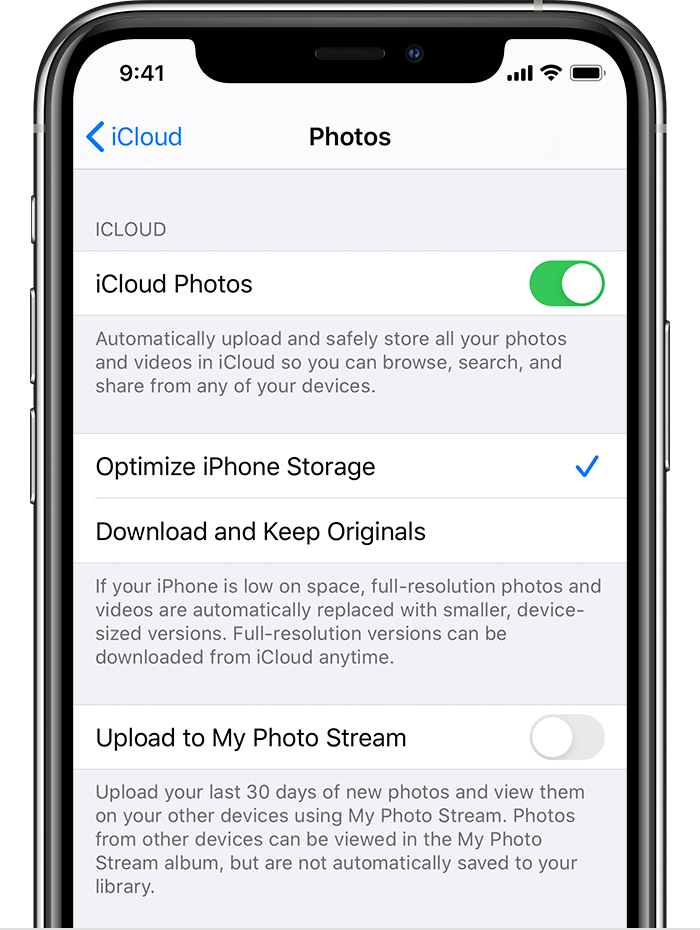
  1. Tap Settings > [your name] > iCloud > Photos.
  2. Turn on iCloud Photos.
  3. Select Optimize iPhone Storage to save space on your device.

With Optimize Storage, smaller, space-saving photos and videos are kept on your device while all of your original, full-resolution versions are stored in iCloud. And as long as you have enough space in iCloud, you can store as many photos and videos as you want.


Contact service center

  • They will do Setup changes - (Doesn't work, I did already)
  • Reformat
  • Change lense
  • or change replace return phone if you have option.


Actually it is lens & Hardware issue

Camera seems to be working fine after taking it to Apple Store and after they erased everything and reinstalled it

Learn iPhone camera basics - Apple Support



Learn about Photographic Styles, QuickTake, Action mode, the Ultra Wide camera, and other camera features on your iPhone.

Understand About the Camera features on your iPhone - Apple Support (IN)


By default, iPhone takes photos in HDR (for the rear camera and the front camera) when it’s most effective. iPhone 12 models, iPhone 13 models, and iPhone 14 models, record video in HDR to capture true-to-life colour and contrast.

Take appropriate action to Adjust HDR camera settings on iPhone - Apple Support (IN)


The camera modes built into your iPhone, iPad, and iPod touch help you take the ideal photo or video. Swipe left or right on the camera screen to switch to a different mode. You can choose from photo, video, time-lapse, slo-mo, square, Portrait, and pano modes.

For this, you may Use camera modes on your iPhone, iPad, and iPod touch


With the Camera on models that support Portrait mode, you can apply a depth-of-field effect that keeps your subject—people, pets, objects, and more—sharp while creating a beautifully blurred foreground and background. You can apply and adjust different lighting effects to your Portrait mode photos, and on iPhone X and later, you can even take a selfie in Portrait mode.

Learn how to --> Take Portrait mode photos with your iPhone camera


Learn about advanced Camera features that let you capture photos faster, apply tailored and enhanced looks to your photos, and view content outside the camera frame.

Try to Change advanced camera settings on iPhone - Apple Support


Use the Camera to record videos and QuickTake videos on your iPhone. Learn how to change modes to take Cinematic, slow-motion, and time-lapse videos.

Here you can see an Apple Article with all video recording options --> Record videos with your iPhone camera - Apple Support


Taking tips from here may also help you. --> Tutorials | iPhone Photography School


Bassman4Jesus wrote:

I’m having the same blurry video issue but am wondering if it has anything to do with the screen protector I have over the three lenses.

Almost certainly the cause.


you will have to contact service center

Either replace lens or mobile phone

Same issue with video and taking photos. Too many blurry sections on the video and too many blurry photos. Never had this issue with the 11 pro max I previously used. It is definitely a hardware problem. I can touch the screen telling the camera to focus in that area and the whole photo is blurry. Or I can be filming video and it will go blurry then come back to focus. It is frustrating.

I’m having the same problems with my iPhone 14 Pro Max. When I take a photo the camera quickly switches to ultra wide and nothing is in focus. If I tap on an area to focus, it switches to ultra wide. I know this from viewing the info for each shot. If I take a photo really quick before this happens, it is in focus. But this is a ridiculous way to have to shoot. I like to have a bit to compose my shot, not to have less than a second to shoot. This happens with all scenes and distances. There is no choice. Am I missing something here? It seems the camera is not working as it should at all. I should not have to use Ultra Wide for every shot. I should also note that this is happening while using other camera apps also - Camera+ and Ps Camera. I have not resubscribed to Halide yet. This same

issue with the camera refusing to focus happened with my 12 Pro Max and I had to u 00004000 se other camera apps for many months before an IOS update corrected it. Not doing this again. Apple wouldn’t help then and won’t now. No more Apple phones for me.

We are on vacation in Europe and 14 Pro Max has ruined it. Videos become blurry and out of focus then after a few seconds it corrects itself.

I have taken it to Apple Store in Spain, Istanbul, Vienna and they all say it is a software problem. 😤😤😤😡😡😡

this is also very strange. When I take a portrait selfie it looks good on the screen or if I do a screen shot of the photo. But the actual

photo is poor quality. So strange. iPhone 13 Pro was also better than 14. Don’t know what to do.

Similar problems with iPhone 14 Pro 256GB. The camera is poor, images are grainy when taken inside the house during the day and "optical"zoom is like low quality digital zoom in the same circumstances.


When I was taking similar photos under similar light with iPhone XR the result was a much sharper picture without grains and pixelated areas.


Hardware or software problem, I don't know but it's a shame for this price to get this poor results.


Has to be solved asap

Hello,


iPhone 14 pro max is flop model.... you are right after paying huge money result is 0.


I am photographer, more I use iPhone for social media shoot, I know picture quality very well but this is huge disappointing for me purchasing iPhone 14 pro max 512GB.


My phone is Apple service center to rectify problem & they have admitted, there is issue in 14 max pro camera.

My cinematic videos are awesome and as were expected but when I switch to normal video capturing the colours are poor many of the times and the brightness low. I was taking a video with my 14 pro 256 and my wife's non-pro 14 model and the difference was massive.... Definitely an issue with the pro cameras. Either software or hardware...


Considering that the cinematic videos have great colours and brightness I believe it might be a software issue.. I doubt if it will be investigated though as there has be no announcement by Apple or a response here.


Same thing with my pro max, some says it’s a software problem as there’s a new feature in which it sharpens the photo automatically. You can’t even turn it off. Hope an update can fix this, if it is really a software issue.

No Solution Yet. It definitely seems like a software issue where the device gets "Confused" and can't focus right. I don't have any covers on the camera so it's something else. I hope it gets better addressed in a software update. It would be good for it to be more reliable than try to be fancy. Also, I noticed that some apps can't switch to the zoom in camera when you hold something close the phone. Seems like that app only has access to the one main camera.

It is annoying... and I am not getting any feedback from Apple technical team to solve this issue thats more frustrating because I paid huge money for the iPhone.

portrait photos I took with iPhone SX are 100 percent better than iPhone 14 pro. This is so frustrating

Absolutely worst performance....

Exactly the same poor quality results in photos taken inside the house.


[Edited by Moderator]

Tanks for update...


good decision to return.... not worth spending huge amount fir poor product


Big failure iPhone 14

Everyone affected by this video problem with iphone 14promax should demand Apple for a fix or exchange to another phone. We paid too much

Hi, 


Thanks for the response, but your reply did not didn't help. Please review videos in below link. Recordings are going blur midway of recordings.

Review and advise how to rectify these


Let me know the solution.


Regards,

Faruk


[Link Edited by Moderator]


Hi, 


Thanks for the response, but your reply did not didn't help. Please review videos in below link. Recordings are going blur midway of recordings.

Review and advise how to rectify these


Let me know the solution.


Regards,

Faruk

Resend message, still waiting for your reply.


Hi, 


Thanks for the response, but your reply did not didn't help. Please review videos in below link. Recordings are going blur midway of recordings.

Review and advise how to rectify these


Let me know the solution.


Regards,

My iPhone was 3 days in service center...

They told me it is setting issue, they did setting for video, attached details for your reference.... still I am testing... so far working.


Picture issue still same, dull images no proper colors, I have to edit each picture which is ridiculous.

Same issue. I want my iPhone 11 Pro back. Better quality on videos. Upgraded and spent money on crappy performance. If apple doesn’t fix this I may just go back to a Samsung phone. My business relies on video clips. iPhone 14 pro max video quality sucks. I have to retake footage multiple times to get a decent video.

So I am also having camera issues. Mine comes with artificial lighting. In sunlight, my video & photo quality is fantastic, mostly. But in artificial light, I get (and this is the only way I know how to describe it) lines or shadows running vertically across my screen from left to right. It looks terrible. I am a content creator and use my phone to take videos and photos, so this is extremely inconvenient… especially since I have a day job and often don’t have a chance to film in natural lighting.

I have the promax and I don’t think the cameras very good at night at all like trying to take the moon I had better luck with my 11 believe it or not with night vision…

I see much better camera photos from ones like the Google pixel and especially the Samsung 23 takes excellent moonshot.. I stuck with the Apple camera and it’s not worth a **** at night shut the daytime stuff comes out they spent most cameras can take daytime pictures without screwing them up.. kind of disappointed in the telephoto lens didn’t do such a hot job🤷‍♂️

I am glad on one level to hear I am not the only one with bad camera performance. Compared to my old phone it seems to take 3-5 seconds to “wake up” and be ready to take pictures. Also have problem with selecting focus areas and very blurry images. Missed a lot of photos I would have easily got with my 11 max. Very disappointed with the camera still after 5 months.

I have the same problem:

  1. when I start filming it gets blurry at some point
  2. I take a simple photo, gets blurry
  3. I try 00004000 to scan qrs through the apps, get blurry so I can’t!
  4. Portrait photos are worst than ever


This is so frustrating since I payed U$D 1350 for this and Apple isn’t giving a solution as it’s definitely a hardware problem.

Given how much software is now a part of the camera hardware, I'd hope there is an easier fix available. I think trying to be too fancy with "features" on a camera is not what most people want. High resolution, good quality and above all reliability is what I want in a camera on my phone.


The sad part is that my iPhone XSMax (that I traded up from) was by far a much more reliable camera. I know "reliability" updates are not what sells a camera but they make existing customers very, very happy.

I’m having the same blurry video issue but am wondering if it has anything to do with the screen protector I have over the three lenses. I haven’t tried taking it off because it takes some effort to get it off and put it back on.

This is so frustrating. Only had the phone 1 month and on vacation in Alaska and my videos are crap. I am past the 30 day return policy and really wish they would get this fixed asap on a $1300 phone!!

Disappointed. iPhone 11 had better resolution as well as far superior low light quality and indoor white balance. Most images look ok on the phone but if you zoom in or view on a bigger screen, the quality leaves a lot to be desired. I agree with the many people on this forum, this camera is a disappointment. I assume if it could be fixed with a firmware update, it would be done by now so it’s probably just crappy sensors.

Same thing in my situation also my fathers iPhone 11 is Best in camera quality but my 14pro is worst in quality of photos I have been waiting since January 2023 will it fixed or not with the updates we are receiving but badluck nothing is happening ..I am feeling regret for buying 14Pro rather than going for S23 ultra


the only last hope is iOS 17 update after that also if it not fixed and we are Scammed by Apple for getting low quality mobile

Arghhh! Biggest regret buying the Apple 14 Pro. I specifically bought it for the advertising for the camera, but it was false advertising. I am experiencing what the other people and saying here and maybe we can start a class action for false advertising.


I have a new job as a content creator so invested in this phone for the camera. The videos go blurry, then correct themselves, then go blurry. The quality of video and photos is extremely low.


In low light the photos look like they were taken for a Nokia from the 90s. My husband bought a regular IPhone 14 and I now have to use his phone to take photos as mine might as well be used as a paper weight.


Not happy at all Apple and I can feel everyone’s frustrations at your inaction. Very poor form! I have lost all faith in Apple and will be going to a Google phone next.


Pick up your act and fix this issue. You are costing people money and memories.

It’s horrendous and is going to be the straw that broke the camel’s back for me and Apple phones. Never again. The camera is possibly the most important thing to me on the phone and the image quality is unpredictable and mostly garbage. Significantly worse than the 10 that this was to be an upgrade from. So, so disappointed and angry. I’m also baffled that no reviews flagged this, while it’s not exactly subtle.

Im having this same issue with my iPhone 14 pro max that I upgraded from the 13 pro max, which took way better pictures. Frustrating is an understatement since I upgraded with hopes of taking even better quality photos. I have tried all the settings and manual options and cannot get the quality pictures I used to get with my 13 pro max. What a disappointment.

very poor quality...

Yes, same problem here. What did you do about it? Do you have any suggestions?

I’m having the same problem! I bought my camera today and I’m returning it tomorrow!

I don’t understand how this issue was never fixed, you’re not alone. Definitely a hardware issue. This may likely be my last iPhone. Just not worth it anymore.

Absolutely....


This is unfortunate for us.... At list in your country you have privilege to return product.... but fo me no.... its like trap...

387

Same here. My 12 ProMax was much better. This 14 ProMax has been a nightmare from

the terrible camera performance to a glitchy Lock Screen. Apple definitely isn’t the same.


[Edited by Moderator]

My Iphone 14 pro max 256GB have the same when shooting a video it gose blurry which is really really annoying

out of almost 10 videos one end with good clarity but the rest are blurry 🤦🏻‍♂️

Mine as well Iphone 14 pro max with blurry videos


we really need a response from Apple !!!!

iphone 14 pro max is a big flop. Paid so much to upgrade and get poor performance.

Me too facing the same issue with my 14 pro 256gb can you tell me any solution did you got out of this

Did you manage to get a resolution to this please? I’m still struggling to get any help at all from Apple, they are fantastic at dodging the question!

This is a user to user forum, Apple is not here.

No bro I am also still hopeless…A senior advisor who is following up my issues marking me to wait for iOS 17 update on my device and then after if also not fixed he said we will discuss further

What they have reinstalled??? can you explain briefly

Did they just do a factory reset?

Apple should address this problem with the I14 promax. I take live videos but it always go blurry. I need a better iphone

Same issue.

camera performance in 14pro max is embarrassing

you have to contact service center

it is lens issue not hardware

either replace lens or mobile phone


iPhon 14 is flop model, unfortunately we are trapped

howto solve this problem?