Unofficial archive. This is a read-only, community-run archive of the Apple Support Community. It is not affiliated with or endorsed by Apple Inc.

IPhone 14 screen not responding in top left corner in most apps

In some apps I open, the top left screen on my iPhone 14 pro max is not responsive. If there’s a back button or any kind of situation where I need to interact with that corner, it’s difficult to find the right place to touch the screen. Anyone else having that issue?

43 replies

weeelllll I think I just discovered a consistent workaround! It’s absurd, but I’ve gotten the top corners to be responsive ONLY after I have swiped down in either corner (to activate the notifications or command center) and immediately swipe back up to clear it away. You do NOT have to fully expand either screen. But once I do this, I am able to click simply on the corresponding corner and it responds.


Hope this helps anyone who sees this cuz this has plagued me since the release of the 14 Pro and there are NO answers online as far as I can find. ✌🏻

Hello Kenyota,


Thank you for reaching out in Apple Support Communities. To help troubleshoot this behavior, let's make sure that your iPhone is updated to the latest version of iOS 16.0.2 and that your apps are updated. This helps to provide software improvements for the operating system of your iPhone and enhance improvements for your apps. Here's how to perform each step:


Update your iPhone or iPad wirelessly

1. Back up your device using iCloud or your computer.

2. Plug your device into power and connect to the internet with Wi-Fi.

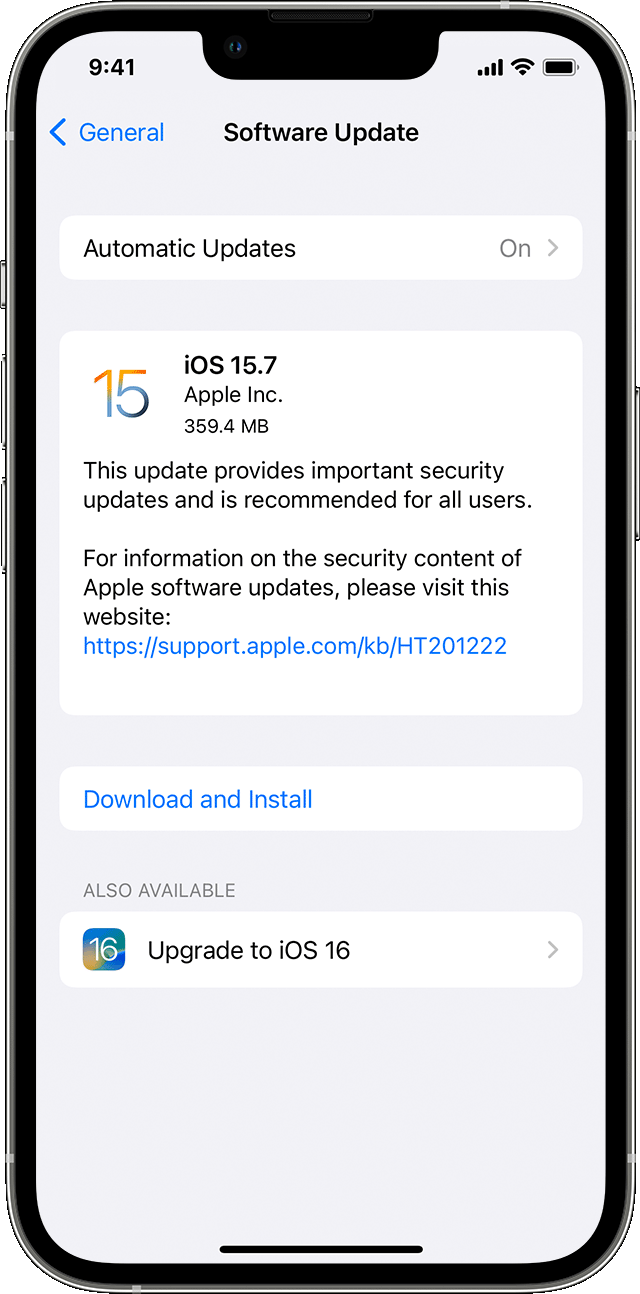
3. Go to Settings > General, then tap Software Update.

4. Choose the software update that you want to install. You can choose to stay on iOS or iPadOS 15 and still get important security updates. Or you can choose the option to upgrade to iOS or iPadOS 16.

The Settings app on iPhone showing options to update to iOS 15.7 or iOS 16.

5. Tap Install Now. If you see Download and Install instead, tap it to download the update, enter your passcode, then tap Install Now. If you don't know your passcode, learn what to do.

These steps are outlined here: Update your iPhone or iPad - Apple Support


How to manually update apps on your iPhone or iPad

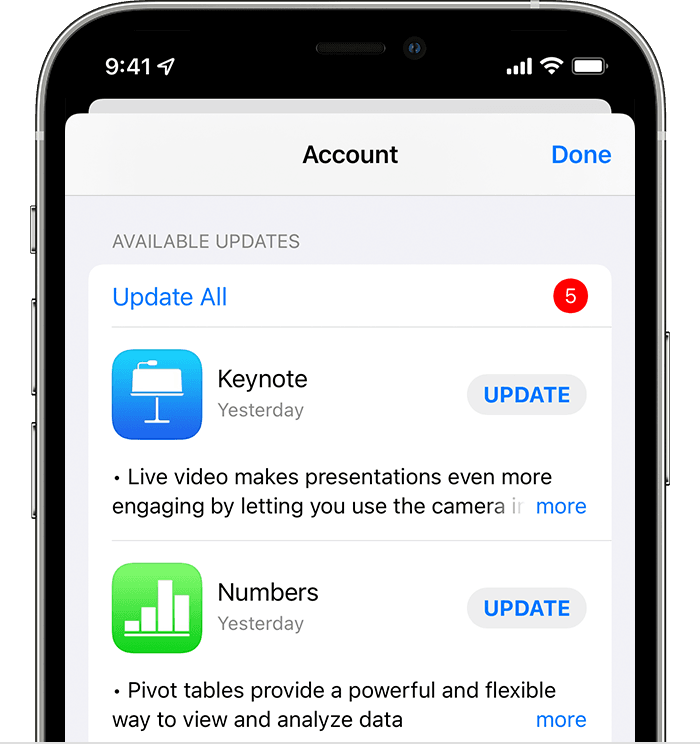
1. Open the App Store.

2. Tap your profile icon at the top of the screen.

3. Scroll to see pending updates and release notes. Tap Update next to an app to update only that app, or tap Update All.

iPhone showing a list of available updates for 5 different apps.

Learn what to do if you can't update an app on your iPhone or iPad.

Here's an article with these helpful steps: How to manually update apps on your Apple device - Apple Support


Updating the operating system on your iPhone to the latest version, along with updating your apps is relevant to the issue you're experiencing and may help.


Please keep us posted with the results.


Kind regards.

iPhone 14 max pro, Cleaning screen fixed mines. was doing the same after ohine case removed

FIX! I just updated to 16.4.1 and, while I have not run extensive testing, the problem seems to have disappeared on my 14 Pro.

I have spent one week to find a workaround fpr this fix for my dad,


swipe up from bottom or up diagonally to the right from bottom left corner, the iphone shows you opened apps and pages, now you can see a cross in the upper left of the reduced page from this view AND you can gently and precisely press the little black cross in the upper left reduced window, it works! Et voilà


[Edited by Moderator]

If someone finds the fix please update me. My husband and I both have iPhone 14 pro max difference in color he doesn’t have a screen protector and took the case off with no change. We did a soft restart. Our phones are updated. He has the higher gb of 500+ I have the 120+ we just wanted to point out that it’s all of the 14 pro max iPhones

While posting things on Facebook marketplace next button icon on top right side of iPhone 14 pro max not working . Every time.

then have to make all app in sandwich form as app screen size reduces then sometimes I can click next and it works. But it’s so irritating

I have a iPhone 14 Pro and it does the same thing very annoying!


It has 16.4.1 (I always keep my equipment updated)

It is not the case I took it off


Screensaver maybe - I do have a glass screen saver on it

I have an iPhone 12 w iOS 17.0. Since iOS 16, I have been having 00004000 difficulties w the top left corner of mynpjone. It particularly happens when I am in the middle of a phone call, have to switch to an app, then to go back to speaking on the phone I should be able to press the phone icon on top left corner. Nothing happens when I do. And the only option for me to go back to the call is they hang up thinking I'm no longer there and I call them back. It's burdensome.

I`m having the same issue. IOS 16.1, any back, X, or ... that is locked in the top right or left between the dynamic island never responds.

These updates did not fix the issue. I (BS) upgraded my phone at the end of October to the IPhone 14 Pro. The top left is still not working...... What actually fixes this issue???? I made sure my software updates and the apps were updated but still not change.....

I have the same issue. The phone doesn’t respond to back or cross icon on some apps at top left corner.

It also happened while trying to dial a phone call, tried to navigate to different tabs like contacts at the bottom, and the touch screen was unresponsive/too slow. I hope this is just a SW bug, have latest iOS (12/22).

I just got the iPhone 14 pro in Dec and I am having this issue. I’ve noticed it when using FB and trying to close a page or use the back button. Family members with iPhone 14 do not seem to be having this issue.

So frustrating. I have 2 apps that cause this problem. The upper screen corners become unresponsive and it’s hard to navigate the menus or send messages in one of my medical portal apps. Any fixes would be appreciated! TY David


I’m disappointed no one has found a solution, but I’m glad it wasn’t just me. Ive been washing my hands and going through microfiber cloths just cleaning the screen like crazy. Bc my lady’s iPhone ( same pro max, but bought months after I had mine so it’s a different model number,) has no issues with the screen. Her screen actually seems more responsive over the entire surface. I’m gonna go fight the good fight and hopefully get the model number she has, or newer,

May the force be with you.

I have this same problem on an iPhone 13 Pro Max but for me it seems to be in both right and left top corners. Sometimes I have to repeatedly push multiple, multiple times over a few minutes. Very frustrating.

My iPhone has the latest update and is still sporadically responding to touch in upper left corner.

I’m already updated to 16, I do have another update available now, 16.1. Will this fix that?

Upgrading to 16.1 doesn’t fix the issue.


ive also tired updating every app and still doesn’t work.

Yes I have the same issues this is so frustrating. Please let me know if you find the fix as well, thank you

I know same here no improvement :(

I am having the same issue. Has anyone found a fix for this?

Did you find a solution bc I just got my new phone and I’m having the same issue

No, I am still having the same issue.

Same and I have an Apple service appointment tomorrow hopefully they can fix it

Please let us know how you go and if there is a solution, I’m sure we are all eager to fix this.

This is extremely frustrating

Would you post an update ksdnj ? I’m curious about what they’ll say.

Thanks, Apple. But this isn’t a working solution. I’m up to date and stills having this issue.

Mine does that too. I do have an apple screen protector but it doesn’t look damaged or compromised in that corner

I am also facing same issue , top right button not working for some apps

I have exactly the same issue with my 14 Pro…so frustrating

I have been facing the same issue

If you see here the left corner back button is not responding @apple #14pro sucks

Wow! That works!

You made a great find!


Thanks so much for sharing.


That alone is the most annoying thing about my iPhone 14Pro.


I tried to tap helpful but it is grayed out

iPhone 13 Pro Max sekin teginish

IPhone yon tugmachalarini bosish qiyin, shuningdek, ba'zida ilovani yopish yoki ochish uchun ekranga tegsangiz, u javob bermaydi.

I have same issue.

I bought iPhone 14 I,it's top icon is not tapped or not working.

iPhone 14 is rubbish

What can be done?

Same issue, Pro15max

didnt happen on my X. Is it me 00004000 , or are most of the people with this issue using Pros of various years?

Insanely frustrating.