When I type the first letters of the album name quickly, Photos will jump to the first album with the matching name. But I am using the most recent system version. I do not remember which upgrade introduced this. Which system version is running on the Mac of your client?
With a long list of albums it helps a lot to groups the albums with enclosing folders and subfolders. Then we just need a few clicks to drill down through the folders and to get to the album we want. For example - I have grouped my travel pictures by enclosing folders for the decade, then for the year and need just three clicks to reach any album, when I know the year.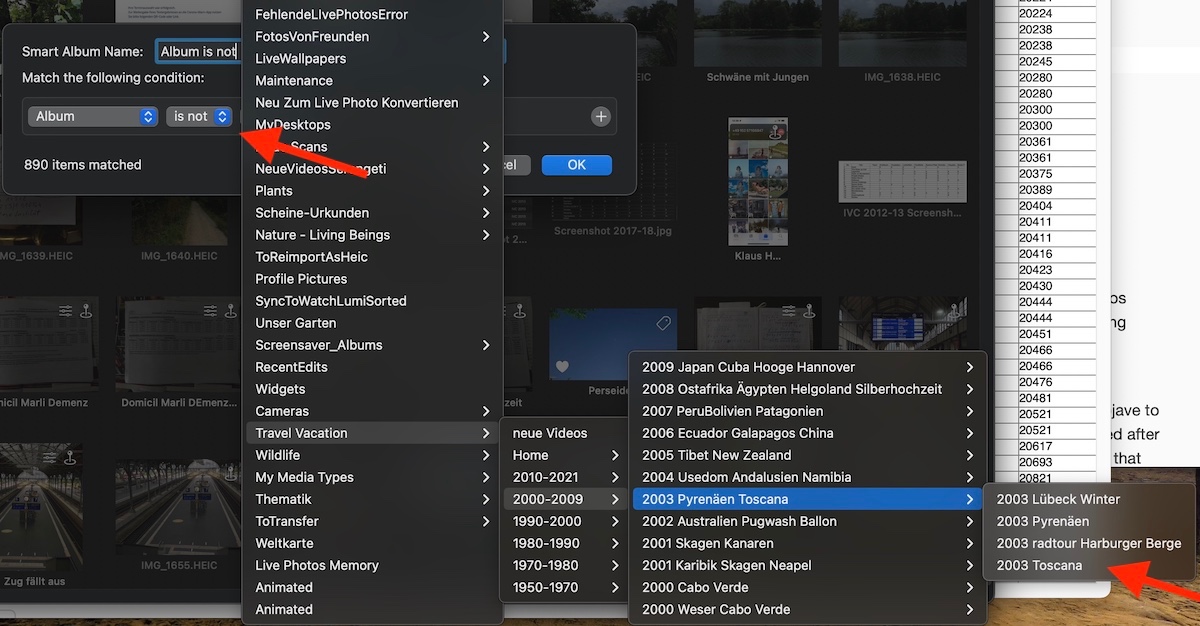
I have the same pictures in albums according to the state, and drill down the folders Continent > Country > State to find the albums with pictures taken in that state:

As the albums are already organised on your client's Mac, it might be easy to find a suitable set of nested folders to make them easier to find in dialogs.