60 replies
Apr 4, 2020 2:01 PM in response to area3d
Model - MacBook Pro 16, Intel Core i7-9750H
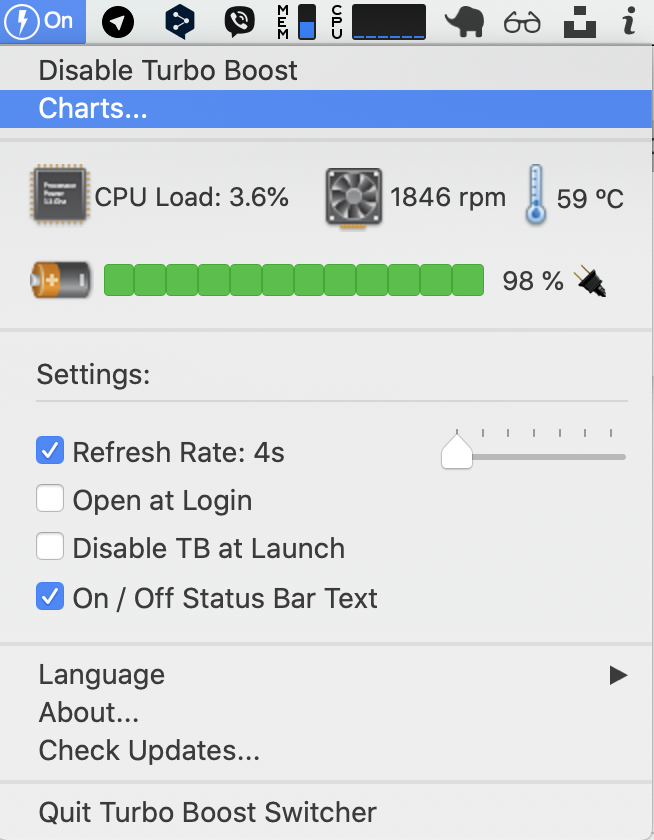
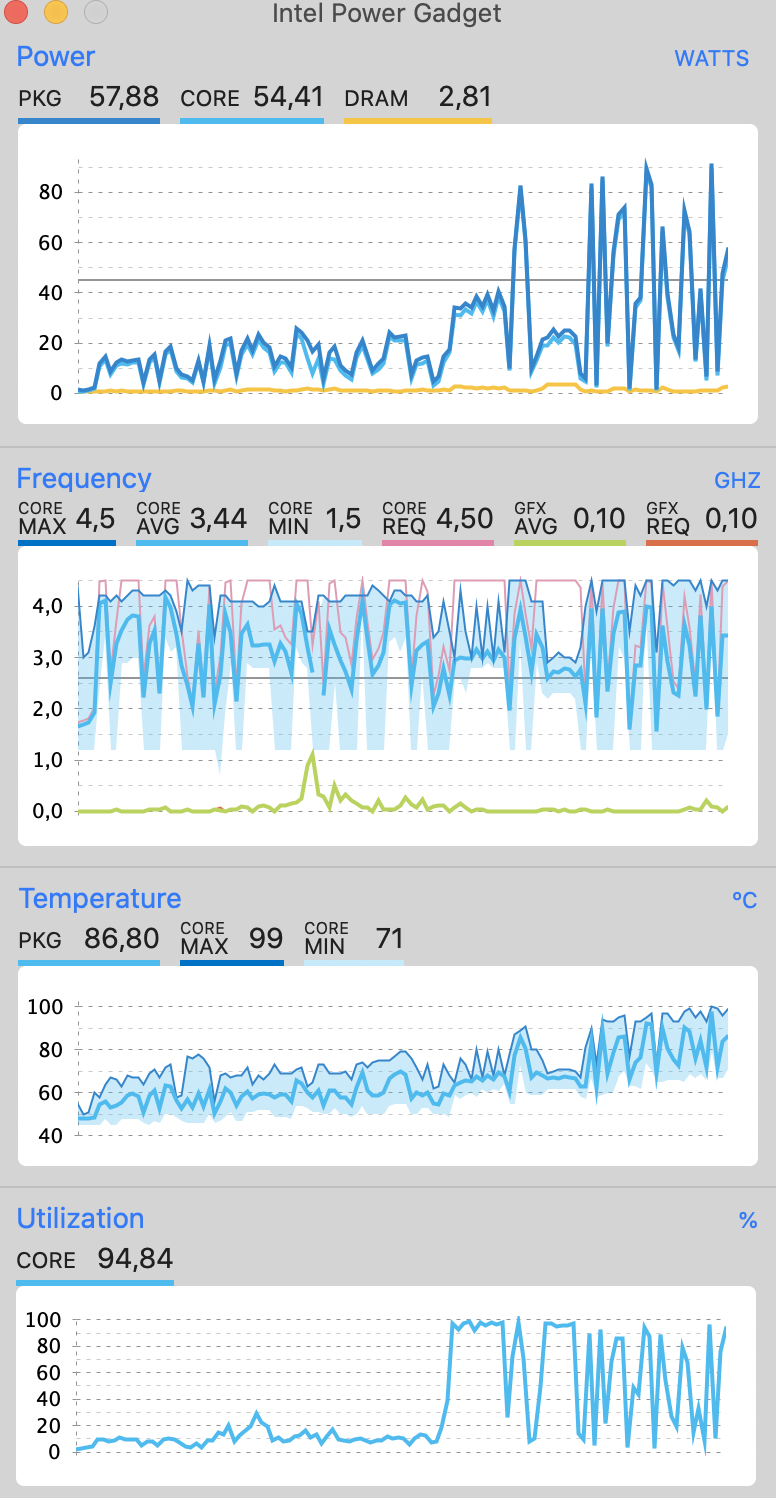
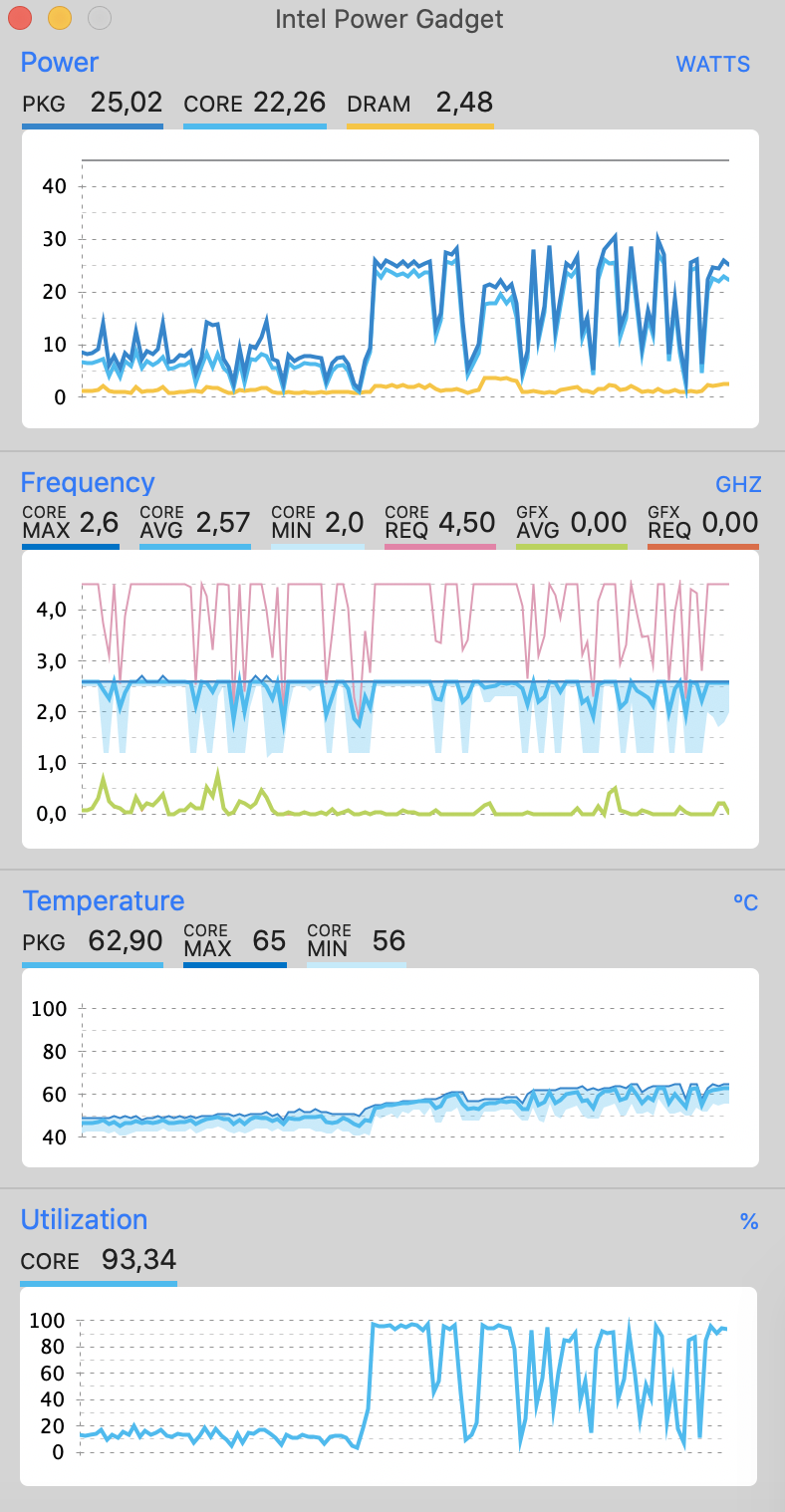
The coil whine appears when there is a sharp high power supply to the processor.When the turboboost is turned on, the power is jumped to 80 watts and the squeaking is heard. If you turn off the turbo boost and run the test, the power will not rise above 40 watts and the coil whine will not be heard. For the load testing was used Geekbench. For power measurement, the Intel Power Gadget was used. Turbo Boost Switcher was used fo turn on/turn off turbo boost.Below images with measurement.
With turboboost on
With coil whine - turbo boost on
Without coil whine - turbo boost is off
Jan 4, 2020 5:05 PM in response to Grant Bennet-Alder
Hello. Are you working for Apple? I heard the sound of my MacBookPro (16 inches), which is indeed similar to this YouTube video. However, I don't think this is from the SSD. why? Because I don't involve reading and writing disks when I perform some application software operations, I have 32G memory and will follow your operation to generate this noise. I tried to use Intel Power Gadget software to monitor the frequency and power consumption of the CPU. I found that the timing of this noise basically coincided with the changes in CPU frequency and power consumption. I also found that the location of the sound should be near the CPU. In other forums, some people said that he disabled the CPU core frequency by using a software (Turbo Boost Switcher), and then this current noise disappeared. So, it seems that all this proves that this current noise comes from the CPU Turbo.It's the coil whine issue.
Jan 5, 2020 5:25 PM in response to Grant Bennet-Alder
You should do a test. Under macOS, some operations do not involve too many reads and writes to the SSD, and there will still be current noise at this time. For example, in Photoshop, most of the image zoom operations, this noise will be synchronized with the operation and appear at the same time. Because the memory is large enough and the picture is very small, the system does not need to use SSD as virtual memory (dynamic swap file), and no other programs are running in the background, so this picture scaling operation hardly involves reading and writing to the SSD hard disk. Why is the noise very synchronous with Photoshop zoom operation? I think there is only one reason, and that is that when scaling, the frequency and power consumption of the CPU, including the GPU, have changed. Therefore, current noise is generated. Of course, not only the operations under Photoshop can generate current noise, but any software with high load on other software will also generate similar current noise. I suggest that you perform some operation tests that can change the CPU frequency and power consumption in an instant, and try not to involve the operation of reading and writing the SSD. At this time, you will be pleasantly surprised.
Jan 3, 2020 10:41 AM in response to area3d
If the noise you hear is similar to the noise in that YouTube video, it comes from very fast writing of data in the SSD drive. It is NOT a defect, just a surprise, because, you know, no moving parts was supposed to be like ... silent. But it's not.
If you change operating parameters so that the speed of writes gets even a little slower, like turning off Turbo, you alter the timing and that will alter the sound generated.
The sound is not caused by any of the other items you mention. The battery and the power adapter are under 20 Volts DC, and there is far less of the power supply stuff you imagine that is actually doing anything interesting that would produce such noise.
May 4, 2020 8:42 AM in response to shpakdm
If you hate the coil whine caused by the increased speed of one processor, turn off Turbo Boost.
Apple is extremely unlikely to come snatch that computer off your desk and upgrade the coils.
Apr 5, 2020 12:16 PM in response to shpakdm
Also you can reproduce coil whine(it's not very loud in exactly such case, but you can still hear it) by starting type letter by letter in spotlight - and you can hear sharp noise when letter was typed
Mar 21, 2020 9:40 AM in response to area3d
Same problem, last year I did a few replacement just for this "whining".
And if you disable the cpu turboboost, the noise disappears.
Jan 4, 2020 6:11 PM in response to Grant Bennet-Alder
I got the same thing on my new 16". But I can trigger this like crazy in Photoshop as I zoom in on the picture I am working with and moving it around. This electricial kind of buzzing sound (almost like a writing HDD) actually changes frequency the more I zoom in and out. No it’s not fan noise I’m not that stupid. On the Intel power gadget it also shows that the CPU reaches it’s highest peak (4,6Ghz) when I zoom and the sound triggers. It’s not the biggest issue but in the silent night of Photoshop editing it can be heard. Feel like the 16" has a lot of "satisfied" customers already.
Apr 7, 2020 3:56 PM in response to shpakdm
The coil appears when the frequency jumps sharply from small(1000Mhz) to very large(3600 or 4000 Mhz) and the greater the difference, the more you can hear the coil whine. Why this happens - apple puts poor quality inductors that produce vibrations
May 2, 2020 6:22 AM in response to shpakdm
I've got MBP 16 i9/32Gb/1Tb/8Gb and the same problem with it. During my own "investigation" came to the same conclusion - the source of squeaking sound is the Turbo Boost, not the SSD. And if it was just scratching, this could be tolerable, but in some apps it's like ultrasonic dog whistle , and brings really uncomfortable feeling. Hope that Apple solves this with firmware update like you proposed!
May 4, 2020 3:30 PM in response to shpakdm
The Lenovo Thinkpad X1 Extreme 2 is the same pricing as the 16" MBP and it exhibits coil whine. The Dell XPS 15" also exhibits the same thing. Demanding a replacement will reward you with the same machine and same coil whine. People here are expecting Apple to have some magic potion to get rid of the coil whine when Apple is using much of the same sourced components as every other computer manufacturer.
May 4, 2020 4:34 PM in response to DPJ
My point is not about blaming Apple for coil whine in general, my point is that MBP 16 model design is poor compared to previous macbooks, because they had whine to, but it was much quieter. This time it's much louder and really annoying. May be the larger gaps in new scissors keyboard are just letting more sound out? Why 2017 MPB 15 doesn't sound like a floppy drive, but this one does? They aren't supposed to have many differences: the same design with touchbar, the same Intel 14nm architecture.
May 8, 2020 6:27 AM in response to shpakdm
Turn off Turbo boost or send it back.
Apple does not think it is defective, they probably used an Intel reference design.
Jan 1, 2020 6:29 PM in response to area3d
Is this your sound? it comes from the very high speed SSD drive, which despite NO moving parts, is not so Silent as we all thought once you get a good fast one.
https://www.youtube.com/watch?v=KS-BHI667po
.
Mar 7, 2020 1:43 PM in response to centas
When you post here, you are "preaching to the Choir" -- Rreaders are all other users like you, and Apple movers and Shakers do not troll the forums looking for problems.
If you want to get this resolved, call the AppleCare toll free number or Contact support using the "contact support" link at the top of every forum page, then follow through and do not let them call your case "Solved" if it is NOT solved. Insist they file a Bug report or escalate your issue to the next level support.
May 2, 2020 7:37 AM in response to arseniy_nikitochkin
This is hardware issue and this issue cannot be fixed with firmware update - so there is two ways try to live with this or get money back. Two times made a request to apple about motherborad replacement - apple said that noise it is typical for electrical devices - so apple refuses to fix this problem
May 4, 2020 7:59 AM in response to shpakdm
Turbo Boost boosts the clock rate on small number of processors when the rest are idle and the processor chip is comparatively cool. When many processors are in use, such as doing high-end work, Turbo Boost is not available.
If the noise bothers you, there are third-party utilities to turn off Turbo boost. The decrease in real-world performance is very small.
For software development, this means you will, wait a little longer for your single-threaded complies to complete, but it will be less irritating while you wait.
May 4, 2020 8:36 AM in response to shpakdm
" It is not about cooling - the noise comes from bad quality inductors - `coil whine` it is not about cooling "
Then that would suggest Dell and Lenovo install bad quality inductors as well. Forums are constantly complaining about coil whine on these brands as well. I can't say you're right or wrong but I'm not convinced something is of "bad quality" when other major manufacturer's laptops exhibit coil whine.
May 4, 2020 4:33 PM in response to arseniy_nikitochkin
Well then exchange it. Simple as that. My 16" MBP doesn't exhibit any coil whine so you may get one without sound. I've heard some on YouTube but they had to put the mic very close to the computer. It may be annoying to you but it certainly isn't loud. Come on!
Jan 4, 2020 6:21 PM in response to stiankb
If you bought direct from Apple after mid November, you have an extended holiday grace period until Jan 8 to return for credit:
https://www.macrumors.com/2019/11/20/apple-holiday-return-policy-2019/
May 4, 2020 8:43 AM in response to Grant Bennet-Alder
then I'll have half the performance in my laptop when I use development tools - well, that's sound funny - I have to turn off the turbo boost to work without coil whine in the laptop I just bought.
May 8, 2020 12:20 AM in response to Song Peng
I have with i7, my my colleague has with i9 - both our laptops with coil whine
Jan 2, 2020 7:18 PM in response to Grant Bennet-Alder
Hello! I just watched this YouTube video. The sound from my MacBookPro 16-inch i9 1TSSD is similar to this one. Excuse me, does all MacBookPro 16 inches have such SSD noise? Or is it probable that only a few people's MacBookPro SSDs make this sound? Is this a quality issue? I feel that the place where the noise is emitted should be near the keyboard W, E, R keys. I had a ThinkPad P1gen2 (i7-9750H, Intel 512G SSD) before, and I had similar current noise. But when I disable the CPU Turbo function in the BIOS, this current noise disappears, and the SSD reads no noise, but the CPU will be hot. And I found that when the ThinkPad P1 turns on the energy-saving mode, the current noise is small, and when the high performance is turned on, the current noise will increase. So I have always suspected that the MacBookPro 16-inch current noise comes from the CPU Turbo function , the power supply inductance howls, and the higher the power consumption, the more obvious this noise is. And the inductance on Apple's SSD is fixed with glue, which should not cause vibration.
May 2, 2020 7:37 AM in response to area3d
Turbo Boost boosts the clock rate on small number of processors when the rest are idle and the processor chip is comparatively cool. When many processors are in use, such as doing high-end work, Turbo Boost is not available.
If the noise bothers you, there are third-party utilities to turn off Turbo boost. The decrease in real-world performance is very small.
May 4, 2020 8:09 AM in response to shpakdm
You bought a very high performance computer in a Notebook format.
Using it a peak performance requires extra cooling and that cooling is sometimes loud.
I do not see any unconscionable design decisions there, just some very simple trade-offs.
"Going zero to 60 in 2 seconds is loud."
May 4, 2020 8:44 AM in response to shpakdm
I didn't say every model has coil whine. The 13" machines are not high performance machines with dGPU's. The same with Lenovo's Thinkpad X1 Extreme. It's a 15" with a dGPU and an 8 core processor. It exhibits coil whine. The Dell XPS 15" also with a dGPU also exhibits coil whine. I'm only mentioning these other brands (especially the Lenovo) because they are expensive and Lenovo's X1 Extreme is just as expensive as the 16" MBP, so the amount someone pays will not dictate if coil whine will exist or not.
May 4, 2020 3:07 PM in response to area3d
Seems to be that SOME here are shunning the fact that other brands like Lenovo and Dell that have incessant coil whine as well and should be ignored so we can focus only the MacBook Pro, which is ridiculous. The point is coil whine is common (for those that experience it) amongst Windows machines as well. Of course people here just want to make it about Apple as if Apple is the only one just so the blame lies only on Apple. Doesn't change the fact that coil whine is common amongst all computer manufacturers. It's silly to give other brands a pass and only place blame towards Apple.
May 4, 2020 3:38 PM in response to DPJ
No this means that apple instead of good quality control give some people macbooks without coil whine, But for Another people - with coil whine - so is this serious on you mind?(please dont give other companies notebooks examples - if i bought other company notebook notebook i would had same conversation on their forum)
Feb 29, 2020 11:05 PM in response to area3d
I got the same thing using ML Enhance in Pixelmator Pro. While calculating I can hear an electrical buzz. Doesn't really bug me but I do think it's weird for a $5000 laptop.
May 7, 2020 4:11 PM in response to shpakdm
Then return it or get it fixed by Apple. Never heard of anyone complain about coil whine saying they couldn't even tolerate it and couldn't get work done. Hmm.
Jan 4, 2020 5:42 PM in response to area3d
<<So, it seems that all this proves that this current noise comes from the CPU Turbo.It's the coil whine issue.>>
Saying that it is so does not make it so.
If you have an article written by reputable source that says otherwise, please cite it. Otherwise, you are talking unverifiable nonsense.
As I stated above that there is no high-voltage power supply in these computers. The Power Adapter generates 20 Volts DC, the battery generally stores about 12 Volts DC and the computer generally runs on 5 volts DC. None of this requires high frequency switching. There is no substantial coils inside to whine -- those are in High Voltage switching power supplies that take in 110 or 220 volts AC chop it up further, and rectify and regulate it back to a DC voltage.
Mar 7, 2020 12:10 PM in response to area3d
Same here, can hear this sound coming from under keyboard. For such an expensive kit this is weird. Can hear the sound even when all I m doing is browsing. Will probably be returning. Never had similar sound with my 2015 Macbook so regardless if it's loud SSD or not this makes no sense. Especially not for such an expensive machine.
Apr 9, 2020 6:40 AM in response to Song Peng
I think it's possible - it's necessary to reduce the difference between the frequencies as much as possible and then either the processor will work all the time at rest at higher frequencies (bad for battery life) or it will cut off the turbobust and then the processor will work at lower frequencies and will not overclock much (bad for performance).
May 3, 2020 3:52 AM in response to sebrock
Be careful with these remarks about publicity of the problem - apple has already removed my similar post - they are afraid of publicity because I suspect they will have to replace the entire line of macbook pro 16 - they are all with such defects judging by user feedback
May 4, 2020 3:05 PM in response to arseniy_nikitochkin
By the way, apple realizes that this is bad for health ? - for example, the system unit you can hide under the table, laptop - no - it squeaks and makes `coil whine` a lot on the nervous system and makes you irritable - what is it to them? They have always worried about the health of users.
May 4, 2020 5:53 PM in response to DPJ
Guys there keep exchanging but they get the same result, or even a louder whine. Why such thing even exist in the era of active noise reduction? Can't they just pick whine sound with internal mics and suppress it with speakers? It's available even in the AirPods. Would cost some performance but nothing compared to disabling Turbo.
May 3, 2020 10:38 AM in response to shpakdm
so apple isn't responding and we all need to make it public that notebooks at this cost can't be with such defects and we have to get apple to make a replacement
Apr 5, 2020 4:04 AM in response to shpakdm
So Mac will wok slower in single core mode. So programs which in some places of execution(or they just constantly use one core) can switch to one core will work slower. Example with turbo boost off - geekbanch show nears in single core mode650 points, but with turboost is on - 1050 points so big difference for single core mode. But we can admit that many programs use single core mode - if we can hear sound - with the turboboost on, so turn off turbo bust is not an option because it reduces performance by almost half for one core.
May 2, 2020 11:51 AM in response to Grant Bennet-Alder
My previous MPB 15 2017 had a lot of problems with keyboard, but it was completely silent. So I bought this one as a "fixed version" of previous generation and I guess it would be such a shame to turn off turbo boost in 4000$ machine and loose half of it's performance.
May 2, 2020 12:22 PM in response to Grant Bennet-Alder
Geekbench, Turbo on: Single core - 1058, Multi core - 6358.
Geekbench, Turbo off: Single core - 647, Multi core - 4280.
Thats'a huge decrease in both single and multi core modes.
Real web project compile:
Turbo on:
Version: webpack 4.42.1
Time: 4754ms
Turbo off:
Version: webpack 4.42.1
Time: 6704ms
May 2, 2020 12:17 PM in response to arseniy_nikitochkin
That is a completely artificial test program. It has NOTHING to do with "real-world performance" which is what I cited.
Try it yourself! If you hate it, it's just a setting to undo.
If it makes the machine quiet enough and does not kill "real-world performance", you have a work-around while Apple and Intel mull over a solution
May 3, 2020 3:19 AM in response to Grant Bennet-Alder
paradoxically, how the QA department at Apple works - how many years in a row do not find such defects - Apple seems to have run out of footage - or they find all these bugs - well, the management says that they would still start selling - people will still buy
May 3, 2020 3:23 AM in response to Grant Bennet-Alder
I also has micro sluterring and freezes every 2-3 minutes when i am on intel hd graphics 630 - when i am on radeon graphics card - micro sluttering go away - it is still about apple QA and last year products quality
May 3, 2020 10:32 AM in response to Grant Bennet-Alder
I've already done - twice about the noise, once about freezess - the apple answer it is normal behavior. !!!!!!!!!!!! Also Grant Bennet-Alder about selfish - please read the forum carefully - I've already written that I've addressed apple.

May 4, 2020 2:54 PM in response to shpakdm
I guess they should put a big RED disclaimer saying "THE DECLARED PERFORMANCE IS ONLY ACHIEVED WITH DENTIST FREAKING SKULL DRILLING SOUND IN YOUR HEAD!". None of my previous macbooks had such thing. If other brands have same issues too, that doesn't mean it's ok and we should agree with it.
May 4, 2020 3:45 PM in response to shpakdm
"please dont give other companies notebooks examples - if i bought other company notebook notebook i would had same conversation on their forum)"
Just to be clear, my post earlier was in response to someone else. You began replying to me on your own. You don't have to agree with me but I was talking to someone else here. I will continue to post examples when it's relevant to the coil whine some are experiencing. It is very relevant as some on this forum only want Apple to be blamed while remaining silent about other companies. Often when people are frustrated here they immediately start saying what they can get better on Windows, so talking about other manufacturers here is relevant and common.
Jan 1, 2020 11:24 PM in response to Grant Bennet-Alder
Sorry. I don't see YouTube. Could you please send this video file to my email address?My email is “” .thank you very much!
[Email Edited by Moderator]
Jan 2, 2020 8:01 AM in response to area3d
The title of that YouTube Video is:
SSDs are NOT SILENT! SSD M.2 making high pitch noise or crackling/whirring
.
Feb 19, 2020 6:18 AM in response to Grant Bennet-Alder
Yes - exactly same problem.
MacBook Pro (16-inch, 2019)
1 tb ssd
Serial number - C0*****D6N
[Personal Information Edited by Moderator]
Feb 29, 2020 8:33 AM in response to stiankb
Same problem. Video demonstrating effect: https://youtu.be/s_9RrVLcG3I
Apr 5, 2020 9:34 AM in response to shpakdm
Have the same problem, with MBP 16" base. Hope Apple will fix it.
Apr 9, 2020 2:48 AM in response to shpakdm
This means that it cannot be fixed by software upgrade, right?
May 2, 2020 1:27 PM in response to Grant Bennet-Alder
I'm a web developer, so compiling a real web project is exactly a real world performance for me. It drops significantly.
May 3, 2020 3:41 AM in response to shpakdm
Oh so I'm not the only one? This stutter is driving me crazy. And for a $5000 computer or feels pretty ******.
I hope some blog or something makes this public. Apple needs to address this.
May 3, 2020 11:27 AM in response to shpakdm
But best way to hear this noise match loudly is mac os software updates or using special development tools or IDE's
May 4, 2020 8:03 AM in response to Grant Bennet-Alder
This is totally strange to buy a new macbook and make possible workarounds to fix apple defects (`for such price`) - I sometimes feel like apple has no conscience at all.
May 4, 2020 8:40 AM in response to DPJ
At this price, it's not acceptable. I own macbook pro 15 2017, macbook pro 13 2015, macbook air 2013 - there were no coil whine
May 4, 2020 2:55 PM in response to arseniy_nikitochkin
May 4, 2020 3:00 PM in response to shpakdm
that is exactly the same sound my 16" MacBook Pro makes.
May 4, 2020 3:10 PM in response to DPJ
if I had bought another company's laptop for such much money I would have demanded the same replacement - so it's not just about apple.
 User level: Level 1 (18 points)