

 6
 2,168
Try These Steps to Fix Missing Text Message Notifications or Sounds
- Check if your notifications are stacked together (for iOS 12 and above)
- Make sure Deliver Quietly is not turned on for the app (for iOS 12 and above)
- Check that your mute switch isn’t on
- If you pair with an Apple Watch, notifications often bypassing the phone and go directly to your watch
- Look through your contacts and ensure that you have not set their text or ringtone to None–if so, update it to a sound you like
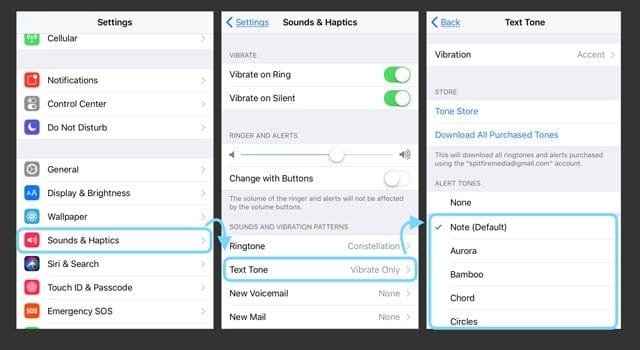
- Select a Text Tone or Change your selected text tone
- Look at your Date & Time and choose Set Automatically
- Change Notification Banners to Persistent
- Make sure Do Not Disturb is off
- Turn off Bluetooth or check your BT connections
- Reset your network
- Update iOS to the latest. The new iOS fixes a bug that prevented missed calls from appearing in the notification center
Comments
There are no comments.